4

I want to copy some figures from previous studies and use them in the introduction of my thesis.

My current procedure to do this is: print screen the necessary page from the pdf file I am interested in, copy it into paint, crop the image I want, save it as a .jpg file, convert this to a .eps file then use epstopdf in my preamble.

This is very low-tech an the resulting image quality isn't great. There must be a much better way to do this that I don't know about?!

I don't have access to Photoshop but do have access to Inkscape if that makes any difference at all.

Thanks!

MattAllegro
  • 1,546
Juggler
  • 449
  • You can include pages from PDFs with pdfpages. Have a look here: http://tex.stackexchange.com/questions/25806/how-can-i-crop-included-pdf-documents – DG' Apr 19 '15 at 14:59
  • Perhaps the answers to this question can be of help: http://tex.stackexchange.com/questions/25806/how-can-i-crop-included-pdf-documents – Fato39 Apr 19 '15 at 15:00
  • Also: http://tex.stackexchange.com/questions/40658/extracting-image-from-pdf-to-use-in-latex-document – MattAllegro Apr 19 '15 at 15:02
  • You could open your pdf documents directly with Inkscape, modify the content and save the figure back in pdf. Alternately, you could do the same thing with GIMP to produce high quality png or jpg from your original pdf. – Jean-Sébastien Apr 19 '15 at 15:11
  • Is there a reason why you are doing pdf -> jpg -> eps -> pdf. Why not loading your image directly as a png or jpg in your thesis? I fail to see the gain of converting a low quality screenshot into a eps image. – Jean-Sébastien Apr 19 '15 at 15:33
  • And in any case, do not save figures as JPEG – that format should only be used for real-life pictures taken by a camera. Use PNG. What I'd do is similar to the above – I'd take the original PDF that contains the figure you want to use and cut out the figure, saving it to a new PDF (or other vector, i.e. not JPG/PNG/etc.) file. After that, it's straightforward to just include that PDF. – Sean Allred Apr 19 '15 at 16:21

1 Answers1

9

I handle image formatting outside of latex and incorporate them directly as pdf, png, or jpg. So this is not a latex answer per se, but it may still be usefull for the production of latex document.

Inkscape

What I usually do is, if I know the image in the pdf is in vectorial format, I will open the image directly in Inkscape, delete the content I don't want, add any modification to the original image, resize the image by doing File -> Document Properties... -> Resize page to content... -> Resize, and save the result in pdf to be incorporated as is in LaTex. When the image in the pdf is not in vectorial format, I end up usually redrawing it in Inkscape anyway... The tool located in Path -> Trace Bitmap... is sometimes useful for this.
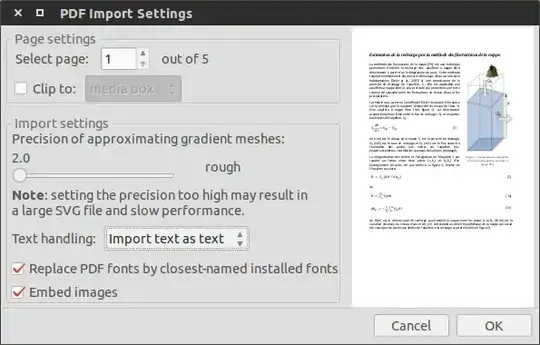
enter image description here

GIMP

Alternately, GIMP can be used to produce high quality screenshot from pdf documents. Open the pdf document with GIMP, select the page on which your image is, define the desired resolution of the image and select whether you want your image to contains anti-aliasing or not. For a thesis for example I would select a resolution of 300 or 600 dpi without anti-aliasing. For a presentation or on screen display, 100 dpi with anti-aliasing.

enter image description here

Once the page is loaded in GIMP, select the area where the image you want is located in the page with the Selection Tool. Crop the image to selection by doing Image -> Crop to Selection and save the image as png or jpg by doing File -> Export As. I usually save in png if it is a graph or if there is text in the image and save it as jpg if it is a picture.