8

I'd like to print two bibliographies at the end of my document. One would be for Articles and other for Online sources. The bibliographies would be one after the other at the end of the document. Here is a minimal example of my current document:

\documentclass{article}
\usepackage[round]{natbib}

\begin{document}
Here are some citations for articles: \citet{a1} and \citet{a2}
Here is an online source \citet{m1}.

\def\bibfont{\small}
\renewcommand\refname{} 
\bibliographystyle{chicago}
\bibliography{examplebib}

\end{document}

My bib file contains the following:

@article{a1,
author="Article Author1",
title="Example Article1",
year="2015",
}

@article{a2,
author="Article Author2",
title="Example Article1",
year="2009"
}

@misc{m1,
author="Online Author3",
title="Example Online Source",
year="2001"
}

This produces the following:

enter image description here

From this I'd like to be able to get the @article and @misc entries in to two different bibliographies. First titled "Articles" and other titled "Online sources" The one requirement I have is that I need to use the natbib package as I've got everything set up exactly the way I want it and don't want to switch away from that. I could create two different bib files if that would help things.

Guido
  • 30,740
Cadbon
  • 351

1 Answers1

7

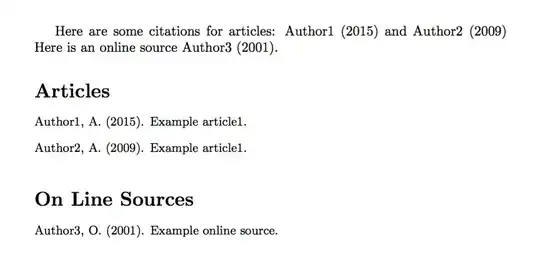
A possible solution is to use the multibib package. With such a package you use the command \newcites{<name>}{Heading} to create a new type of citations/bibliography. then you use the <name> as an affix to the standard citation commands (e.g., \cite<name>, \bibliography<name>, ...).

\documentclass{article}
\usepackage{multibib}
\newcites{online}{On Line Sources}
\usepackage[round]{natbib}

\begin{document}
Here are some citations for articles: \citet{a1} and \citet{a2}
Here is an online source \citetonline{m1}.

\def\bibfont{\small}
\renewcommand\refname{Articles} 
\bibliographystyle{chicago}
\bibliography{examplebib}

\bibliographystyleonline{chicago}
\bibliographyonline{examplebib}
\end{document}

The workflow is

latex <file>
bibtex <file>
bibtex online
latex <file>
latex <file>

enter image description here

Guido
  • 30,740
  • That seems like a valid solution albeit it will require me to go through every cite command. But the problem I have is that if I directly copy the code you provided it doesn't work for me. The error I get is "No file online.bbl". This might also be due to the fact that I don't have any idea what the workflow bit means. – Cadbon May 20 '15 at 21:08
  • The workflow indicates the commands you have to execute to compile the document. You first have to compile with (pdf)latex, then you call bibtex on the main file, and then bibtex on the file with the axffix name. – Guido May 20 '15 at 21:10
  • I'm sorry but my understanding of Latex is extremely limited. Could you somehow provide a step by step instructions? I'm using TexStudio as my editor. – Cadbon May 20 '15 at 21:14
  • I do not use TeXstudio, open a command line window, move to directory where you have your files, and then type the commands in the workflow, eventually using pdflatex instead of latex. – Guido May 20 '15 at 21:21
  • Well I managed to get the minimal example to work but with my full document which has loads of additional packages and citations and with them I get errors. The errors seem to come from the acro package so with commands \ac{something}. Additionally the command \textsubscript brings up an error. Any way to fix these? Otherwise this method seems to work really well – Cadbon May 21 '15 at 20:17
  • 1
    For \textsubscript have a look at http://tex.stackexchange.com/q/1013/16895. You should post a new question for the case with acro. – Guido May 21 '15 at 21:24
  • Thank you so much for that! That fixed the issue with the subscripts and now I've even been able to resolve the acro issue on my own (though not quite sure how). You're the best! – Cadbon May 22 '15 at 10:09
  • May be worth commenting also on plain \cite use (instead of \citet). – 0 _ Aug 21 '17 at 02:33