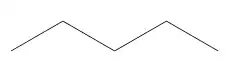
Well, there is no built-in way to use such a shortcut. But, we can hack one together by re-\defining the code that processes the bond angle specification.
(PS I'm rather new at doing this sort of thing, so improvement suggestions are welcome!)
Somewhat arbitrarily, I'll choose letters a through l (lowercase ell) to represent the angles 0 through 330 degrees. Then, we just need to add some code to the bottom of the macro where the processing of the integer specifications takes place to process the letters instead of numbers:
\def\CF@set@bondangle#1#2{
    \ifx\@empty#1\@empty%
        \let#2\CF@default@angle
    \else
        \if
             ...% In the code I've removed, it reads the explicit angle specification
        \else % Here is the new code
            \ifnum0<0#1\relax% First check if the input is an integer or a letter
                \ifnum#1>7% If an integer, process as before. This code is unchanged
                    \pgfmathparse{#1-floor(#1/8)*8}
                    \ifdim\pgfmathresult pt<\z@\pgfmathparse{\pgfmathresult+8}\fi
                    \edef#2{\ifcase\expandafter\CF@int@part\pgfmathresult\@nil0\or45\or90\or135\or180\or225\or270\or315\else-1\fi}
                \else
                    \edef#2{\ifcase#1 0\or45\or90\or135\or180\or225\or270\or315\else-1\fi}%
                \fi
            \else% Otherwise, process the letter into an integer and assign the proper angle
                \edef#2{\ifcase\numexpr`#1 - `a\relax 0\or30\or60\or90\or120\or150\or180\or210\or240\or270\or300\or330\else-1\fi}%
            \fi%
        \fi
    \fi
}
Note that only letters a through l are supported, and this can probably break in a number of unforeseen ways, including (I think) negative integer inputs (but those didn't work in the original implementation anyways). The line to check whether the input is an integer or letter is from here: How to check if the value of a parameter is a number? (see egreg's answer), and the code to check the case containing a letter was suggested by David Carlisle.
MWE:
\documentclass{standalone}
\usepackage{chemfig}
\makeatletter
\def\CF@set@bondangle#1#2{% le code de la direction est contenu dans #1, en sortie, #2 contient l'angle
    \ifx\@empty#1\@empty%
        \let#2\CF@default@angle
    \else
        \if:\expandafter\noexpand\@car#1\@nil
            \if:\expandafter\expandafter\expandafter\noexpand\expandafter\@car\@gobble#1\@nil
                \pgfmathparse{\CF@previous@angle+\expandafter\@gobble\@gobble#1}%
                \let#2\pgfmathresult
            \else
                \expandafter\def\expandafter#2\expandafter{\@gobble#1}%
            \fi% puis normalise l'angle entre 0 et 360
            \ifdim\ifdim#2pt<\z@-\fi#2pt>360pt % si |#2|>360
                \pgfmathparse{#2-360*floor(#2/360)}%
                \ifdim\pgfmathresult pt<\z@\pgfmathparse{\pgfmathresult+360}\fi
                \let#2\pgfmathresult
            \else
                \ifdim#2pt<\z@
                    \pgfmathparse{#2+360}%
                    \let#2\pgfmathresult
                \fi
            \fi
        \else
            \ifnum0<0#1\relax%
                \ifnum#1>7
                    \pgfmathparse{#1-floor(#1/8)*8}%
                    \ifdim\pgfmathresult pt<\z@\pgfmathparse{\pgfmathresult+8}\fi
                    \edef#2{\ifcase\expandafter\CF@int@part\pgfmathresult\@nil0\or45\or90\or135\or180\or225\or270\or315\else-1\fi}
                \else
                    \edef#2{\ifcase#1 0\or45\or90\or135\or180\or225\or270\or315\else-1\fi}%
                \fi
            \else
                \edef#2{\ifcase\numexpr`#1 - `a\relax 0\or30\or60\or90\or120\or150\or180\or210\or240\or270\or300\or330\else-1\fi}%
            \fi%
        \fi
    \fi
}
\makeatother

\begin{document}
\chemfig{-[:30]-[l]-[b]-[:330]}
\end{document}