2

I have an image (image.pdf, http://www.solidfiles.com/d/d8874ce2ff/). This is how the image looks like:original image
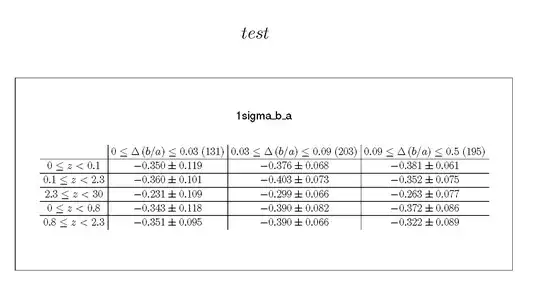
And this small TeX code:

\documentclass{standalone}
\usepackage{graphics}
\begin{document}
\includegraphics{image.pdf}
\end{document}

This returns the following output:image processed by latex

Obviously, there are a few things missing, e.g. b/a and z. Why?

Can anyone reproduce this? I am using TeXShop (Typeset, LaTeX) on a MacBook Pro.

Andy
  • 479
  • I think something of this kind has already appeared on the site. – egreg May 26 '15 at 20:41
  • was there a solution found? – Andy May 26 '15 at 20:44
  • 2
    Yes! :-) Add \pdfinclusioncopyfont=1 at the start of the file; see http://tex.stackexchange.com/questions/98353/embedded-fonts-not-showing-up-correctly-in-pdf-generated-using-pdfpages-in-pdfla – egreg May 26 '15 at 20:51
  • @egreg Ah, I thought it was another one (I linked it in my answer). :D But does that work only using pdfpages and not graphicx? – Alenanno May 26 '15 at 20:52
  • Here's another one: http://tex.stackexchange.com/questions/50829/ligatures-in-figures-and-pdftex – egreg May 26 '15 at 20:57
  • thx!! \pdfinclusioncopyfonts=1 worked perfectly! ... it's always hard to find the right wording for a question^^ – Andy May 26 '15 at 20:59

1 Answers1

2

This has been encountered before, see also: \includegraphics and \includepdf both remove all copy (text) from my (R outputted) pdf graphs, using pdfTeX

So as I was suspecting it's a font problem. You can compile your document using XeLaTeX (or XeTeX), not pdflatex.

enter image description here

\documentclass{standalone}
\usepackage{graphics}
\begin{document}
\includegraphics{image.pdf}
\end{document}
Alenanno
  • 37,338