0

I am trying to enter a sentence that contains a fraction in between it using Latex.

My code looks like this:

Which of the following fractions is smaller than $\frac{1}{5}$

It looks like this:

enter image description here.

How do I change the equation so that it looks more aligned with the text? I want the text to be like this:

enter image description here

Need some guidance on this.

lakshmen
  • 101
  • 1
  • 1
    I think that you need to post a complete minimal working example as for me \frac{1}{5} produces exactly what you want. So, I think that something in your tex file is changing the default behaviour. This said, if you are using the amsmath package then \tfrac{1}{5} will almost certainly work -- \tfrac forces the fraction to be typeset in "text" mode. There is a corresponding \dfrac for forcing the fraction into display mode. –  Jun 02 '15 at 15:46
  • @Andrew thanks first of all. I have tried \tfrac and \frac. But I want the fraction to be at the center. – lakshmen Jun 02 '15 at 16:01
  • Are you setting this on a website using Mathjax? – Werner Jun 03 '15 at 00:08
  • @Warner, it doesn't look like MathJax, it looks like an image. MathJax would have centered the fraction on the math axis (even if it were using image fonts). He may be using some other TeX plugin on a blog, perhaps one that runs TeX on the server and delivers an image (badly placed). – Davide Cervone Jun 03 '15 at 11:38

3 Answers3

5

In running text I tend to use something like 3/4.

If you use the memoir class it provides a variety of ways of setting fractions.

\documentclass{memoir}
\pagestyle{empty}
\begin{document}
In memoir fractions can be typeset like 3/4 or $\frac{3}{4}$ or
\slashfrac{3}{4} or \slashfracstyle{3/4}
\end{document}

enter image description here

Off topic: I hope that somebody can tell me how to upload a LaTeX MWE file and also a pdf file showing the result of processing it.

Zarko
  • 296,517
Peter Wilson
  • 28,066
  • Peter, MWE's are intended to be small, so just cut and paste them into the GIU. If you indent then by four spaces then code highlighting kicks in. Otherwise you can select the code block and hit the {} key in the GUI. To insert images use the "picture" key in the GUI. See the ? on the top right side of the GUI or the editing help page for more details. –  Jun 02 '15 at 18:39
2

You don't need amsmath, even, to get the default centred result. (But you do need it to switch easily to display size or whatever using e.g. \dfrac.)

\documentclass{article}
\begin{document}
  Which of the following fractions is smaller than $\frac{1}{5}$?
\end{document}

centred fraction

In text with a standard class, I would tend to use nicefrac but if this is a set of examples for younger students, this style would almost certainly be inappropriate.

\documentclass{article}
\usepackage{nicefrac}
\begin{document}
  Which of the following fractions is smaller than $\frac{1}{5}$?

  Which of the following fractions is smaller than \nicefrac{1}{5}?
\end{document}

nicer fractions in text

absent
  • 21
1

As I said in the comments I think there is something wrong in your preamble as, for in-lined mathematics, the default behaviour of \frac is what you want. To demonstrate this consider the example:

\documentclass{article}
\usepackage{amsmath}% you need this!
\begin{document}
\textsf{frac}: Which of the following fractions is smaller than $\frac{1}{5}$ and
bigger than $\frac{3}{7}$?

\textsf{tfrac}:   Which of the following fractions is smaller than $\tfrac{1}{5}$ and
bigger than $\tfrac{3}{7}$?

\textsf{dfrac}: Which of the following fractions is smaller than $\dfrac{1}{5}$ and
bigger than $\dfrac{3}{7}$?

For displayed equations \verb|\frac| defaults to \verb|\dfrac|:
\[ \textsf{respectively, frac, tfrac and dfrac:}
         \frac{1}{5}, \tfrac{1}{5} \text{and } \dfrac{1}{5}.
\]
\end{document}

This produces:
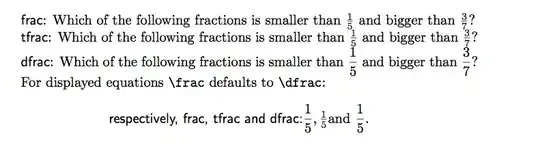
enter image description here

As you see from the image, the fractions are centered in the text. Perhaps you are missing \usepackage{amsmath} or perhaps you are loading another package which redefines the default behaviour of \frac. Unless you give us a minimal working example we won't be able to tell you what the problem is.