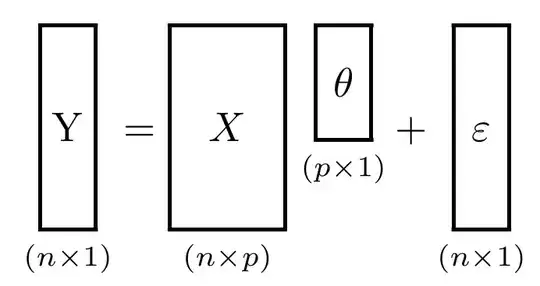
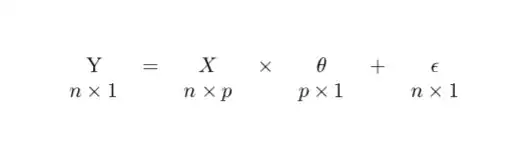
I am just starting to use latex, and with all the internet help i figured out how to do many things myself, but now i am stuck. How can I write what you all can see in the picture? 
Thanks for the help!!!
I am just starting to use latex, and with all the internet help i figured out how to do many things myself, but now i am stuck. How can I write what you all can see in the picture?
Thanks for the help!!!

At its simplest, this might be the easiest way.
\documentclass{article}
\usepackage{amsmath}
\begin{document}
\begin{equation}
\underset{n\times 1}{\mathrm{Y}} =  \underset{n\times p}{X} \times
\underset{p\times 1}{\theta} + \underset{n\times 1}{\varepsilon}
\end{equation}
\end{document}

As egreg points out, putting the matrix dimensions in \scriptscriptstyle may give a better appearance. That can be added to each underset of the above solution (or, as he notes, by creating a helper macro), or one could try this alternate stackengine approach, which gives added control over the depth of the underset.
\documentclass{article}
\usepackage{stackengine}
\stackMath
\begin{document}
\begin{equation}
\def\sss{\scriptscriptstyle}
\setstackgap{L}{8pt}
\def\stacktype{L}
\stackunder{\mathrm{Y}}{\sss n\times 1} =  \stackunder{X}{\sss n\times p} \times
\stackunder{\theta}{\sss p\times 1} + \stackunder{\varepsilon}{\sss n\times 1}
\end{equation}
\end{document}

If one wants a more visual interpretation of this result, I would note this related question, Matrix decomposition dimensions diagram
\documentclass{article}
\usepackage{stackengine}
\stackMath
\newlength\matfield
\newlength\tmplength
\def\matscale{1.}
\newcommand\dimbox[3]{%
  \setlength\matfield{\matscale\baselineskip}%
  \setbox0=\hbox{\vphantom{X}\smash{#3}}%
  \setlength{\tmplength}{#1\matfield-\ht0-\dp0}%
  \fboxrule=1pt\fboxsep=-\fboxrule\relax%
  \fbox{\makebox[#2\matfield]{\addstackgap[.5\tmplength]{\box0}}}%
}
\newcommand\raiserows[2]{%
   \setlength\matfield{\matscale\baselineskip}%
   \raisebox{#1\matfield}{#2}%
}
\newcommand\matbox[5]{
  \stackunder{\dimbox{#1}{#2}{$#5$}}{\scriptstyle(#3\times #4)}%
}
\parskip 1em
\begin{document}
$\renewcommand\matscale{.6}
\matbox{7}{2}{n}{1}{\mathrm{Y}} =
\matbox{7}{4}{n}{p}{X} \raiserows{1.5}{\matbox{4}{2}{p}{1}{\theta}} +
\matbox{7}{2}{n}{1}{\varepsilon}$
\end{document}

\underset{\scriptscriptstyle n\times p}{X} gives less prominence to the dimensions.
– egreg
Jun 03 '15 at 16:12
\scriptscriptstyle, I might as well do it with stackengine ;^b
– Steven B. Segletes
Jun 03 '15 at 16:13
\newcommand{\matrixdim}[2]{\underset{\scriptscriptstyle#2}{#1}} and \matrixdim{X}{n\times 1} is easy (and preferable anyway, even if we don't add the style selection).
– egreg
Jun 03 '15 at 16:15
I add my little answer in the form of a tabular (much more dirty than the math ones, but may be useful if a lot of complexity is added to the expression)
\documentclass{article}

\begin{document}
\begin{tabular}{ccccccc}
Y & $=$ & $X$ & $\times$ & $\theta$ & $+$ & $\epsilon$ \\
$n\times 1$ & & $n\times p $ & & $p\times 1$ & & $n\times 1$
\end{tabular}
\end{document}

matrix or array environment to avoid going in and out of math mode all the time :-)
– Sean Allred
Jun 03 '15 at 20:27

\documentclass{...}and ending with\end{document}. – Jun 03 '15 at 16:04