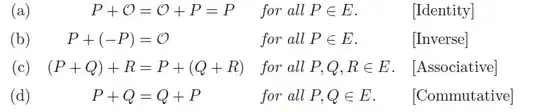
I'm new and I don't know a lot of things about latex. I don't want to align the equals but I want to align left the equation and right the description Thanks in advance.
I'm new and I don't know a lot of things about latex. I don't want to align the equals but I want to align left the equation and right the description Thanks in advance.
It may be simplest to set this up as a tabular environment.
By loading the array package, it is straightforward to set up the second column to be in math mode, the third column to be in italics, and the words in the fourth column to be surrounded by bracket. Performing this setup saves quite a bit of typing in the body of the tabular environment.

\documentclass{article}
\usepackage{array}
\begin{document}
\begin{center}
\renewcommand{\arraystretch}{1.5}
\begin{tabular}{l >{$}l<{$} >{\itshape}l >{[}l<{]}}
(a) & P+\mathcal{O}=\mathcal{O}+P=P & for all $P\in E$.     & Identity \\
(b) & P+(-P)=\mathcal{O}            & for all $P\in E$.     & Inverse \\
(c) & (P+Q)+R=P+(Q+R)               & for all $P,Q,R\in E$. & Associative\\
(d) & P+Q=Q+P                       & for all $P,Q\in E$.   & Commutative \\
\end{tabular}
\end{center}
\end{document}

\arraystretch command back to its original value afterwards, so that the other tabular environments to come are not affected.
– anderstood
Jun 04 '15 at 21:11
\arraystretch ends with \end{center}; no need to reset \arraystretch explicitly.
– Mico
Jun 04 '15 at 21:12
array is. +1 for yet another application.
– Sean Allred
Jun 04 '15 at 22:26
A straight-forward align* (from amsmath) can manage this layout:

\documentclass{article}
\usepackage{lipsum}% Just for this example
\usepackage{amsmath}
\begin{document}
\lipsum*[1]% Just for this example
\begin{align*}
  \text{(a)} && P + \mathcal{O} &= \mathcal{O} + P = P && \textit{for all $P \in E$.}     && \text{[Identity]}    \\
  \text{(b)} &&        P + (-P) &= \mathcal{O}         && \textit{for all $P \in E$.}     && \text{[Inverse]}     \\
  \text{(c)} &&     (P + Q) + R &= P + (Q + R)         && \textit{for all $P,Q,R \in E$.} && \text{[Associative]} \\
  \text{(d)} &&           P + Q &= Q + P               && \textit{for all $P,Q \in E$.}   && \text{[Commutative]}
\end{align*}
\lipsum[2]% Just for this example
\end{document}
You can add another alignment components & if you "don't want to align the equations". I don't think that will be helpful though:

\documentclass{article}
\usepackage{lipsum}% Just for this example
\usepackage{amsmath}
\begin{document}
\lipsum*[1]% Just for this example
\begin{align*}
  \text{(a)} &&& P + \mathcal{O} = \mathcal{O} + P = P && \textit{for all $P \in E$.}     && \text{[Identity]}    \\
  \text{(b)} &&&        P + (-P) = \mathcal{O}         && \textit{for all $P \in E$.}     && \text{[Inverse]}     \\
  \text{(c)} &&&     (P + Q) + R = P + (Q + R)         && \textit{for all $P,Q,R \in E$.} && \text{[Associative]} \\
  \text{(d)} &&&           P + Q = Q + P               && \textit{for all $P,Q \in E$.}   && \text{[Commutative]}
\end{align*}
\lipsum[2]% Just for this example
\end{document}

align* as well but you need to move the third & in order to answer the OPs question because they want the LHS of the equations aligned rather than the equals signs.
–
Jun 04 '15 at 21:14

