3

I am using TikZ to draw graph, and want to add edge weights. I have seen some successful example like this. However, when I try to do the same thing, it doesn't work. Could anyone know the reason? Much indebted!

The following is my current code:

\documentclass{article}
\usepackage{tikz}
\usepackage{caption}
\begin{document}
\tikzstyle{every node}=[circle, draw, fill=black!100, inner sep=0pt, minimum width=4pt]
\begin{figure}[h]
    \centering
    \begin{tikzpicture}
    \foreach \r in {1,...,4}
    {
        \foreach \s in {1,...,4}
        {
            \node (\r\s) at ({cos(\r*90)*(2+sqrt(2)*0.5*cos(45+\s*90))-sin(\r*90)*(sqrt(2)*0.5*sin(45+\s*90))},{sin(\r*90)*(2+sqrt(2)*0.5*cos(45+\s*90))+cos(\r*90)*(sqrt(2)*0.5*sin(45+\s*90))}) {};
        }
        \foreach \s in {5,6}
        {
            \node (\r\s) at ({cos(\r*90)*(2)-sin(\r*90)*(1+sqrt(3))*(\s-5.5)},{sin(\r*90)*(2)+cos(\r*90)*(1+sqrt(3))*(\s-5.5)}) {};
        }
        \draw[-] (\r1)--(\r2);
        \draw[-] (\r3)--(\r4);
        \draw[-] (\r2)--(\r3);
        \draw[-] (\r4)--(\r1);
        \draw[-] (\r5)--(\r2);
        \draw[-] (\r5)--(\r3);
        \draw[-] (\r6)--(\r4);
        \draw[-] (\r6)--(\r1);
    }
    \draw[-] (16)--(25);
    \draw[-] (26)--(35);
    \draw[-] (36)--(45);
    \draw[-] (46)--(15);
    \end{tikzpicture}
    \caption*{\footnotesize{Figure 2}}
\end{figure}
\end{document}

The code currently looks like: enter image description here
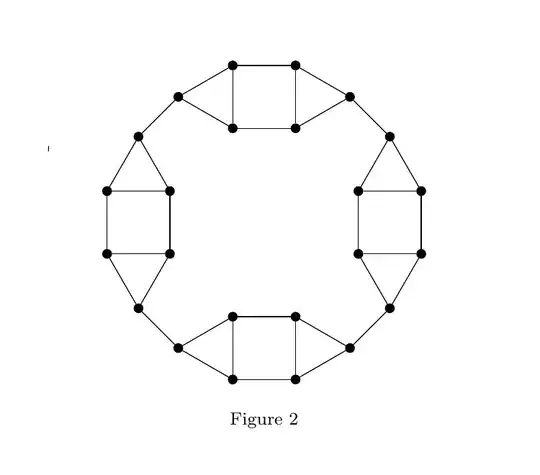
My goal is: enter image description here

What I have tried, like the solution in the successful example, but fails in my case, I add \draw (16) -- node {weight} (34);, then it becomes: enter image description here

Salomo
  • 231
  • Well, you haven't yet added any nodes to the code. (I guess that is what you mean with "edge weights"?) Is this code computer-generated? – Qrrbrbirlbel Jun 07 '15 at 22:30
  • @Qrrbrbirlbel As I know, "\node" is adding node to the graph, isn't it? I type the code by hand, not computer-generated, actually my programming is not that good. – Salomo Jun 07 '15 at 22:37
  • @Paul Thanks for editing! Can you tell me how to do this? – Salomo Jun 07 '15 at 22:39
  • @Salomo I guess similarly our graph theory is not good either. Can you elaborate what are the edges in your diagram? And what exactly you mean by weights? – percusse Jun 07 '15 at 22:39
  • @Salomo you're welcome! You can just select all of the block of code and click the { }-looking button at the top of the editor box, or use the keyboard shortcut Ctrl + K. Short bits of inline code can be marked by surrounding them with backticks: `. – Paul Gessler Jun 07 '15 at 22:41
  • @percusse The edge weights I mean is exactly that in the top answer of the successful example I mentioned. – Salomo Jun 07 '15 at 22:50
  • @PaulGessler Actually I tried that "{}" button and paste, but then only the first line appears as code. – Salomo Jun 07 '15 at 22:51
  • So the dots are the nodes and the bold and thin lines are all edges then? They are really cramped. Are you sure you want to label them? – percusse Jun 07 '15 at 22:51
  • @percusse We can just ignore those edges, say I want to add edge weight for a solid line. – Salomo Jun 07 '15 at 22:53
  • @Salomo Hahaha come on now. Which ones ? Why do you describe it instead of just mentioning these those etc. They are all solid. You can edit your question and write the description of valid edges . – percusse Jun 07 '15 at 22:59
  • Try it out for yourself: \draw (16) -- node {weight} (34); Why ask about computer-generation. There is a lot of trigonometric calculation going on in your code.Do you know that TikZ knows polar coordinates: (<angle>:<distance>). With the calc library, you can easily add different coordinates and such. – Qrrbrbirlbel Jun 07 '15 at 23:05
  • @percusse Edited, thanks for your patience. – Salomo Jun 07 '15 at 23:17
  • @Salomo No problem. It always takes some time to get used to here also partially due to us :) – percusse Jun 07 '15 at 23:18
  • @Qrrbrbirlbel That is what I tried actually, but it doesn't work, see that result in the newly edited. – Salomo Jun 07 '15 at 23:18
  • 1
    Aaaah, yes. The problem is the every node style. It is also applied to the edge nodes. You will need to declare an own style for the dots which you will need to use at those nodes you alread have. (A separate style for the edge node is usually also helpful.) – Qrrbrbirlbel Jun 07 '15 at 23:22
  • 1
    @Salomo select all the code (once it's already in the text field here) and click the button or use the shortcut. – Paul Gessler Jun 07 '15 at 23:25
  • 1
    Thanks all of you guys for your support in my first question here! :) – Salomo Jun 07 '15 at 23:32
  • @Qrrbrbirlbel It works perfectly now, thanks! – Salomo Jun 07 '15 at 23:44

1 Answers1

2

You defined a filled circle node style for every node, which also applies to the weight labels, as mentioned by Qrrbrbirlbel in a comment.

Use that style only on the graph nodes. Btw. \tikzstyle is obsolete anyway, use \tikzset instead or define the style as option to tikzpicture.

A quick fix would be overriding the "every node" style for your label nodes:

\draw[-] (16) edge node [above left,draw=none,fill=none] {k} (25);

But once you removed that "every node" style, you can use the edge ["k"] syntax with the quotes library, since Tikz 3.0.

Stefan Kottwitz
  • 231,401