4

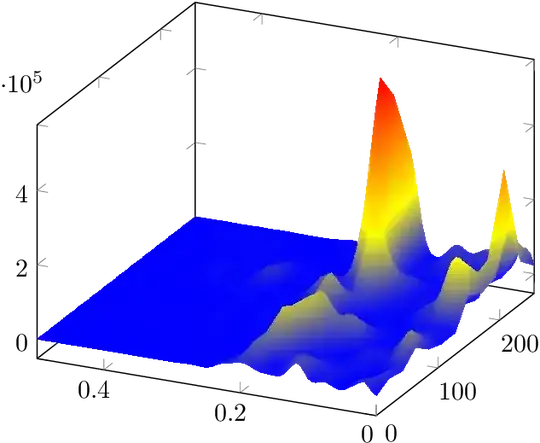
I have a .csv file with 3 columns: time, f and psd. I would like to create a 3D surf plot using this data. Just like the following image generated in Matlab. enter image description here.

Here is the link to the data I am trying to use: datastft.csv.

The code that I am using is the following:

\documentclass{standalone}
\usepackage{pgfplots}
\usepackage{filecontents}
\pgfplotsset{compat=1.9}

\begin{document}
\begin{tikzpicture}
\begin{axis}
\addplot3 [surf] table[x=time, y=f, z=psd, col sep=comma] {datastft.csv};

\end{axis}
\end{tikzpicture}
\end{document}

Using this code I am getting this image with lines:

enter image description here

Any help would be greatly appreciated.

  • 1
    Welcome to TeX.SX! This compiles for me, after changing from sep to col sep, and adding the missing semicolon at the end of the \addplot line. – Torbjørn T. Jun 17 '15 at 13:30
  • Hi @TorbjørnT., Thank you so much. It worked now! Now I need help to make the plot pretier, because the plot is made of lines. Do you know how can I achieve an aspect just like the Matlab figure above? – Rhenan Bartels Jun 17 '15 at 20:53
  • No, not really. I suggest you edit your question with the updated code and describe what is wrong with the output. – Torbjørn T. Jun 17 '15 at 20:57
  • You should leave a blank line in your .csv file each time the x-coordinate (in your case "time") changes value. – Pier Paolo Jun 17 '15 at 21:20
  • Please add datastft.csv directly to your question and do not link them to a cloud solution. – Bobyandbob Jul 11 '17 at 17:21

1 Answers1

11

pgfplots does not know, how the data are organized. There are thirteen scan lines. Either separate the blocks with empty lines in the .csv file or count them and specify them: mesh=rows=13.

Package pgfplots provides many different shaders and patch types (see library patchplots.

Some examples:

\documentclass{standalone}
\usepackage{pgfplots}
\pgfplotsset{compat=newest}

\begin{document} \begin{tikzpicture} \begin{axis}[x dir=reverse] \addplot3 [surf, mesh/rows=13, shader=interp] table[x=f, y=time, z=psd, col sep=comma] {datastft.csv};

\end{axis} \end{tikzpicture} \end{document}

Result interp

With shader=faceted interp:

Result faceted interp

\documentclass{standalone}
\usepackage{pgfplots}
\pgfplotsset{compat=newest}
\usepgfplotslibrary{patchplots}

\begin{document} \begin{tikzpicture} \begin{axis}[x dir=reverse] \addplot3 [surf, mesh/rows=13, shader=interp, patch type=bilinear] table[x=f, y=time, z=psd, col sep=comma] {datastft.csv};

\end{axis} \end{tikzpicture} \end{document}

Result interp/patch type=bilinear

Heiko Oberdiek
  • 271,626
  • I am trying this example but it shows an error that \package{filecontents} not found – supriya Jun 05 '21 at 10:42
  • If you have a new question, please ask it by clicking the Ask Question button. Include a link to this question if it helps provide context. - From Review – Willoughby Jun 05 '21 at 12:01
  • @supriya The line \usepackage{filecontents} comes from the example of the question. But is is not needed and I have it removed in the updated answer. BTW, if a package is not found, installing it would be the usual option. – Heiko Oberdiek Jun 08 '21 at 17:17