7

My University's thesis requirements for margins (letter paper 8.5in x 11in) are as follows:

Top: 1 inch; Left: 1.25 inch; Right: 1.25 inch; and Bottom: 1.0 inch

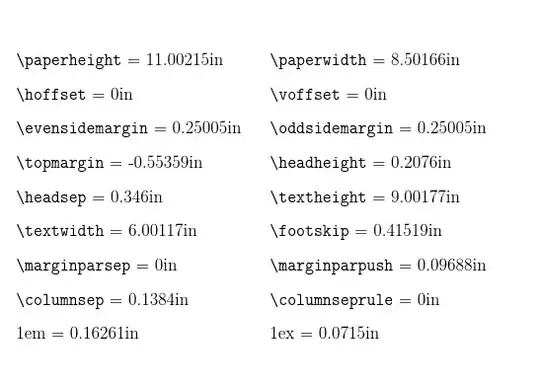
I was/am having difficulty fulfilling these requirements using LaTeX. It's unclear to me whether or not the page numbering is pushing the first line of text further than the 1 inch top margin (e.g., 1.2 inches down?). I would like the first line of text to begin EXACTLY 1 inch below the top of the page and would like the page number to fit within the top margin space, so that it fits neatly there without sitting too close to the body of the text.

When you compile my MWE, look at pages 3 & 4. The manner in which these are displayed show the layout/spacing I have in my thesis. I would like more space between the page number and the body of text while preserving the 1 inch top margin.

\documentclass[man,12pt,floatsintext,longtable,noextraspace,natbib, tmargin=1in, lmargin=1in, rmargin=1in, bmargin=1in, tmargin=1in, lmargin=1.25in, rmargin=1.25in, bmargin=1in]{apa6}
\usepackage{layouts}
\usepackage{lipsum} % for dummy text only

%geometry and fancyhdr packages loaded automatically by apa6 document class.

@R. Shumacher showed me the layouts package to allow me to see my page defaults, which was helpful.

I set some page layout parameters manually in the preamble:

\setlength{\voffset}{0.0in}
\setlength{\topmargin}{0in}  
\setlength{\headsep}{0in}
\setlength{\headheight}{0in}
\setlength{\textheight}{9in}

\begin{document}
\titlepage

% Create Header information for Arabic Arabic Numbering.

\fancyhf{} % clear all header and footers
\renewcommand{\headrulewidth}{0pt} % remove the header rule
\setcounter{page}{1}
\pagenumbering{arabic}
\fancyheadoffset{0cm}  % This is so page number does not extend into right margin (thesis requirements).
\rhead{\thepage}  % Center the page number at the Footer
\pagestyle{fancy}

% Below uses commands from the "layouts" package in order to determine exact margin setup.

\drawdimensionstrue
\printinunitsof{in}
\pagediagram   % draws diagram with all layout vernacular identified (except bottom margin)
\pagevalues
\currentpage

enter image description here

\vspace{0.5in}
\lipsum
\end{document}

MWE is below. I would like more space between the page number and the body of the text WITHOUT pushing the body of the text greater than the required 1 inch margin.

\documentclass[man,12pt,floatsintext,longtable,noextraspace,natbib, tmargin=1in, lmargin=1in, rmargin=1in, bmargin=1in, tmargin=1in, lmargin=1.25in, rmargin=1.25in, bmargin=1in]{apa6}
\usepackage{layouts}
\usepackage{lipsum} % for dummy text only

\setlength{\voffset}{0.0in}
\setlength{\topmargin}{0in}  
\setlength{\headsep}{0in}
\setlength{\headheight}{0in}
\setlength{\textheight}{9in}

\begin{document}
\titlepage

\fancyhf{} % clear all header and footers
\renewcommand{\headrulewidth}{0pt} % remove the header rule
\setcounter{page}{1}
\pagenumbering{arabic}
\fancyheadoffset{0cm}  % This is so page number does not extend into right margin (thesis requirements).
\rhead{\thepage}  % Center the page number at the Footer
\pagestyle{fancy}

\drawdimensionstrue
\printinunitsof{in}
\pagediagram   % draws diagram with all layout vernacular identified (except bottom margin)
\pagevalues
\currentpage

\vspace{0.5in}
\lipsum
\end{document}
Edward
  • 329
  • 2
  • 5
  • 14
  • add the option showframe to geometry to see the "frame" of the various text elements. – jon Jun 20 '15 at 02:04
  • 2
    Why are you using the apa6 document class? This is designed for submission to APA journals, and I suspect will have other issues that your university will not like (e.g. unnumbered sections) and you will spend a lot of time undoing the class functionality. If you need APA bibliography formatting, I recommend using biblatex-apa and then building your thesis document using either the KOMA class or memoir. – Alan Munn Jun 20 '15 at 02:07
  • I also wonder if your thesis office could be a little more clear than "these don't comply". Admittedly, the rule-makers for the visual appearance of theses (well-known to be the surest way to judge the calibre of a thesis) often seem to have sprung forth fully formed from the pages of Kafka, but that's still pretty vague! – jon Jun 20 '15 at 02:14
  • I have everything else in the document fitted, albeit, I've had to build it in parts and merge it back together using adobe pro. – Edward Jun 20 '15 at 02:15
  • It's probably my MWE that's vague. I was hoping someone might have some inventive and insightful comments. Admittedly, I haven't provided too much. Aside from loading my entire thesis showing BLOCKs of code, not sure what to do. – Edward Jun 20 '15 at 02:16
  • Well, in what way doesn't the document comply? For example, when I did this, they said that the title (or was it the chapter headings?) were '2mm too high'. (They are the only people in the US who used metric - I will concede that much. Though, thinking about it, I may have told them I needed to know in metric.) – cfr Jun 20 '15 at 02:19
  • Certainly, being a novice at LaTeX hasn't helped matters. Trying to tackle the steep learning curve! – Edward Jun 20 '15 at 02:20
  • Okay, \usepackage{showframe} allows me to see the margins, which helps. \usepackage[showframe]{geometry} didn't. – Edward Jun 20 '15 at 02:29
  • 2
    Sorry: you can add the option to \geometry{}, which is another way to load options for the geometry package, which (I assume) this class loads behind the scenes. – jon Jun 20 '15 at 02:38
  • Aside from seeing boxes, is there a command that will actually print the widths in units that one desires? – Edward Jun 20 '15 at 02:53
  • 1
    @user76245 Use the package layouts This is a link to a TeX.SE question and answer http://tex.stackexchange.com/questions/42371/margins-and-text-position/42381#42381 And the documentation, note pg 3, provides needed details, especially getting dimensions in inches or millimeters. http://ctan.sharelatex.com/tex-archive/macros/latex/contrib/layouts/layman.pdf – R. Schumacher Jun 20 '15 at 03:04
  • 1
    Or use the package layout which is more current. – R. Schumacher Jun 20 '15 at 03:11
  • @R. Schumacher, the layouts or layout package looks promising. I need time to digest this and check them out. – Edward Jun 20 '15 at 03:18
  • Is your thesis being typeset on A4 paper instead of US letter paper? (The apa6 document class assumes you're using letter paper.) If so, try adding the option a4paper to the \geometry instruction. – Mico Jun 20 '15 at 03:57
  • So is this solved? You seem to have the dimensions you need, as far as I can tell? We can't compile your MWE as you haven't posted one. – cfr Jul 12 '15 at 00:07
  • You really should *not* set page dimensions and not tell geometry about them if you are using geometry! (Which you are since the class loads it.) Use \geometry{} to set the dimensions you need. Also, in your console output or log, you (presumably) have a message from fancyhdr telling you that the header height is too small and that it is changing it, but that this may lead to inconsistent layout. It will also tell you how large it needs to be. Tell geometry this as well. – cfr Jul 12 '15 at 00:12
  • Using apa6 doc class, you can't specify the margins using \geometry{etc.}. It is NOT allowed. The remedy as stated by the help given by TEX is to as put the margins within the brackets. How do I go about putting the header with the page number where I want it while preserving a 1 inch top margin between the top of the page and the body of my text? – Edward Jul 12 '15 at 00:20
  • apa6 is designed to limit your freedom to change stuff. You need to change stuff. Why use apa6? It is hard enough to comply with thesis formatting requirements without making life more difficult for yourself ;). – cfr Jul 12 '15 at 00:32
  • Make a copy of the class, apa6mine.cls, in TEXMFHOME or your working directory. Then you can edit the bit which is making this difficult. That is, if everything else is fine and it is just this which is a problem, that is what I would do. – cfr Jul 12 '15 at 00:33
  • It is hard and I won't ever use it again. It has been hell --- and I absolutely agree and know now that it's dismal for this purpose. :( Yes, sad face. :-) However, I literally have 2-3 tweaks to perform and the thesis office will accept it. – Edward Jul 12 '15 at 00:35
  • You have the following warning in the console output: ackage Fancyhdr Warning: \headheight is too small (0.0pt): Make it at least 14.49998pt. We now make it that large for the rest of the document. This may cause the page layout to be inconsistent, however. Your layout is bound to be inconsistent with this set up. – cfr Jul 12 '15 at 00:36
  • Right. So make a copy of the class apa6user76245version.cls and make changes to that. Then you can use that class in your thesis, changing it minimally to meet the requirements. This is not uncommon. I have an adulterated and renamed copy of amsbook.cls in TEXMFHOME for just this reason. (Originally courtesy of the maths department.) – cfr Jul 12 '15 at 00:38
  • (without measuring) Something like this should work: \setlength{\topmargin}{-0.5in} \setlength{\headsep}{\dimexpr 0.5in - 15pt\relax} \setlength{\headheight}{15pt}. I'd want to double check, however. – jon Jul 12 '15 at 00:39
  • If this is the very last thing, you don't actually need to copy the class, I don't think. – cfr Jul 12 '15 at 00:58
  • This helps but I'm a newbie. Apologize for this. I found apa6.cls using kpsewhich apa6.cls. Found the path and made a copy of this called apa6_myedits.cls. Investigating this file, I find that for the doc or "Regular Format" layout in apa6 lingo, there's info pertaining to fancyhdr. For instance, it has \setlength{\headheight}{15.2pt}. Do you think this is what should be changed? – Edward Jul 12 '15 at 01:02
  • Also is it best to put this custom class file in a different directory as here (http://www.latex-community.org/forum/viewtopic.php?f=24&t=17242). It looks like I can find my TEXMFHOME using kpsewhich -var-value=TEXMFHOME and then running sudo mktexlsr. When I compile my TeX file, how does one get it to find the custom class file? – Edward Jul 12 '15 at 01:02
  • It's just about the last thing. I need to also find a way to specify spacing after Subsections. The default value gives a bit too much (apparently, according to the thesis office). – Edward Jul 12 '15 at 01:04
  • @user76245 You don't actually need the copy for this. It turns out geometry has a reset option ;). I didn't realise this until I was trying to figure out how to alter the class and make it work with your MWE. See if my answer works first as it just adds a line to the preamble (and deletes a few). – cfr Jul 12 '15 at 01:11
  • For the record, you could either put the modified class in the same directory as the .tex file or you could put it in TEXMFHOME. No need to run sudo mktexlsr for your home tree, though. It is searched directly and does not rely on a database to look up filenames. – cfr Jul 12 '15 at 01:14
  • @cfr Great! That makes sense. – Edward Jul 12 '15 at 01:22

2 Answers2

8

Quick example of layouts. This is a very versatile package. It can be used to carefully examine the layouts of any of the subparts of a document. The documentation must be read and experimented with to understand the command sequence. http://texdoc.net/texmf-dist/doc/latex/layouts/layman.pdf

\documentclass[10pt,letterpaper]{article}
\usepackage{layouts}
\usepackage[tmargin=1.5in, lmargin=1.25in, rmargin=1.25in, bmargin=1.0in]{geometry}
\begin{document}
\drawdimensionstrue
\printinunitsof{in}
\pagediagram
\pagevalues
\currentpage
\end{document}

Yields:

enter image description here

3

If this is literally the last thing you need to fix, the following should work.

Add this in your preamble:

\geometry{reset, letterpaper, height=9in, width=6in, hmarginratio=1:1, vmarginratio=1:1, marginparsep=0pt, marginparwidth=0pt, headheight=15pt}

Remove all manual settings for layout dimensions from the preamble. If you need to make adjustments, add them to the argument you feed \geometry{}.

So, with your MWE, my document looks like this:

adulterated layout

Close-up of layout dimensions:

layout dimensions

Note that this is right. You don't want the margins to be what they are meant to be, because you want the height of the header and the separation between the header and the text to be 'taken out' of the margin. You want \topmargin to be 0in minus the height of the header and the separation between header and text body. You want the left and right margins to be .25in. You want a text body of 6in by 9in. We let geometry figure out the actual values to feed everything.

[LaTeX has margins of 1in all round. These dimensions are additions to or subtractions from those. So a left margin of .25in in LaTeX's terms is a left margin of 1.25in in the terms of your thesis office. geometry offers the ability to enter either the commonsensical or the native dimensions, but here we let it do most of the calculations for us.]

Note also, that these are LaTeX's dimensions. These do not all have the same meaning as the same terms in geometry. But this seems to be what you want.

\documentclass[man,12pt,floatsintext,longtable,noextraspace,natbib,letterpaper]{apa6}
\usepackage{layouts}
\usepackage{lipsum} % for dummy text only

\geometry{reset, letterpaper, height=9in, width=6in, hmarginratio=1:1, vmarginratio=1:1, marginparsep=0pt, marginparwidth=0pt, headheight=15pt}

\begin{document}
\titlepage

\fancyhf{} % clear all header and footers
\renewcommand{\headrulewidth}{0pt} % remove the header rule
\setcounter{page}{1}
\pagenumbering{arabic}
\fancyheadoffset{0cm}  % This is so page number does not extend into right margin (thesis requirements).
\rhead{\thepage}  % Center the page number at the Footer
\pagestyle{fancy}

\drawdimensionstrue
\printinunitsof{in}
\pagediagram   % draws diagram with all layout vernacular identified (except bottom margin)
\pagevalues
\currentpage

\vspace{0.5in}
\lipsum
\end{document}
cfr
  • 198,882
  • Fantastic!!! :-) Very detailed and helpful explanation. – Edward Jul 12 '15 at 01:21
  • @user76245 Glad it helped. The reset option is fantastic! I just corrected the explanation. (LaTeX doesn't actually have a right margin dimension at all - I should have used left for my example ;).) – cfr Jul 12 '15 at 01:24