0

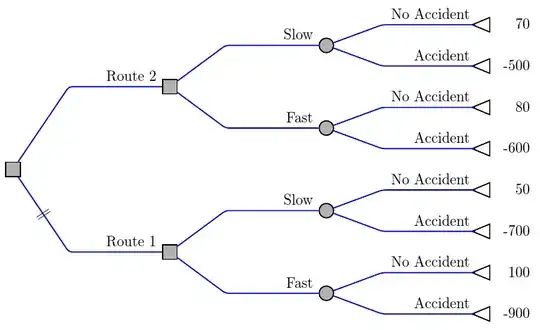
I am creating decision trees using the 'forest' package and would like to add short lines across a branch to indicate that the decision is sub-optimal. Can this be done in 'forest'? I am attaching a sample figure from a book.

If it's not possible to generate exactly this look, I would be interested in alternative solutions that are close.

enter image description here

EDIT: As requested, here is sample code for the general structure of the tree (not quite the same as the scanned version, and omitting some of the numbers).

\documentclass{beamer}

\usepackage{tikz}
\usetikzlibrary{trees,shapes,snakes}
\usepackage{forest}


\tikzset{
    decision/.style={rectangle, minimum height=10pt, minimum width=10pt, draw=black, fill=black!30!white, thick, inner sep=0pt},
    chance/.style={circle, minimum width=10pt, draw=black, fill=black!30!white, thick, inner sep=0pt},
    leaf-chance/.style={isosceles triangle, minimum width=10pt, draw=black, thick, fill=white, inner sep=0pt, shape border rotate=180, outer sep=-\pgflinewidth}
  }

\begin{document}


\begin{frame}[fragile]

\scalebox{0.85}{
 \begin{forest}
   my label/.style={
      edge label={node[auto, sloped,pos=.75,anchor=south]{#1}}
    },
    for tree={
      grow=0,
      child anchor=west,
      anchor=west,
      text ragged,
      inner sep=1mm,
      edge={thick, draw=blue},
      l sep+=30mm,
      s sep+=5mm,
      if n children=0{
        before typesetting nodes={
          label/.wrap pgfmath arg={right:#1}{content()},
          content={},
          leaf-chance,
        },
      }{},
      edge path={
       \noexpand\path [draw, \forestoption{edge}] (!u.parent anchor) |- (.child anchor)\forestoption{edge label};
       % alternatively, with angled lines
        %\noexpand\path[\forestoption{edge}]
        % (!u.parent anchor) -- ([xshift=-2.6cm].child anchor) --    
        % (.child anchor)\forestoption{edge label};
  },
    }
    [,decision
      [0.8351,chance,my label=Insure]
      [,chance,my label=Don't Insure        
        [0.8394,chance,my label=No outbreak
        ]
        [,chance,my label=Outbreak
          [0.8334,chance,my label=Bans only
          ]
          [0.6663,chance,my label=Slaughter
          ]
        ]
      ]
    ]
\end{forest}
}

\end{frame}
\end{document}

enter image description here

fraserbc
  • 117
  • 7
  • Can you post a minimal document showing the code you have? Then people can more easily adapt it. – Alan Munn Jun 21 '15 at 20:31
  • I can post a sample of the general tree structure, but I currently have no attempted solution at the short lines across the branch. – fraserbc Jun 21 '15 at 20:35
  • That would be fine (and helpful). Your question is quite clear. – Alan Munn Jun 21 '15 at 20:39
  • Whatever you have towards the tree would be helpful. Don't worry about the short lines - that's what you are asking about. But the code you have already can be used as a basis for the solution. – cfr Jun 21 '15 at 20:45
  • @cfr I have added code for a simplified version. Thanks. – fraserbc Jun 21 '15 at 20:56

3 Answers3

3

Here's an example based on code I posted in response to one of your earlier questions. sub optimal crosses through the relevant branch of the tree.

\documentclass[tikz,border=5pt]{standalone}
\usepackage{forest}
\usetikzlibrary{shapes}

\tikzset{
  decision/.style={rectangle, minimum height=10pt, minimum width=10pt, draw=black, fill=black!30!white, thick, inner sep=0pt},
  chance/.style={circle, minimum width=10pt, draw=black, fill=black!30!white, thick, inner sep=0pt},
  leaf-chance/.style={isosceles triangle, minimum width=10pt, draw=black, thick, fill=white, inner sep=0pt, shape border rotate=180, outer sep=-\pgflinewidth}
}
\newsavebox\notgood
\sbox\notgood{\textbardbl}
\forestset{
  declare toks={optimality}{},
  sub optimal/.style={
    optimality={
      node [midway, sloped] {\usebox\notgood}
    }
  }
}

\begin{document}
\begin{forest}
   my label/.style={
     edge label={node[auto, pos=1, anchor=south east]{#1}}
   },
   for tree={
     grow=0,
     child anchor=west,
     anchor=west,
     text ragged,
     inner sep=1mm,
     edge={thick, draw=blue, rounded corners=2pt},
     s sep+=5mm,
     l sep+=30mm,
     if n children=0{
       if n=1{my label=Accident}{my label=No Accident},
       before typesetting nodes={
         label/.wrap pgfmath arg={[align=right, text width=25pt]right:#1}{content()},
         content={},
         leaf-chance,
       },
     }{
       if level=2{
         chance,
         if n=1{my label=Fast}{my label=Slow}
       }{decision}
     },
     edge path={
       \noexpand\path[\forestoption{edge}]
       (!u.parent anchor) -- ([xshift=-22.5mm].child anchor)\forestove{optimality} --  (.child anchor)\forestoption{edge label};
     }
   }
    [
      [,my label=Route 1, sub optimal
        [
           [-900]
           [100]
        ]
        [
           [-700]
           [50]
        ]
      ]
      [,my label=Route 2
        [
           [-600]
           [80]
        ]
        [
           [-500]
           [70]
        ]
      ]
    ]
\end{forest}
\end{document}

non-optimality

cfr
  • 198,882
  • Note that I posted this before the OP added code to the question... ;). Hence the entirely different-looking tree. (Style is similar.) – cfr Jun 21 '15 at 21:16
2

Here's a simple example of how to cross out a branch of a tree.

\documentclass{article}
\usepackage{forest}
\usepackage{mathtools}
\newcommand{\verteq}{\rotatebox{90}{$=$}}
\begin{document}
\begin{forest}
crossed/.style={edge label={node[midway, sloped]{$\verteq$}}}
[A [B [C,crossed ] [D ] ] [E,crossed ] [F,crossed ]]
\end{forest}

\end{document}

output of code

Alan Munn
  • 218,180
0

Thanks, @cfr and @AlanMunn. I have adapted @cfr's answer to the original decision tree.

\documentclass{beamer}

\usepackage{tikz}
\usetikzlibrary{trees,shapes,snakes}
\usepackage{forest}


\tikzset{
    decision/.style={rectangle, minimum height=10pt, minimum width=10pt, draw=black, fill=black!30!white, thick, inner sep=0pt},
    chance/.style={circle, minimum width=10pt, draw=black, fill=black!30!white, thick, inner sep=0pt},
    leaf-chance/.style={isosceles triangle, minimum width=10pt, draw=black, thick, fill=white, inner sep=0pt, shape border rotate=180, outer sep=-\pgflinewidth}
  }

\newsavebox\notgood
\sbox\notgood{\textbardbl}
\forestset{
  declare toks={optimality}{},
  sub optimal/.style={
    optimality={
      node [midway, sloped] {\usebox\notgood}
    }
  }
}

\begin{document}


\begin{frame}[fragile]

\scalebox{0.85}{
 \begin{forest}
   my label/.style={
      edge label={node[auto, sloped,pos=.75,anchor=south]{#1}}
    },
    for tree={
      grow=0,
      child anchor=west,
      anchor=west,
      text ragged,
      inner sep=1mm,
      edge={thick, draw=blue},
      l sep+=30mm,
      s sep+=5mm,
      if n children=0{
        before typesetting nodes={
          label/.wrap pgfmath arg={right:#1}{content()},
          content={},
          leaf-chance,
        },
      }{},
      edge path={
        \noexpand\path[\forestoption{edge}]
       (!u.parent anchor) -- ([xshift=-22.5mm].child anchor)\forestove{optimality} --  (.child anchor)\forestoption{edge label};
  },
    }
    [,decision
      [0.8351,chance,my label=Insure]
      [,chance,my label=Don't Insure, sub optimal      
        [0.8394,chance,my label=No outbreak
        ]
        [,chance,my label=Outbreak
          [0.8334,chance,my label=Bans only
          ]
          [0.6663,chance,my label=Slaughter
          ]
        ]
      ]
    ]
\end{forest}
}

\end{frame}
\end{document}
enter image description here

fraserbc
  • 117
  • 7