4

The objective is to make a grid of 5 rows by 2 columns for each page. Unfortunately, only the first page has a grid of 4 rows by 2 columns. How to fix it?

Minimal Working Example

I have tried to make this MWE as minimal as possible and at the same time keep the real scenario remain unchanged. Please don't remove the code that might be trivial.

\documentclass{article}

\usepackage[a4paper,hmargin=2mm,vmargin=2mm]{geometry}
\usepackage{longtable,array}

\newcounter{counter}


\newcolumntype\specifier{|*2{>{\centering\stepcounter{counter}}m{0.5\dimexpr\linewidth-4\tabcolsep-3\arrayrulewidth\relax}|}}

\makeatletter
\def\row[#1]#2{%
        \parbox[c][0.2\dimexpr\textheight-6\arrayrulewidth-\topskip\relax][c]{\linewidth}{\centering #1 \par \vspace{15pt} {\bf #2}}%
        \ifodd\value{counter}
            \expandafter\@firstoftwo
        \else
            \expandafter\@secondoftwo
        \fi
        {&}{\tabularnewline\hline}%
}
\makeatother

\newcommand\finalline{%
\ifodd\value{counter}\omit\tabularnewline\cline{1-1}\fi
}


\usepackage{etoolbox}

\AfterEndPreamble{%
    \topskip=0pt\relax
  \begin{longtable}{\specifier}\hline
}
\preto\enddocument{\finalline\end{longtable}}


\pagestyle{empty}


\begin{document}

    \row[RAM]{Random Access Memory}
    \row[BIOS]{Basic Input Output System}
    \row[MWE]{Minimal Working Example}
    \row[OMG]{Oh My Ghost}
    \row[PS]{Post Script}

    \row[RAM]{Random Access Memory}
    \row[BIOS]{Basic Input Output System}
    \row[MWE]{Minimal Working Example}
    \row[OMG]{Oh My Ghost}
    \row[PS]{Post Script}

    \row[RAM]{Random Access Memory}
    \row[BIOS]{Basic Input Output System}
    \row[MWE]{Minimal Working Example}
    \row[OMG]{Oh My Ghost}
    \row[PS]{Post Script}

    \row[RAM]{Random Access Memory}
    \row[BIOS]{Basic Input Output System}
    \row[MWE]{Minimal Working Example}
    \row[OMG]{Oh My Ghost}


\end{document}

Output

enter image description here enter image description here enter image description here

Bonus problem

I just noticed that when there is only a single cell on the last page, an unwanted extra line appear right to the cell as pointed by a red arrow. How to remove it as well?

  • 1
    In my latest project doing this, I ended up using tikz to globally place nodes on the page. That seems to be a lot more flexible than having to figure out why something like this does not always work – daleif Jun 23 '15 at 11:15
  • Though admirable, I think such requirements often ends up taking more time than it takes writing the tikz code. Here is the most crusial part: \begin{tikzpicture}[remember picture,overlay] ;-) – daleif Jun 23 '15 at 11:22
  • I did not downvote. – daleif Jun 23 '15 at 12:12
  • Is this all that you want in the document, or is this part of a bigger document with regular text. In the former case, you can simply typeset box sized pages and then impose them together. – Aditya Jun 23 '15 at 14:59
  • If you want to create flash cards and print them together, may be this answer can serve as an alternative procedure: http://tex.stackexchange.com/a/104199/1952 – Ignasi Jun 24 '15 at 13:24

4 Answers4

5

Here is another answer using the raster library of tcolorbox. I tried to rebuild your example as far as possible, but without the problems you want to remove. Especially, I kept your document content unchanged with exception of the first blank line.

\documentclass{article}
\usepackage[a4paper,hmargin=2mm,vmargin=2mm]{geometry}
\usepackage[many]{tcolorbox}

\AtBeginDocument{%
  \begin{tcbitemize}[raster height=\textheight,raster columns=2,raster rows=5,
    size=fbox,sharp corners,
    center upper,%     <--- alternatively: halign=flush center,
    valign=center,
    boxrule=0.4pt,%    <--- line width
    raster column skip=-0.4pt,raster row skip=-0.4pt,%   <--- negative line width
    colframe=black,colback=white
    ]%
}
\preto\enddocument{\end{tcbitemize}}

\newcommand{\row}[2][]{\tcbitem #1\par\vspace{15pt}{\bfseries#2}}

\pagestyle{empty}

\begin{document}% no blank line here
    \row[RAM]{Random Access Memory}
    \row[BIOS]{Basic Input Output System}
    \row[MWE]{Minimal Working Example}
    \row[OMG]{Oh My Ghost}
    \row[PS]{Post Script}

    \row[RAM]{Random Access Memory}
    \row[BIOS]{Basic Input Output System}
    \row[MWE]{Minimal Working Example}
    \row[OMG]{Oh My Ghost}
    \row[PS]{Post Script}

    \row[RAM]{Random Access Memory}
    \row[BIOS]{Basic Input Output System}
    \row[MWE]{Minimal Working Example}
    \row[OMG]{Oh My Ghost}
    \row[PS]{Post Script}

    \row[RAM]{Random Access Memory}
    \row[BIOS]{Basic Input Output System}
    \row[MWE]{Minimal Working Example}
    \row[OMG]{Oh My Ghost}
\end{document}

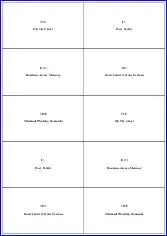
enter image description here

UPDATE (follow-up requirements by the OP):

To transform the grid into a sequence of pages where each cell is printed on a single tight page, only a few adaptions are needed. I also changed the \row command to take `tcolorbox' options. This allows e.g. different rule widths for the cards:

\documentclass{article}
\usepackage[paperwidth=10cm,paperheight=5cm,hmargin=5mm,vmargin=5mm]{geometry}
\usepackage[many]{tcolorbox}

\AtBeginDocument{%
  \begin{tcbitemize}[raster height=\textheight,raster columns=1,raster rows=1,
    size=fbox,sharp corners,
    center upper,%     <--- alternatively: halign=flush center,
    valign=center,
    boxrule=0.4pt,%    <--- line width
    colframe=black,colback=white
    ]%
}
\preto\enddocument{\end{tcbitemize}}

\newcommand{\row}[3][]{\tcbitem[#1] #2\par\vspace{15pt}{\bfseries#3}}

\pagestyle{empty}

\begin{document}% no blank line here
    \row{RAM}{Random Access Memory}
    \row[boxrule=3mm]{BIOS}{Basic Input Output System}
    \row{MWE}{Minimal Working Example}
    \row{OMG}{Oh My Ghost}
    \row{PS}{Post Script}

    \row{RAM}{Random Access Memory}
    \row{BIOS}{Basic Input Output System}
    \row{MWE}{Minimal Working Example}
    \row{OMG}{Oh My Ghost}
    \row{PS}{Post Script}

    \row{RAM}{Random Access Memory}
    \row{BIOS}{Basic Input Output System}
    \row{MWE}{Minimal Working Example}
    \row{OMG}{Oh My Ghost}
    \row{PS}{Post Script}

    \row{RAM}{Random Access Memory}
    \row{BIOS}{Basic Input Output System}
    \row{MWE}{Minimal Working Example}
    \row{OMG}{Oh My Ghost}
\end{document}
  • Is it possible to transform the grid into a sequence of pages where each cell is printed on a single tight page with a given new setting, for example, border size and box size? – Friendly Ghost Jun 27 '15 at 10:27
  • More precisely, each cell is printed on a page of 10cm x 5cm, with border of 5mm so the box size is 9.5cm x 4.5cm, for example. – Friendly Ghost Jun 27 '15 at 10:32
  • @FriendlyGhost I added some code for a sequence of tight pages which are all 10cm x 5cm. Border rules can be changed easily. If you would like to have different paper sizes per box, this would require more changes to code and document content. – Thomas F. Sturm Jun 28 '15 at 13:09
4

Here you have a possible solution with raster library from tcolorbox package.

You'll have to adjust some colors and dimensions, but at least first page contains five rows.

\documentclass{article}
\usepackage[a4paper,hmargin=2mm,vmargin=2mm]{geometry}
\usepackage[most]{tcolorbox}

\newtcolorbox{mybox}{sharp corners, width=.5\linewidth, height=0.2\textheight, valign=center, halign=center}

\begin{document}
\begin{tcbraster}[raster columns=2,enhanced, sharp corners, raster column skip=0pt, raster row skip=0pt] 
\foreach \i in {1,...,5}{
\begin{mybox}
RAM\\[1cm]Random Access Memory
\end{mybox}
\begin{mybox}
BIOS\\[1cm]Basic Input Output System
\end{mybox}
\begin{mybox}
MWE\\[1cm]Minimal Working Example
\end{mybox}
\begin{mybox}
OMG\\[1cm]Oh My Ghost
\end{mybox}
\begin{mybox}
PS\\[1cm]Post Script
\end{mybox}}
\end{tcbraster}
\end{document}

enter image description here

Ignasi
  • 136,588
2

If the goal is flash cards, then something like this might work (possibly with tweaking if you want borders and such). You said you didn't want to load extra packages so that's one potential benefit of doing it this way:

\documentclass{article}
\def\row[#1]#2{\parbox[c][.2\textheight]{.5\textwidth}
{\centering #1 \par \vspace{15pt} {\bf #2}}\ignorespaces\penalty0}
\begin{document}
\noindent
    \row[RAM]{Random Access Memory}
    \row[BIOS]{Basic Input Output System}
    \row[MWE]{Minimal Working Example}
    \row[OMG]{Oh My Ghost}
    \row[PS]{Post Script}
    \row[RAM]{Random Access Memory}
    \row[BIOS]{Basic Input Output System}
    \row[MWE]{Minimal Working Example}
    \row[OMG]{Oh My Ghost}
    \row[PS]{Post Script}
    \row[RAM]{Random Access Memory}
    \row[BIOS]{Basic Input Output System}
    \row[MWE]{Minimal Working Example}
    \row[OMG]{Oh My Ghost}
    \row[PS]{Post Script}
    \row[RAM]{Random Access Memory}
    \row[BIOS]{Basic Input Output System}
    \row[MWE]{Minimal Working Example}
    \row[OMG]{Oh My Ghost}
\end{document}
Sigur
  • 37,330
Mark
  • 1,393
  • If you want to get a border, this tweak kind of works: \def\row[#1]#2{\fbox{\parbox[c][.2\textheight]{\dimexpr.5\textwidth-2\fboxsep-2\fboxrule} {\centering #1 \par \vspace{15pt} {\bf #2}}}\ignorespaces\penalty0} – Mark Jun 26 '15 at 09:34
1

This method is childishly simple, perhaps.

The labels package is designed to print the kind of sheets of labels which you can feed through an inkjet or laser printer. In addition to some pre-defined settings, it allows you to specify the dimensions required for printing on arbitrary sheets.

Now, typically, you do not draw a grid around labels when printing them. However, for testing purposes, the package provides a command to show the grid. The idea is that you print this on a sheet of paper and hold it with your sheet of labels up to the light to check alignment. This way, a mistake only costs a sheet of paper and not a (more expensive) sheet of labels.

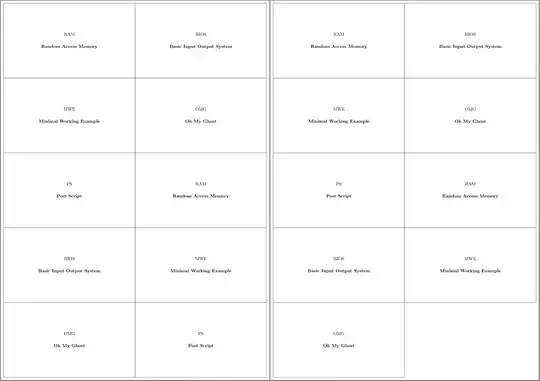
My answer simply sets up a sheet of 'labels' with the flash card dimensions and turns on the option to show the grid. The result is 5x2 sets of flash cards except on the final sheet which includes only one card. Because only one 'label' appears on this sheet, only its border is shown. That is, I think this solves the 'bonus' problem as well.

I am not quite sure, however, that my answer is within the constraints specified in the question since I have dispensed with a significant proportion of the preamble's code.

I have replaced \bf with \bfseries as the former is long deprecated and ought not be used in LaTeX documents at all.

I have used \card rather than \row to define the cards. The only reason for this is that I was using both commands for testing purposes and \card made sense to me. But you can specify \row (or anything else) if preferred.

Here's the result:

flash cards

The only thing to watch is that you do not leave blank lines between the flash cards. I've commented the blank lines to keep the grouping but avoid the problems which otherwise ensue.

\documentclass[a4paper]{article}
\usepackage[newdimens]{labels}

\LabelCols=2
\LabelRows=5
\LeftPageMargin=2mm
\RightPageMargin=2mm
\TopPageMargin=2mm
\BottomPageMargin=2mm
\InterLabelColumn=0mm
\InterLabelRow=0mm
\RightLabelBorder=5mm
\LeftLabelBorder=5mm
\TopLabelBorder=5mm
\BottomLabelBorder=5mm
\LabelGridtrue
\numberoflabels=1

\newlength\cardwidth
\setlength\cardwidth{\dimexpr.5\textwidth-12mm}
\newcommand*\card[2][]{%
  \genericlabel{%
    \begin{minipage}{\cardwidth}
      \centering
      #1\par\vspace{15pt}
      \bfseries #2
    \end{minipage}}}

\pagestyle{empty}

\begin{document}
%
  \card[RAM]{Random Access Memory}
  \card[BIOS]{Basic Input Output System}
  \card[MWE]{Minimal Working Example}
  \card[OMG]{Oh My Ghost}
  \card[PS]{Post Script}
%
  \card[RAM]{Random Access Memory}
  \card[BIOS]{Basic Input Output System}
  \card[MWE]{Minimal Working Example}
  \card[OMG]{Oh My Ghost}
  \card[PS]{Post Script}
%
  \card[RAM]{Random Access Memory}
  \card[BIOS]{Basic Input Output System}
  \card[MWE]{Minimal Working Example}
  \card[OMG]{Oh My Ghost}
  \card[PS]{Post Script}
%
  \card[RAM]{Random Access Memory}
  \card[BIOS]{Basic Input Output System}
  \card[MWE]{Minimal Working Example}
  \card[OMG]{Oh My Ghost}
  \card[PS]{Post Script}
%
  \card[RAM]{Random Access Memory}
  \card[BIOS]{Basic Input Output System}
  \card[MWE]{Minimal Working Example}
  \card[OMG]{Oh My Ghost}
  \card[PS]{Post Script}
%
  \card[RAM]{Random Access Memory}
  \card[BIOS]{Basic Input Output System}
  \card[MWE]{Minimal Working Example}
  \card[OMG]{Oh My Ghost}
  \card[PS]{Post Script}
%
  \card[RAM]{Random Access Memory}
\end{document}
cfr
  • 198,882