9

How would I go about centering the zero within the column for the following dcases MWE:

\documentclass{article}
\usepackage{mathtools}
\begin{document}
\begin{equation}
    T  =
\begin{dcases}
    0 &, \text{ if A, or} \\
    \frac{1.0}{1.0 + X} &, \text{ if B, or} \\
    \frac{X}{1.0 + X} &, \text{ if C}
\end{dcases} 
\end{equation}
\end{document}

i.e. instead of the produced the produced,

I want it to look like this like this

I have found previous posts describing centering in a cases environment, but I haven't been able to get them to work in dcases

arghdos
  • 235

3 Answers3

12

I wouldn't do it, but if you really want to, you have to fix the wrong definition of dcases made in mathtools:

\documentclass{article}
\usepackage{mathtools}

\MHInternalSyntaxOn
\renewcommand{\dcases}
 {
  \MT_start_cases:nnnn
    {\quad}
    {$\m@th\displaystyle##$\hfil}
    {$\m@th\displaystyle##$\hfil}
    {\lbrace}
 }
\MHInternalSyntaxOff

\begin{document}
\begin{equation}
    T  =
\begin{dcases}
    \hfil 0 & \text{, if A, or} \\
    \frac{1.0}{1.0 + X} &\text{, if B, or} \\
    \frac{X}{1.0 + X} &\text{, if C}
\end{dcases}
\end{equation}
\end{document}

The original definition has \displaystyle{##} which is simply wrong.

I'd avoid the commas hanging from nowhere too.

enter image description here

egreg
  • 1,121,712
7

The low level \omit helps. It removes the original format of the cell. Then the cell is centered manually by adding \hfil on both sides. Also the math mode needs to be set. Also dcases uses \displaystyle, but that does not matter for a simple digit.

\documentclass{article}
\usepackage{mathtools}
\begin{document}
\begin{equation}
    T  =
\begin{dcases}
    \omit\hfil$0$\hfil &, \; \text{ if A, or} \\
    \frac{1.0}{1.0 + X} &, \; \text{ if B, or} \\
    \frac{X}{1.0 + X} &, \; \text{ if C}
\end{dcases}
\end{equation}
\end{document}

Result

Heiko Oberdiek
  • 271,626
5

Of course, an array can also help in adjusting your horizontal alignment if the defaults don't suit your needs:

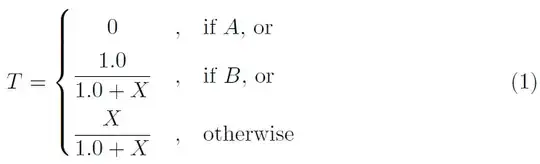
enter image description here

\documentclass{article}
\usepackage{amsmath,colortbl}
\setlength{\minrowclearance}{5pt}
\begin{document}
\begin{equation}
  T =
  \left\{\begin{array}{@{}c@{\quad,\quad}l}
              0         & \text{if $A$, or} \\
    \dfrac{1.0}{1.0 + X} & \text{if $B$, or} \\
     \dfrac{X}{1.0 + X}  & \text{otherwise}
  \end{array}\right.
\end{equation}
\end{document}
Werner
  • 603,163