I have a macro from here: Force "axis on top" for plotmarks in pgfplots
Which allows me to draw the axis line on top of the markers. However, if I use it in conjunction with a colorbar, it does not work correctly, as the ticks and ticklabels for the colorbar are transparent
\makeatletter \newcommand{\pgfplotsdrawaxis}{\pgfplots@draw@axis} \makeatother

\pgfplotsset{axis line on top/.style={
  axis line style=transparent,
  ticklabel style=transparent,
  tick style=transparent,
  axis on top=false,
  after end axis/.append code={
    \pgfplotsset{axis line style=opaque,
      ticklabel style=opaque,
      tick style=opaque,
      grid=none,
      every extra x tick/.style={grid=none},
      every extra y tick/.style={grid=none}}
    \pgfplotsdrawaxis}
  }
}
Here a MWE:
\documentclass{article}

\usepackage{pgfplots}
\usepackage{pgfplotstable}

\pgfplotsset{compat=1.12}

    \pgfplotsset{axis line on top/.style={
      axis line style=transparent,
      ticklabel style=transparent,
      tick style=transparent,
      axis on top=false,
      after end axis/.append code={
        \pgfplotsset{axis line style=opaque,
          ticklabel style=opaque,
          tick style=opaque,
          grid=none,
          every extra x tick/.style={grid=none},
          every extra y tick/.style={grid=none}}
        \pgfplotsdrawaxis}
      }
    }

\begin{document}

\pgfplotstableread{
A B C
0 5 -1
0.5 2 0
1 7 1
1.5 11 1.5
}\mytable %


\begin{tikzpicture}

\pgfplotsset
{
colormap
={test}{color=(green); color=( green!75!black);color=(black)}
}

    \makeatletter \newcommand{\pgfplotsdrawaxis}{\pgfplots@draw@axis} \makeatother

\begin{axis}[
axis line on top,
xmin=0,
colorbar,
]
        \addplot[%
            scatter,%
            only marks,
            mark=*,
            scatter src=explicit,
            colormap name=test,
            ] table [x={A}, y ={B},meta ={C}] %
            {\mytable};
\end{axis}
\end{tikzpicture}

\end{document}


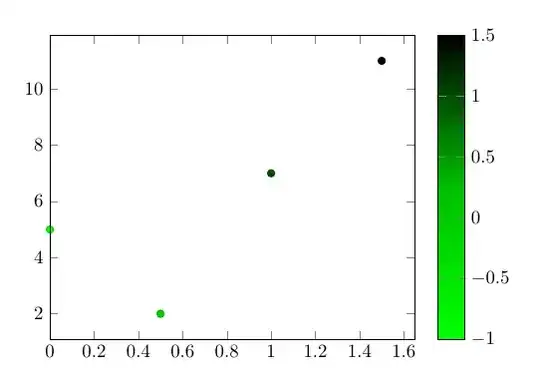

@-pinging Jake wont work here, as he hasn't edited/commented the post, see How do comment @replies work? – Torbjørn T. Jul 07 '15 at 13:44