The easiest way to me seems to be to load enumitem and define a new list:
\usepackage{enumitem}
\newlength\myitemwidth
\setlength\myitemwidth{5em} % <<< choose what you need here
\newlist{myacronymlist}{description}{1}
\setlist[myacronymlist]{
  labelindent = 0pt ,
  labelsep    = 0pt ,
  leftmargin  = \myitemwidth ,
  labelwidth  = \myitemwidth ,
  itemindent  = 0pt ,
  format      = \normalfont
}
and then tell acro to use this list:
\usepackage{acro}
\DeclareAcroListStyle{myliststyle}{list}{
  list = myacronymlist
}
\acsetup{ list-style = myliststyle }
Versions prior to v2.2 use the deprecated option list-type:
\usepackage{acro}
\acsetup{ list-type = myacronymlist }
The complete example:
\documentclass{article}
\usepackage{enumitem}
\newlength\myitemwidth
\setlength\myitemwidth{5em} % <<< choose what you need here
\newlist{myacronymlist}{description}{1}
\setlist[myacronymlist]{
  labelindent = 0pt ,
  labelsep    = 0pt ,
  leftmargin  = \myitemwidth ,
  labelwidth  = \myitemwidth ,
  itemindent  = 0pt ,
  format      = \normalfont
}
\usepackage{acro}
\DeclareAcroListStyle{myliststyle}{list}{
  list = myacronymlist
}
\acsetup{ list-style = myliststyle }
\DeclareAcronym{loT}{
  short = IoT ,
  long  = Internet of Things ,
  class = abbrev
}
\DeclareAcronym{dbms}{
  short = DBMS ,
  long  = Database Management System ,
  class = abbrev
}
\begin{document}
\acuseall
\printacronyms[include-classes=abbrev,name=Abbreviations]
\end{document}
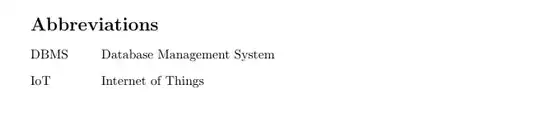
For version 3 of acro the fastest adaption of the above code would be
\usepackage[version=3]{acro}
\SetupAcroTemplate[list]{description}{%
  \let\description\myacronymlist
  \let\enddescription\endmyacronymlist
}
otherwise using the same definitions as above. This changes the default list template. One could define a custom template which does the same:
\usepackage[version=3]{acro}
\NewAcroTemplate[list]{custom}{%
  \let\description\myacronymlist
  \let\enddescription\endmyacronymlist
  \UseAcroTemplate[list]{description}[0]%
}
\acsetup{list/template=custom}
In order to run without warnings with version 3, class should be replaced by tag in the acronym definitions and include-classes should become include in the list setup:
\documentclass{article}
\usepackage{enumitem}
\newlength\myitemwidth
\setlength\myitemwidth{5em} % <<< choose what you need here
\newlist{myacronymlist}{description}{1}
\setlist[myacronymlist]{
  labelindent = 0pt ,
  labelsep    = 0pt ,
  leftmargin  = \myitemwidth ,
  labelwidth  = \myitemwidth ,
  itemindent  = 0pt ,
  format      = \normalfont
}
\usepackage[version=3]{acro}
\SetupAcroTemplate[list]{description}{%
  \let\description\myacronymlist
  \let\enddescription\endmyacronymlist
}
\DeclareAcronym{loT}{
  short = IoT ,
  long  = Internet of Things ,
  tag   = abbrev
}
\DeclareAcronym{dbms}{
  short = DBMS ,
  long  = Database Management System ,
  tag   = abbrev
}
\begin{document}
\acuseall
\printacronyms[include=abbrev,name=Abbreviations]
\end{document}
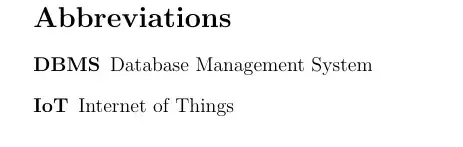
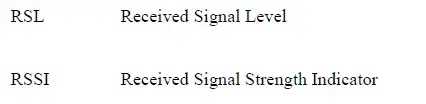


tabularmight suffice. For a list that needs to page break, one could use anitemizelist, but place the labels in a fixed-width box. – Steven B. Segletes Jul 02 '15 at 13:18