How can I make comments inside an long equation, something like:
\begin{equation}
G(r)
% comment here
= \frac{A}{B}
= \frac{\frac{t_c}{3}}{2 \cdot \frac{2t_b + t_v + t_c}{r}}  = \frac{t_c}{6 \cdot (2t_b + t_v + t_c)} \cdot r
\end{equation}
How can I make comments inside an long equation, something like:
\begin{equation}
G(r)
% comment here
= \frac{A}{B}
= \frac{\frac{t_c}{3}}{2 \cdot \frac{2t_b + t_v + t_c}{r}} = \frac{t_c}{6 \cdot (2t_b + t_v + t_c)} \cdot r
\end{equation}

Do you mean something like this? If you are referring to setting source code (LaTeX listings) you should clarify that a bit in your question.
% arara: pdflatex

\documentclass{article}
\usepackage{mathtools}

\begin{document}
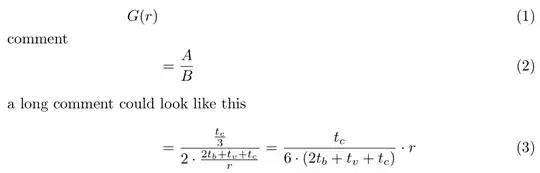
\begin{align}
    G(r) & \\
\shortintertext{comment}
    &= \frac{A}{B} \\
    \intertext{a long comment could look like this}
    &= \frac{\frac{t_c}{3}}{ 2 \cdot \frac{2t_b + t_v + t_c}{r}}  = \frac{t_c}{6 \cdot (2t_b + t_v + t_c)} \cdot r
\end{align}
\end{document}

Just to provide a few more ideas:
\shortintertext{} which needs mathtools is my personal favourite and there's already an example\intertext{} is similar to \shortintertext{} but will have a larger space above and below the the math, also in the example\tag{} is different as it will put text in brackets at the end of the line of Math. If the tag text cannot fit into the line, it will be placed on the line belowNote that some of these, I forget which, only work in AMS environment equations.
Hope it helps!

\shortintertext, it's necessary to load the mathtools environment.
– Mico
Jul 06 '15 at 11:03
\text{..}or\intertext{..}used in conjunction with thealignenvironment? – Bordaigorl Jul 06 '15 at 09:43%-sign infront of your comment. – Wamseln Jul 06 '15 at 09:55