I expect to break a long text automatically in tabular. After searching this site, there are several ways:
(i). Use p{dimension} in tabular, answered here
\begin{table}[h]
\begin{tabular}{|l|l|}
\hline
key & \multicolumn{1}{p{4cm}|}{A very long text. A very long text. A very long text. A very long text}\\
\hline
\end{tabular}
\end{table}
As you can see, we need to assign dimension, not automatic.
(ii). Use the package tabularx, answered here
\begin{table}[h]
\begin{tabularx}{\textwidth}{|l|X|}
\hline
key & A very long text. A very long text. A very long text. A very long text. A very long text. A very long text. A very long text. A very long text. \\
\hline
\end{tabularx}
\end{table}
(iii). Use the package longtable, answered here
\begin{longtable}{|l|p{4cm}|}
\hline
key & A very long text. A very long text. A very long text. A very long text. A very long text. A very long text. A very long text. A very long text. \\
\hline
\end{longtable}
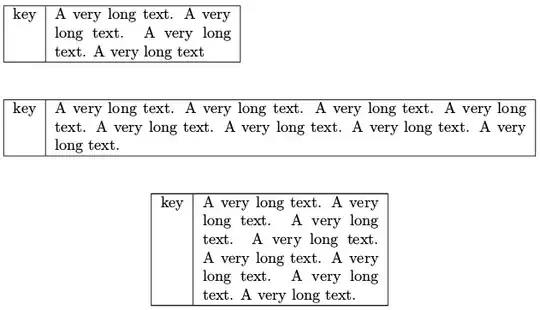
Here is the result.
(iv). Other solutions?


longtableis irrelevant here, it's thep{4cm}column specification that enables line breaking (for all cells in that column), and that works withtabularandtabularxas well. – Torbjørn T. Jul 08 '15 at 16:24longtableexample is that you have specified three columns, and the third one is apcolumn, but in the table there are only two columns, so the very long text ends up in anlcolumn where line breaking does not happen. Remove onel|in the column specification. – Torbjørn T. Jul 08 '15 at 16:39p{...}should work in any tabular - environment which is derived fromarray, as far as I know. In addition to Torbjørn T.'s comment use{|*{2}p{4cm}|}if you really need the|– Jul 08 '15 at 16:40\begin{longtable}{|l|p{4cm}|}? Yes, it works. – SparkAndShine Jul 08 '15 at 16:47cmvalues manually and keep adjusting them every time the table content changes. What these comments suggest is that you can either have a flexibly sized column, or automatic line breaks, but not both; am I understanding this correctly? – Daniel Saner Jul 04 '18 at 08:39