I used the suggestion from Adding row spacing to a longtable? to decrease the row spacing in my longtable.
\documentclass{article}
\usepackage{longtable}
\begin{document}

\renewcommand{\arraystretch}{0.7}
\begin{longtable}{ l | l | l }
    a & b & a small phrase \\
    a & b & a small phrase \\
    a & b & a small phrase
\end{longtable}

\end{document}
produces

But if I have a p column
\documentclass{article}
\usepackage{longtable}
\begin{document}

\renewcommand{\arraystretch}{0.7}
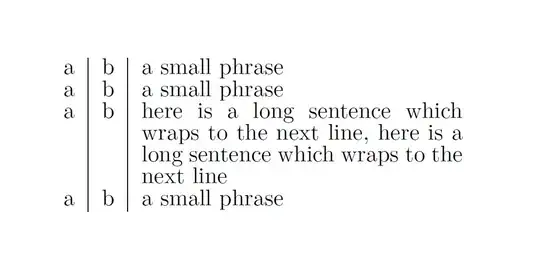
\begin{longtable}{ l | l | p{5 cm} }
    a & b & a small phrase \\
    a & b & a small phrase \\
    a & b & here is a long sentence which wraps to the next line \\
    a & b & a small phrase
\end{longtable}

\end{document}
The spacing between the lines of the paragraph doesn't get reduced.

How can I also reduce the spacing between the paragraph lines?
I also read Longtable with multicolumn and parbox spacing issues, but the example was so complex, I wasn't sure whether the problem was the same at all.




\arraystretch.:)Maybe\linespread{<value>}could be of use, but I'm not too keen on this table layout. – Paulo Cereda Jul 14 '15 at 16:34longtablespacing. I thought imitating the default spacing oftabularwould make it more compact and easier to scan. – 2cents Jul 14 '15 at 17:11\footnotesize. Inside a paragraph cell, use\linespread{…}as mantioned by @Paulo Cereda, or (perhaps better)\setstretch{…}, from thesetspacepackage. – Bernard Jul 14 '15 at 17:16