I want to draw a red page border only on the title page and signature page of my thesis.
How can I achieve this. I tried the fancybox package but it has some conflict with fancyhdr package and displayed some of the page headings out of place.
Asked
Active
Viewed 6,179 times
4

Godey
- 805
5 Answers
4
\documentclass{article}
\usepackage{fancybox,fancyhdr}
\pagestyle{fancy}
\fancypage*{%
  \setlength{\fboxsep}{8pt}%
  \setlength{\shadowsize}{8pt}%
  \shadowbox}{}
\fancyhead{bar}

\begin{document}
\section{foo}

    Hello world

\end{document}

3
Without a graphic-package like tikz or pstrick you can use eso-pic
    \documentclass{scrreprt}

    \usepackage{xcolor}
    \usepackage{eso-pic}
    \usepackage{lipsum}
    \title{Title}
    \author{Name}
    \newcommand{\frameattitle}[1][red]{%
      \AddToShipoutPictureBG*{\AtTextLowerLeft{%
          \color{#1}%
          \linethickness{5pt}%
         \framebox(\LenToUnit{\textwidth},\LenToUnit{\textheight}){}}%
         }%
    }

    \begin{document}
    \frameattitle
    \maketitle
    \clearpage
    \frameattitle
    \null\vfill
    \begin{center}
    \bfseries
    Signature
    \end{center}
    \vfill
    \clearpage
    \chapter{foo}
    \lipsum


    \end{document}
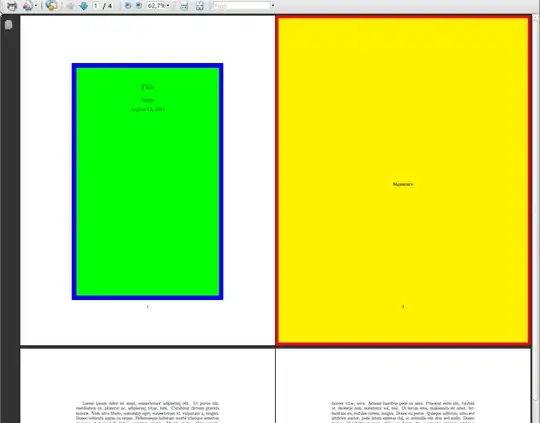
In relation to the idea of xport here an example with allows a frame around the text size and the paper size.
EDIT:
I modified my code. Now you can stretch the frame around the text with the setting of the lengths extraxsep and extraysep.
\documentclass{scrreprt}

\usepackage{xcolor}
\usepackage{eso-pic}
\usepackage{lipsum,showframe}
\title{Title}
\author{Name}
\makeatletter
%\frameattext{<backgroundcolor>}{linecolor}{<linewidth>}
\newdimen\extraxsep
\newdimen\extraysep
\extraxsep=20mm
\extraysep=20mm
\newcommand\frameattext[3]{%
  \linethickness{#3}%
  \AddToShipoutPicture*{%
    \AtTextLowerLeft{%%text-boder
       \put(\LenToUnit{-,5\extraxsep},\LenToUnit{-0.5\extraysep}){\color{#1}%
             \rule{\dimexpr\textwidth+\extraxsep\relax}{\dimexpr\textheight+\extraysep\relax}}%
       \put(\LenToUnit{-,5\extraxsep},\LenToUnit{-0.5\extraysep}){\color{#2}%
       \framebox(\LenToUnit{\dimexpr\textwidth+\extraxsep\relax},%
                 \LenToUnit{\dimexpr\textheight+\extraysep\relax}){}
       }
    }%
  }%
}
%\frameatpage{<backgroundcolor>}{linecolor}{<linewidth>}
\newcommand\frameatpage[3]{%
  \linethickness{#3}%
  \AddToShipoutPicture*{%
    \AtPageLowerLeft{%%page-border
      \put(0,0){\color{#1}\rule{\paperwidth}{\paperheight}}%
      \put(\LenToUnit{\@wholewidth},\LenToUnit{\@wholewidth}){%
       \color{#2}\framebox(\LenToUnit{\dimexpr\paperwidth-2\@wholewidth\relax},%
                  \LenToUnit{\dimexpr\paperheight-2\@wholewidth\relax}){}%
      }%
    }%
  }%
}

\makeatother
\begin{document}
\frameattext{green}{blue}{10pt}
\maketitle
\clearpage
\frameatpage{yellow}{red}{6pt}
\null\vfill
\begin{center}
\bfseries
Signature
\end{center}
\vfill
\clearpage
\frameatpage{yellow}{red}{6pt}
\chapter{foo}
\lipsum
\end{document}
enter image description here

Marco Daniel
- 95,681
3
I actually required something like this yesterday for my appendix pages of my thesis. Use the tikz package and then place the following code somewhere on the title page. This requires two compilation runs to get correct results. Adjust the settings accordantly.
\tikz[remember picture,overlay] {%
    \draw [thick,red!50!black]
    ([shift={(+10mm,-10mm)}]current page.north west)
    rectangle
    ([shift={(-10mm,+10mm)}]current page.south east)
    ;
}%
See also Use TikZ to draw frontpage and Title page using TikZ as well as Get a "Boxed" page with TeX.


Martin Scharrer
- 262,582
-
@Martin: This could be written a bit more elegantly as
\draw [thick,red!50!black] ([shift={(+10mm,-10mm)}]current page.north west) rectangle ([shift={(-10mm,+10mm)}]current page.south east) ;– Jake Aug 15 '11 at 06:55 -
1@Jake: Indeed! Funny, I should have known that. I'm just in my last week of thesis write-up and don't have much concentration for anything else :-) I updated my code. Thanks! – Martin Scharrer Aug 15 '11 at 07:01
2
This is what I did:
- Create a title page by LibreOffice and export it to PDF say, title.pdf
Use package wallpaper and include these lines after \begin{document}:
\begin{titlepage}
\ThisLRCornerWallPaper{1}{title.pdf}
\null
\vfill
\end{titlepage}
Enjoy :-)

minhle_r7
- 121
1

\documentclass[dvipsnames,cmyk]{article}
\usepackage[a4paper,margin=25mm]{geometry}
\usepackage{eso-pic,xcolor,calc}

% #1: border color
% #2: background color
% %3: border width
\newcommand\Border[3]{%
    \pagecolor{#1}%
    \newdimen\borderwidth
    \borderwidth=#3
    \AddToShipoutPictureBG*{%
    \AtPageLowerLeft{%
        \color{#2}\hspace{\borderwidth}%
        \rule[\borderwidth]{\paperwidth-2\borderwidth}{\paperheight-2\borderwidth}}}}


\usepackage{lipsum}

\begin{document}
\Border{red}{yellow!50}{1cm}
\lipsum[1]
\newpage

\Border{Green}{cyan!30}{1cm}
\lipsum[2]
\newpage

\pagecolor{white}
\lipsum
\end{document}

Display Name
- 46,933
-
1
-
1@Marco: Both
latex-dvips-ps2pdfandxelatexcan compile it without problem. – Display Name Aug 13 '11 at 14:22 -
1
\frameattitleand\frameattextworks but\frameatpagedoes not. pdflatex complains"a <box> is suppose to the here". Is there a way to increase the space between the text and the box. In my case the box wraps around the text too tightly. – Godey Aug 13 '11 at 14:46\makeatletterand\makeatother– Marco Daniel Aug 13 '11 at 15:02