Background: I'm writing my thesis and per the department guidelines, I have to use TrueType fonts and they need to be embedded in the PDF.
Now, I have managed to change everything into Computer Modern Unicode (CMU) or Latin Modern for monospace font, but the output file says there are other font types (Type 1) embedded in the PDF (and there are so many duplicates for some reason):

My question is, how can I make sure only TrueType fonts are being used? I searched for these fonts in the preamble:
\usepackage[paper= letterpaper,left=1.5in,right=1in,top=1.25in,bottom=1.25in]{geometry}
\usepackage{verbatim}
\usepackage{latexsym}
\usepackage{mathchars}
\usepackage{setspace}

\usepackage[english]{babel}
\usepackage{blindtext}
\usepackage[compact]{titlesec} % removing extra white space with "titlespacing"
\usepackage[labelsep=period]{caption} % adds dots instead of colon
\usepackage[none]{hyphenat} % removes word hyphenating
\usepackage[document]{ragged2e}% no word-wrap justification
\setlength{\RaggedRightParindent}{\parindent}
\usepackage{etoolbox} % to fix the problem caused by above code -- see "AtBeginEnvironment"
\usepackage{txfonts}  % for upright greek letters | use $\betaup$ or $\muup$
\usepackage{bibentry} % for full citation inline
\usepackage{textcomp} % for copyright and other symbols
\usepackage{datetime} % for date
\usepackage{tabto} % for tabbing (see committee.tex)
\usepackage{fontspec} % to import fonts via XeTeX
\setmainfont{CMU Serif} % TrueType font of Computer Modern
\setmonofont{Latin Modern Mono Prop} % Mono TrueType font
\setromanfont{CMU Serif} % TrueType
\setsansfont{CMU Serif} % TrueType
\usepackage{enumitem} % for better item listing and change its spacing
\usepackage{fixltx2e} % for textsubscript{}
\usepackage[natbibapa]{apacite} % for bibliography % use apacite or apalike
\usepackage[nottoc,notlof,notlot]{tocbibind} % to fix bib href jump
\usepackage{hyperref} % for bibliography
\usepackage{setspace} % Allows for \singlespacing and \doublespacing command
\usepackage[super]{nth} % for creating 1st, 2nd, etc. using \nth{1}, \nth{2}
\usepackage{tabu} % for more adjustments for table
\usepackage{tabularx} % for table
\usepackage{placeins} % for table -- add \FloatBarrier before and after begin/end table
\usepackage[flushleft]{threeparttable} % for table
\usepackage{booktabs,caption,fixltx2e} % caption width setup (captionsetup) is further down
\usepackage[space]{grffile} % for spacing in graphics path name
\usepackage{graphicx} % for images - related: use [float] package for placement
\graphicspath{ {/Users/Payam/Google Drive/Thesis/images/} } % image directory
\usepackage{gensymb} % for degree sign \degree
\usepackage[table,xcdraw]{xcolor} % for table

\usepackage{xpatch} % for two spaces after period
\makeatletter % for two spaces after period
\xpatchcmd{\selectfont} % for two spaces after period
  {\pickup@font\font@name} % for two spaces after period
  {\pickup@font\font@name\fontdimen7\font=\fontdimen2\font}
 {}{}
\makeatother % for two spaces after period
\usepackage{tocloft} % changing TOC boldness

\usepackage{color} % for color text
%%%%%%%%%%%%%%%%%%%%%%%%%%%%%%%%%%%%%%%%%%%%%%%%%%%%%%%%%%%%%%%%%%%%%%%%%%%%%%
 \let\oldtextbf\textbf % changes all bolod text color to red
 \renewcommand{\textbf}[1]{\textcolor{red}{\oldtextbf{#1}}} % changes bold text color to red
%%%%%%%%%%%%%%%%%%%%%%%%%%%%%%%%%%%%%%%%%%%%%%%%%%%%%%%%%%%%%%%%%%%%%%%%%%%%%%
%%% Remove the two lines above after userpackage{color} before submitting  %%%
%%%%%%%%%%%%%%%%%%%%%%%%%%%%%%%%%%%%%%%%%%%%%%%%%%%%%%%%%%%%%%%%%%%%%%%%%%%%%%
%%%%%%%%%%%%%%%%%%%%%%%%%%%%%%%%%%%%%%%%%%%%%%%%%%%%%%%%%%%%%%%%%%%%%%%%%%%%%%


% Removing extra space
\titlespacing{\section}{0pt}{*0}{*0}
\titlespacing{\subsection}{0pt}{*0}{*0}
\titlespacing{\subsubsection}{0pt}{*0}{*0}

%%% This is for shortauthor references
\defcitealias{CDC2012}{CDC, 2012}
\defcitealias{CDCfasd}{CDC, 2014}
\defcitealias{NIHalcohol}{NIH, 2015}
\defcitealias{NIHcpt1}{NIH, 2014}
\defcitealias{DoHaHS2014}{HSS, 2014}

% Removes bolded TOC entries
\renewcommand\cftchapfont{\mdseries}
\renewcommand\cftchappagefont{\mdseries}

% centers table tex vertically when use "m"
\renewcommand\tabularxcolumn[1]{>{\Centering}m{#1}}

\input{blocked.sty}
\input{uhead.sty}
\input{boxit.sty}
\input{icthesis.sty}

\newcommand{\ipc}{{\sf ipc}}

\newcommand{\Prob}{\bbbp}
\newcommand{\Real}{\bbbr}
\newcommand{\real}{\Real}
\newcommand{\Int}{\bbbz}
\newcommand{\Nat}{\bbbn}

\newcommand{\NN}{{\sf I\kern-0.14emN}}   % Natural numbers
\newcommand{\ZZ}{{\sf Z\kern-0.45emZ}}   % Integers
\newcommand{\QQQ}{{\sf C\kern-0.48emQ}}   % Rational numbers
\newcommand{\RR}{{\sf I\kern-0.14emR}}   % Real numbers
\newcommand{\KK}{{\cal K}}
\newcommand{\OO}{{\cal O}}
\newcommand{\AAA}{{\bf A}}
\newcommand{\HH}{{\bf H}}
\newcommand{\II}{{\bf I}}
\newcommand{\LL}{{\bf L}}
\newcommand{\PP}{{\bf P}}
\newcommand{\PPprime}{{\bf P'}}
\newcommand{\QQ}{{\bf Q}}
\newcommand{\UU}{{\bf U}}
\newcommand{\UUprime}{{\bf U'}}
\newcommand{\zzero}{{\bf 0}}
\newcommand{\ppi}{\mbox{\boldmath $\pi$}}
\newcommand{\aalph}{\mbox{\boldmath $\alpha$}}
\newcommand{\bb}{{\bf b}}
\newcommand{\ee}{{\bf e}}
\newcommand{\mmu}{\mbox{\boldmath $\mu$}}
\newcommand{\vv}{{\bf v}}
\newcommand{\xx}{{\bf x}}
\newcommand{\yy}{{\bf y}}
\newcommand{\zz}{{\bf z}}
\newcommand{\oomeg}{\mbox{\boldmath $\omega$}}
\newcommand{\res}{{\bf res}}
\newcommand{\cchi}{{\mbox{\raisebox{.4ex}{$\chi$}}}}
%\newcommand{\cchi}{{\cal X}}
%\newcommand{\cchi}{\mbox{\Large $\chi$}}

% Logical operators and symbols
\newcommand{\imply}{\Rightarrow}
\newcommand{\bimply}{\Leftrightarrow}
\newcommand{\union}{\cup}
\newcommand{\intersect}{\cap}
\newcommand{\boolor}{\vee}
\newcommand{\booland}{\wedge}
\newcommand{\boolimply}{\imply}
\newcommand{\boolbimply}{\bimply}
\newcommand{\boolnot}{\neg}
\newcommand{\boolsat}{\!\models}
\newcommand{\boolnsat}{\!\not\models}


\newcommand{\op}[1]{\mathrm{#1}}
\newcommand{\s}[1]{\ensuremath{\mathcal #1}}

% Properly styled differentiation and integration operators
\newcommand{\diff}[1]{\mathrm{\frac{d}{d\mathit{#1}}}}
\newcommand{\diffII}[1]{\mathrm{\frac{d^2}{d\mathit{#1}^2}}}
\newcommand{\intg}[4]{\int_{#3}^{#4} #1 \, \mathrm{d}#2}
\newcommand{\intgd}[4]{\int\!\!\!\!\int_{#4} #1 \, \mathrm{d}#2 \, \mathrm{d}#3}

% Large () brackets on different lines of an eqnarray environment
\newcommand{\Leftbrace}[1]{\left(\raisebox{0mm}[#1][#1]{}\right.}
\newcommand{\Rightbrace}[1]{\left.\raisebox{0mm}[#1][#1]{}\right)}

% Funky symobols for footnotes
\newcommand{\symbolfootnote}{\renewcommand{\thefootnote}{\fnsymbol{footnote}}}
% now add \symbolfootnote to the beginning of the document...

\newcommand{\normallinespacing}{\renewcommand{\baselinestretch}{1.5} \normalsize}
\newcommand{\mediumlinespacing}{\renewcommand{\baselinestretch}{1.2} \normalsize}
\newcommand{\narrowlinespacing}{\renewcommand{\baselinestretch}{1.0} \normalsize}
\newcommand{\bump}{\noalign{\vspace*{\doublerulesep}}}
\newcommand{\cell}{\multicolumn{1}{}{}}
\newcommand{\spann}{\mbox{span}}
\newcommand{\diagg}{\mbox{diag}}
\newcommand{\modd}{\mbox{mod}}
\newcommand{\minn}{\mbox{min}}
\newcommand{\andd}{\mbox{and}}
\newcommand{\forr}{\mbox{for}}
\newcommand{\EE}{\mbox{E}}

\newcommand{\deff}{\stackrel{\mathrm{def}}{=}}
\newcommand{\syncc}{~\stackrel{\textstyle \rhd\kern-0.57em\lhd}{\scriptstyle L}~}

\def\coop{\mbox{\large $\rhd\!\!\!\lhd$}}
\newcommand{\sync}[1]{\raisebox{-1.0ex}{$\;\stackrel{\coop}{\scriptscriptstyle
#1}\,$}}

\newtheorem{definition}{Definition}[chapter]
\newtheorem{theorem}{Theorem}[chapter]

\newcommand{\Figref}[1]{Figure~\ref{#1}}
\newcommand{\fig}[3]{
\begin{figure}[!ht]
\begin{center}
\scalebox{#3}{\includegraphics{figs/#1.ps}}
\vspace{-0.1in}
\caption[ ]{\label{#1} #2}
\end{center}
\end{figure}
}

\newcommand{\figtwo}[8]{
\begin{figure}
\parbox[b]{#4 \textwidth}{
\begin{center}
\scalebox{#3}{\includegraphics{figs/#1.ps}}
\vspace{-0.1in}
\caption{\label{#1}#2}
\end{center}
}
\hfill
\parbox[b]{#8 \textwidth}{
\begin{center}
\scalebox{#7}{\includegraphics{figs/#5.ps}}
\vspace{-0.1in}
\caption{\label{#5}#6}
\end{center}
}
\end{figure}
}
but I don't see anything.
I am using XeLaTeX and have the following codes in preamble:
\usepackage{fontspec} % to import fonts via XeTeX
\setmainfont{CMU Serif} % TrueType font of Computer Modern
\setromanfont{CMU Serif} % Roman TrueType
\setsansfont{CMU Serif} % Sans TrueType
\setmonofont{Latin Modern Mono Prop} % Mono TrueType font
Other notes: I am using EPS files (edited in Illustrator) to embed my graphs, but I've made sure the fonts used there are TrueType as well:

UPDATE: Just wanted to update this post in case somebody else has the same problem. I followed @cfr suggestion and got rid of the CMR, Nimbus, rtxmi, txmia and txsy. Also, as @Sverre mentioned in the comments below, one of the culprits was the images I was using in my document. They were EPS files and Illustrator was embedding the font within them. So to get around that, I followed this guide and converted my images into outlines.
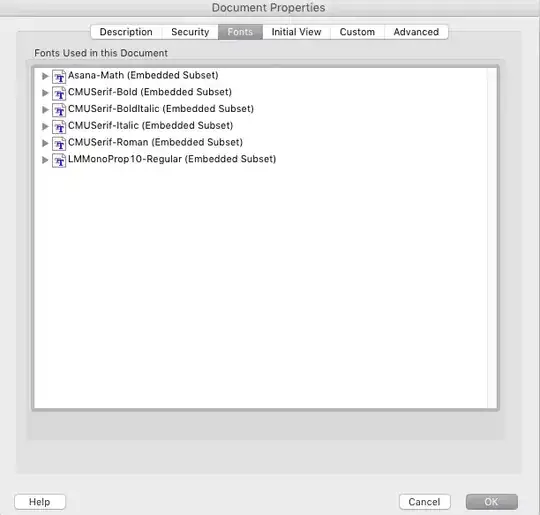
And now I only have these TT fonts embedded:


.otf. If that's acceptable, try just\usepackage{fontspec}- don't set the text fonts specifically. That way, you'll get all Latin Modern which is probably better. Then you could try usingunicode-mathand Latin Modern Math. But you need to zap your current maths font configuration. – cfr Oct 01 '15 at 22:28\documentclass[a4paper]{article} \usepackage{fontspec} \setmainfont{CMU Serif} % TrueType font of Computer Modern \setromanfont{CMU Serif} % Roman TrueType \setsansfont{CMU Serif} % Sans TrueType \setmonofont{Latin Modern Mono Prop} % Mono TrueType font \begin{document} Some text $some maths$. \end{document}introduces a type1 subset because the maths is still type1.fontspecdoesn't touch it. – cfr Oct 01 '15 at 22:34tx...are from a Times-clone package, too, if I remember correctly. – cfr Oct 01 '15 at 22:36txfonts, so ... (Plus a bunch of other strange things I noticed in that preamble). – Sverre Oct 01 '15 at 22:39latexsym,txfontsandgensymbwill introduce type1 fonts. But if these weren't loaded, you'd still get type1 CM maths by default. The preamble is a mess and uses font commands which were deprecated 20+ years ago, but that seems par for the course in thesis preambles - they are inherited and extended like a rambling old house, and people forget there's an old woman spinning in one of the turrets until it is too late. – cfr Oct 01 '15 at 22:46.ttffile. 3: I didn't think about the math fonts, I'll try theunicode-mathand will try again. 4: I'll play with the images, too, and see what happens. – Re-l Oct 01 '15 at 22:48.ttf, then I don't see anyway to typeset the mathematics. The only thing you could do would be to create your maths stuff as PNG or something and include them as images. Obviously, these will not scale at all well, but they will avoid using type1 fonts. If you can use.otf, you can probably do it although the requirement is, I repeat, nuts. Type1 scale beautifully. – cfr Oct 01 '15 at 23:09.ttcfont. It won't look very good, but that is probably not a requirement. (I don't think it will look very good with CMU - this isn't an aesthetic judgement of the font itself.) – cfr Oct 01 '15 at 23:11Nimbus Roman No 9using\usepackage[no-math]{fontspec}and\usepackage{mathastext}, so thank you for that. I will email the graduation office and ask them about Type1 and see if they allow it. In the mean time, I'll see if I can figure out where the last three remaining Type1 fonts are coming from:rtxr,txmia, andtxsy. – Re-l Oct 01 '15 at 23:17txfonts. See my answer below. I don't thinkno-mathis doing anything.mathastextis doing the work by overriding partiallytxfonts. – cfr Oct 01 '15 at 23:18