How to draw a checkered torus (doughnut) in LaTeX? I have seen the example of drawing a torus. But I also need to make a $4 \cross 4$ chess board on it. It'll be more helpful if I can also change the color scheme!
Asked
Active
Viewed 2,696 times
7

Werner
- 603,163

UmerScientist
- 79
- 1
- 2
-
8Welcome to TeX.sx! Please show some attempt you've made in achieving this and specify what you're struggling with. The point of this Q&A site is to solve specific problems, not to have other people do your work. – doncherry Sep 05 '11 at 21:32
2 Answers
16
run with xelatex. I do not realy understand where you want to place the chess board.
\documentclass{article}
\usepackage{pst-solides3d}
\begin{document}

\psset{Decran=20,lightsrc=10 20 20 rtp2xyz}
\psframebox{%
\begin{pspicture}(-5,-4)(5,3)
\psSolid[
  r1=2.5,r0=1.5,
  object=tore,
  ngrid=18 36,
  fillcolor=green!30,
  action=draw**]
\end{pspicture}}

\end{document}
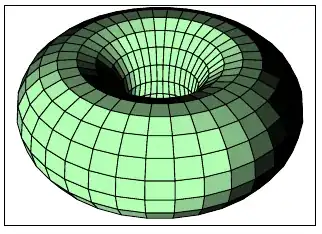
and the chessboard one with a 4x4 square:
\documentclass{article}
\usepackage{pst-solides3d}

\begin{document}
\begin{pspicture}(-3,-3)(3.5,2.5)
\psset{Decran=20,RotZ=-160}
\psSolid[
  object=tore,
  fcol =  0 256 768 { /i ED
          i 8 i 32 add { dup 3 add 1 exch { 32 i 127 add { (Black) } for } for } for } for
        132 256 900 { /i ED
          i 8 i 32 add { dup 3 add 1 exch { 32 i 127 add { (Black) } for } for } for } for,
    r1=2.5, r0=1.5, ngrid=32 32, %numfaces=all,fontsize=5,
  linewidth=0.1pt]
\end{pspicture}

\end{document}

or vive la france ... :-)
\documentclass{article}
\usepackage{pst-solides3d}

\begin{document}
\begin{pspicture}(-3,-3)(3.5,2.5)
\psset{Decran=20,RotZ=-160}
\psSolid[
  object=tore,
  fcol =  0 256 768 { /i ED
          i 8 i 32 add { dup 3 add 1 exch { 32 i 127 add { (Blue) } for } for } for } for
        132 256 900 { /i ED
          i 8 i 32 add { dup 3 add 1 exch { 32 i 127 add { (Red) } for } for } for } for,
    r1=2.5, r0=1.5, ngrid=32 32, %numfaces=all,fontsize=5,
  linewidth=0.1pt]
\end{pspicture}

\end{document}

-
I think he wants the squares on your drawing to be alternating colours, like a chess board. (Not sure how the 4x4 is supposed to be calculated, though.) – Alan Munn Sep 05 '11 at 22:23
-
@Herbert: So how would you modify the code to typeset a 4x4 (or an 8x8, or 16x16) chessboard on the 32x32 torus grid that you currently have? Yours currently represent a rectangular 16x8 chessboard. – Werner Sep 06 '11 at 17:56
-
@Werner: use
numfaces=all,fontsize=5,without a color setting, then you'll get all polygons numbered and then it is quite easy to see which one must be colored black, eg for the first black 4x4 "square"0 8 32 { dup 3 add 1 exch { 32 128 { (Black) } for } for } for– Sep 06 '11 at 20:48 -
@Herbert: Thanks. I was not so much concerned about what the face numbers are (although that's helpful). More so how to nest the colouring scheme! – Werner Sep 06 '11 at 20:50
-
-
@Herbert: I see that you're using
... {...{...{...} for } for } for. This looks like a nestedforloop in order to assign colours to the required faces. I just called it a 'nested colour scheme'; perhaps technically incorrect. – Werner Sep 06 '11 at 21:51 -
10
Drawing a torus using the pst-solides3d package, as in Herbert's answer, is possible. You can extend this to the code below, which embeds a 4x4 black-and-red chessboard on a torus.
\documentclass{article}
\usepackage{pst-solides3d}% http://ctan.org/pkg/pst-solides3d
\begin{document}
\begin{pspicture}(-3,-3)(3.5,2.5)
  \psset{Decran=20,viewpoint=10 10 15}%,lightsrc=10 10 20 rtp2xyz,lightintensity=1
  \pstVerb{/iface 0 store}%
  \psSolid[
  fcol=4 {%
    iface         (Black) iface   1 add (Black) iface   2 add (Black) iface   3 add (Black)
    iface   4 add (Red)   iface   5 add (Red)   iface   6 add (Red)   iface   7 add (Red)

    iface   8 add (Black) iface   9 add (Black) iface  10 add (Black) iface  11 add (Black)
    iface  12 add (Red)   iface  13 add (Red)   iface  14 add (Red)   iface  15 add (Red)
    iface  64 add (Red)   iface  65 add (Red)   iface  66 add (Red)   iface  67 add (Red)
    iface  68 add (Black) iface  69 add (Black) iface  70 add (Black) iface  71 add (Black)
    iface  72 add (Red)   iface  73 add (Red)   iface  74 add (Red)   iface  75 add (Red)
    iface  76 add (Black) iface  77 add (Black) iface  78 add (Black) iface  79 add (Black)
    iface 128 add (Black) iface 129 add (Black) iface 130 add (Black) iface 131 add (Black)
    iface 132 add (Red)   iface 133 add (Red)   iface 134 add (Red)   iface 135 add (Red)

    iface 136 add (Black) iface 137 add (Black) iface 138 add (Black) iface 139 add (Black)
    iface 140 add (Red)   iface 141 add (Red)   iface 142 add (Red)   iface 143 add (Red)
    iface 192 add (Red)   iface 193 add (Red)   iface 194 add (Red)   iface 195 add (Red)
    iface 196 add (Black) iface 197 add (Black) iface 198 add (Black) iface 199 add (Black)
    iface 200 add (Red)   iface 201 add (Red)   iface 202 add (Red)   iface 203 add (Red)
    iface 204 add (Black) iface 205 add (Black) iface 206 add (Black) iface 207 add (Black) /iface
    iface  16 add store}
  repeat,
    r1=4,r0=1,% Inner radius and torus radius
    object=tore,% Object is a torus
    ngrid=16 16,% Grid definition
    linewidth=0.1pt,% Edge line width
%    grid,% Remove edges
%    RotY=30% Rotation about y-axis (RotX and RotZ for rotations about x- and z-axis)
    ]
\end{pspicture}
\end{document}
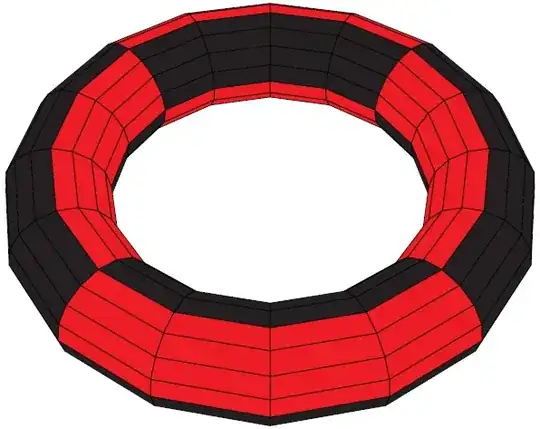
The fcol=... repeat part specifies the face colours. Merely using a 4x4 grid makes a torus look like a square. For that reason, I bumped it up to a 16x16 grid torus. However, this adds a bunch of face colour specification, which can't be nested to make it easier. It is still feasible, but cumbersome. The smoother the surface you're after, the more you'll have to add to colour the faces. Add the option grid in your \psSolid[...] definition removes the edges, and produces

All the rendering/processing of the solid is performed on the Postscript side of things. This implies that compilation will be quick, while loading into a viewer might be a little slow. However, once you're happy with the torus look, you can export the vertices & faces to a file, and load these directly. This speeds up the viewing dramatically.
In the above examples, the colours were chosen to accentuate the torus definition. Choosing white without adding edges would not work well, so perhaps some off-white colour would work. Also, you can modify the viewpoint and/or axis rotation. See the package documentation for more information on these parameters.
