The following defines and uses a \btVFill command that pushes the content really to the bottom of the slide. See also How do I write something at the end of the slide in beamer?
\documentclass{beamer}

\newcommand{\btVFill}{\vskip0pt plus 1filll}

\begin{document}
\begin{frame}{Duke says}
  \begin{itemize}
  \item It don't mean a thing
  \end{itemize}
\btVFill
{\footnotesize%
\hrule\vspace{.2em}
  \begin{tabular}{ll}
    If it ain't got & that swing.\\
  \end{tabular}
}

\end{frame}

\end{document}

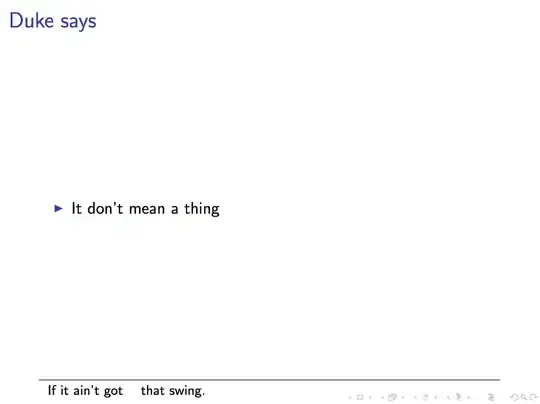
The \btVFill command inserts an infinitely stretchable vertical fill, which has the side effect that the content above it is also pushed to the top. To prevent this, one can just "stack" several \btVFill. In this case TeX will distribute the vertical space equally:
\documentclass{beamer}

\newcommand{\btVFill}{\vskip0pt plus 1filll}

\begin{document}
\begin{frame}{Duke says}
\btVFill
  \begin{itemize}
  \item It don't mean a thing
  \end{itemize}
\btVFill
{\footnotesize%
\hrule\vspace{.2em}
  \begin{tabular}{ll}
    If it ain't got & that swing.\\
  \end{tabular}
}

\end{frame}

\end{document}


[b]. This should help. – Zarko Dec 01 '15 at 14:14[b]option, all the content is move downwards which is not exactly what I am looking for. – M. Toya Dec 01 '15 at 14:51\renewcommand*{\footnoterule}{}\renewcommand*{\thefootnote}{~}and put your table (tabular) into\footnote{<whatever>\\}. – Zarko Dec 02 '15 at 13:27