7

This is a continuation of the topic: Alphabetically display the items in itemize

But sadly I don't have the necessary reputation to comment there.

Method proposed by @Werner works perfect, even when you need to display formatted text in your list. But I have an additional issue: I need to sort items which contain formatting, and I need to be able to edit these items' text and formatting. Hence I use macros, So I can't use the trick with the optional containing the plain text.

Here is a MWE:

\documentclass{article}
\usepackage{datatool}% http://ctan.org/pkg/datatool
\newcommand{\sortitem}[1]{%
  \DTLnewrow{list}% Create a new entry
  \DTLnewdbentry{list}{description}{#1}% Add entry as description
}
\newenvironment{sortedlist}{%
  \DTLifdbexists{list}{\DTLcleardb{list}}{\DTLnewdb{list}}% Create new/discard old list
}{%
  \DTLsort{description}{list}% Sort list
  \begin{itemize}%
    \DTLforeach*{list}{\theDesc=description}{%
      \item \theDesc}% Print each item
  \end{itemize}%
}
\begin{document}

% I need to be able to edit these items and their formatting without changing the rest of my code
\newcommand{\firstitem}{ISDYNSTP:  Is dynamic time step used ?}
\newcommand{\seconditem}{\textit{ISCDCA:}}
\newcommand{\thirditem}{\textbf{MVAR}}
\newcommand{\fourthitem}{IS2TL}

Default:
\begin{itemize}
  \item \firstitem
  \item \seconditem
  \item \thirditem
  \item \fourthitem
\end{itemize}

Sorted:
\begin{sortedlist}
  \expandafter\sortitem\expandafter{\firstitem}
  \expandafter\sortitem\expandafter{\seconditem}
  \expandafter\sortitem\expandafter{\thirditem}
  \expandafter\sortitem\expandafter{\fourthitem}
\end{sortedlist}

\end{document}

I added the \expandafter so the macros are expanded, so items are well sorted, unless they have some formatting like \textbf, then they are just displayed first without any alphabetical ordering.

Any idea ?

mberthet
  • 113
  • I think that the easiest way would be to add the items to the list first and then print the list. That way, you could add a sort key to the definition which would not include problematic mark-up. Datatool is designed to handle data from e.g. .csv files. It is not, as far as I can tell, intended for processing stuff with TeX macros in it. – cfr Dec 14 '15 at 01:34

3 Answers3

2

I suggest to add structure; a command \newitem (supplemented by \useitem) will maintain separate the actual data from the formatting instructions.

\documentclass{article}

\usepackage{datatool}

\makeatletter
\newcommand{\sortitem}{\@ifnextchar\bgroup\@sortitem{\expandafter\@sortitem}}

\newcommand{\@sortitem}[2]{%
  \DTLnewrow{list}% Create a new entry
  \DTLnewdbentry{list}{description}{#1}% Add entry as description
  \DTLnewdbentry{list}{formatting}{#2}% Add formatting info
}
\newenvironment{sortedlist}{%
  \DTLifdbexists{list}{\DTLcleardb{list}}{\DTLnewdb{list}}% Create new/discard old list
}{%
  \DTLsort{description}{list}% Sort list
  \begin{itemize}%
    \DTLforeach*{list}{\theDesc=description,\theForm=formatting}{%
      \item \theForm{\theDesc}}% Print each item
  \end{itemize}%
}
\newcommand{\newitem}[3]{\newcommand#1{{#2}{#3}}}
\newcommand{\useitem}[1]{\expandafter\@useitem#1}
\newcommand{\@useitem}[2]{#2{#1}}
\makeatother

\begin{document}

% I need to be able to edit these items and their formatting without changing the rest of my code
\newitem{\firstitem}{ISDYNSTP:  Is dynamic time step used ?}{}
\newitem{\seconditem}{ISCDCA:}{\textit}
\newitem{\thirditem}{MVAR}{\textbf}
\newitem{\fourthitem}{IS2TL}{}

\useitem\seconditem % just for example

Sorted:
\begin{sortedlist}
  \sortitem\firstitem
  \sortitem\seconditem
  \sortitem\thirditem
  \sortitem\fourthitem
  \sortitem{AAAAfirst}{\textsc}
\end{sortedlist}

\end{document}

enter image description here

egreg
  • 1,121,712
  • Hello, and thank you for your answer. However it does not solve entirely my issue, I wasn't clear enough. Your solution and @Guho 's one both require me to type myself a plain version of the item somewhere, and I can't do that, because I already have a huge dictionnary of macros, and I can't edit it.

    Isn't there a way to extract the plain text from a macro ? For exemple a \extractplain macro that would be able to automatically output MVAR when \extractplain{\thirditem} is called ?

    That would allow to feed @Werner 's \sortitem optional argument, for example, and would work for me.

    – mberthet Dec 14 '15 at 14:56
  • I found something working, I posted it as an answer ! – mberthet Dec 14 '15 at 20:54
1

Adapting the second part of @Werner's answer to your linked question with the optional plain text sort, the following might suit your needs.

For each formatted command you will have to define a separate command with the same name but with the suffix plain that defines the plain text used for sorting. The \sortitem command has been modified so that if one argument is passed, it is first tested to see if it is a command (courtesy of an adapted form of this answer by egreg). If so, the plain variant is tested and, if it exists, that is used as the sort label. If not, the passed argument is used.

Your MWE (with a few additional test entries):

\documentclass{article}
\usepackage{datatool}% http://ctan.org/pkg/datatool

%from egreg at: https://tex.stackexchange.com/a/42337/89497
\makeatletter
\begingroup\lccode`\|=`\\
\lowercase{\endgroup\def\removebs#1{\if#1|\else#1\fi}}
\newcommand{\macroname}[1]{\expandafter\removebs\string#1}

%adapted from https://tex.stackexchange.com/a/42337/89497
\newif\ifisamacro
\begingroup\lccode`\|=`\\
\lowercase{\endgroup\def\nameifmacro#1#2\nil{\if#1|#2\else\relax\fi}}
\makeatother

\newcommand{\sortitem}[2][\relax]{%
    \DTLnewrow{list}% Create a new entry
    \ifx#1\relax%no option passed...see if #2 is a macro and has a plain-text variant
        \edef\testifmacro{\expandafter\nameifmacro\string#2\nil}%test if it is a macro. will be the name if it is a macro, \relax if not
        \expandafter\ifx\testifmacro\relax%then it is not a macro...
            \DTLnewdbentry{list}{sortlabel}{#2}%
        \else%it is a macro
            \expandafter\ifcsname\macroname{#2}plain\endcsname%then it has a plain text option defined              
                \edef\rslt{\noexpand\DTLnewdbentry{list}{sortlabel}{\expandafter\expandafter\expandafter\expandonce\expandafter\csname\macroname{#2}plain\endcsname}}%
            \else%no plain text option...expand macro once to pass contents for sorting
                \edef\rslt{\noexpand\DTLnewdbentry{list}{sortlabel}{\expandonce#2}}%
            \fi
            \rslt%execute the \DTLnewdbentry command
        \fi
  \else
    \DTLnewdbentry{list}{sortlabel}{#1}% Add entry sortlabel (optional argument)
  \fi%
  \DTLnewdbentry{list}{description}{#2}% Add entry description
}
\newenvironment{sortedlist}{%
  \DTLifdbexists{list}{\DTLcleardb{list}}{\DTLnewdb{list}}% Create new/discard old list
}{%
  \DTLsort{sortlabel}{list}% Sort list
  \begin{itemize}%
    \DTLforeach*{list}{\theDesc=description}{%
      \item \theDesc}% Print each item
  \end{itemize}%
}
\begin{document}

% I need to be able to edit these items and their formatting without changing the rest of my code
\newcommand{\firstitem}{ISDYNSTP:  Is dynamic time step used ?}
\newcommand{\seconditem}{\textit{ISCDCA:}}
\newcommand{\thirditem}{\textbf{MVAR}}
\newcommand{\fourthitem}{IS2TL}

%append plain to the end of the associated macroname to define the plain text variant for it.
\newcommand{\seconditemplain}{ISCDCA:}
\newcommand{\thirditemplain}{MVAR}

Default:
\begin{itemize}
  \item \firstitem
  \item \seconditem
  \item \thirditem
  \item \fourthitem
\end{itemize}

Sorted:
\begin{sortedlist}
    \sortitem{b}
    \sortitem{\firstitem}
    \sortitem{\seconditem}
    \sortitem{seconditem}
    \sortitem{\thirditem}
    \sortitem{\fourthitem}
    \sortitem{A}
\end{sortedlist}
\end{document}

Yields:
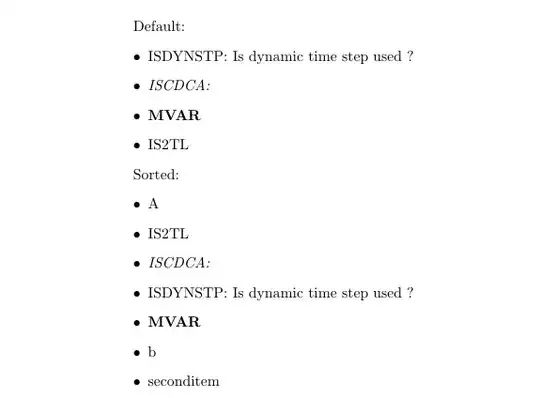
sorted results

The initial test was included so that \sortitem{seconditem} would not be sorted according to the contents of \seconditemplain. I have tried to limit expansion of the arguments and referenced commands to their contents for the sortlabel to keep it from breaking. As such, if no plain variant is provided, then they will be sorted according to the \ at the start of the contents (as far as I can tell) and will appear at the beginning of the list. This also keeps it from breaking if the plain commands are not actually plain text. Note that it will break if you have spaces between the opening brace and the command (e.g., \sorteditem{ \seconditem}).

A nice addition would be to wrap the creation of both formatted and plain commands into a single call, for example:

\newcommand{\newsorteditem}[3][\relax]{%
    \ifx#1\relax\else
        \expandafter\newcommand\expandafter{\csname#3plain\endcsname}{#1}%
    \fi
    \expandafter\newcommand\expandafter{\csname#3\endcsname}{#2}}%

which would be called like \newsorteditem[plain text]{formatted text}{commandname}.

Guho
  • 6,115
  • Hey ! Thank you for your input. However I have an additional issue I described in @egreg 's post.I don't think your solution would work, since I have to define the plain version of my macros somewhere, and I don't want to do that. I would need \_macro_plain to be automatically fed. – mberthet Dec 14 '15 at 14:58
  • I found something working, I posted it as an answer ! – mberthet Dec 14 '15 at 20:54
0

I found a way to use @Werner's method without having to write myself plain text versions of the macros I was trying to sort.

It uses \pdfstringdef from hyperref package to extract the plain text form of the macros.

Be careful with this method, because it's not safe with any formatting, for example I had to define an exception for \textcolor. It also acts weirdly with spaces, but that isn't a problem in my case.

Here is the code :

\documentclass{article}

\usepackage{datatool}
\usepackage{xcolor}
\usepackage{hyperref}

\newcommand{\sortitem}[2][\relax]{%
  \DTLnewrow{list}% Create a new entry
  \ifx#1\relax
    \DTLnewdbentry{list}{sortlabel}{#2}% Add entry sortlabel (no optional argument)
  \else
    \DTLnewdbentry{list}{sortlabel}{#1}% Add entry sortlabel (optional argument)
  \fi%
  \DTLnewdbentry{list}{description}{#2}% Add entry description
}
\newenvironment{sortedlist}{%
  \DTLifdbexists{list}{\DTLcleardb{list}}{\DTLnewdb{list}}% Create new/discard old list
}{%
  \DTLsort{sortlabel}{list}% Sort list
  \begin{itemize}%
    \DTLforeach*{list}{\theDesc=description}{%
      \item \theDesc}% Print each item
  \end{itemize}%
}

\pdfstringdefDisableCommands{\def\textcolor#1{}}

\begin{document}

\newcommand{\first}{ISDYNSTP: Is dynamic time step used ?}
\newcommand{\second}{\textcolor{blue}{ISCDCA:}}
\newcommand{\third}{\textbf{MVAR}}
\newcommand{\fourth}{IS2TL}

List of items :
\begin{itemize}
\item \first
\item \second
\item \third
\item \fourth
\end{itemize}
\bigskip

\pdfstringdef\firstplain{\first}
\pdfstringdef\secondplain{\second}
\pdfstringdef\thirdplain{\third}
\pdfstringdef\fourthplain{\fourth}

List of "plain" items :
\begin{itemize}
\item \firstplain
\item \secondplain
\item \thirdplain
\item \fourthplain
\end{itemize}
\bigskip

Sorted items (without expandafter) :
\begin{sortedlist}
  \sortitem[\firstplain]{\first}
  \sortitem[\secondplain]{\second}
  \sortitem[\thirdplain]{\third}
  \sortitem[\fourthplain]{\fourth}
\end{sortedlist}
\bigskip

Sorted items (with expandafter) :
\begin{sortedlist}
  \expandafter\sortitem\expandafter[\firstplain]{\first}
  \expandafter\sortitem\expandafter[\secondplain]{\second}
  \expandafter\sortitem\expandafter[\thirdplain]{\third}
  \expandafter\sortitem\expandafter[\fourthplain]{\fourth}
\end{sortedlist}
\bigskip

\end{document}

As you can see if you try out that code sample, you need to use \expandafter to get the correct result.

Following is a more complex example which can deal with a list of macros to sort.

\documentclass{article}

\usepackage{datatool}
\usepackage{xcolor}
\usepackage{etoolbox}
\usepackage{xparse}

\usepackage{hyperref}

\makeatletter

\newcommand{\sortitem}[2][\relax]{%
  \DTLnewrow{list}% Create a new entry
  \ifx#1\relax
    \DTLnewdbentry{list}{sortlabel}{#2}% Add entry sortlabel (no optional argument)
  \else
    \DTLnewdbentry{list}{sortlabel}{#1}% Add entry sortlabel (optional argument)
  \fi%
  \DTLnewdbentry{list}{description}{#2}% Add entry description
}
\newenvironment{sortedlist}{%
  \DTLifdbexists{list}{\DTLcleardb{list}}{\DTLnewdb{list}}% Create new/discard old list
}{%
  \DTLsort{sortlabel}{list}% Sort list
  \begin{itemize}%
    \DTLforeach*{list}{\theDesc=description}{%
      \item \theDesc}% Print each item
  \end{itemize}%
}

\pdfstringdefDisableCommands{\def\textcolor#1{}}

%%%  Lists handling %%%

\newcommand{\addlocallist}{\listadd\locallists@dummy}
\NewDocumentCommand{\parsespacelist}{ >{\SplitList{ }} m } {%
    \ProcessList{#1}{\addlocallist}%
}
\NewDocumentCommand{\parsecommalist}{ >{\SplitList{,}} m } {%
    \ProcessList{#1}{\addlocallist}%
}
\newcommand{\parselist}[3][,]{%
    \renewcommand\addlocallist{\listadd#3}%
    \undef#3%
    \ifstrequal{#1}{ }{\parsespacelist{#2}}{\parsecommalist{#2}}%
}

\newcommand{\addtosortedlist}[1]{%
    \pdfstringdef\plaintexttemp{#1}%
    \expandafter\sortitem\expandafter[\plaintexttemp]{#1}
}%

\newcommand{\ruleslist}[1]{%
    \parselist[,]{#1}{\locallists@ruleslist}%
    \begin{sortedlist}%
        \forlistloop{\addtosortedlist}{\locallists@ruleslist}%
    \end{sortedlist}%
}

\begin{document}

\newcommand{\first}{ISDYNSTP: Is dynamic time step used ?}
\newcommand{\second}{\textcolor{blue}{ISCDCA:}}
\newcommand{\third}{\textbf{MVAR}}
\newcommand{\fourth}{IS2TL}

List of items :
\begin{itemize}
\item \first
\item \second
\item \third
\item \fourth
\end{itemize}
\bigskip

Ordered list :

\ruleslist{\first, \second, \third, \fourth}

\end{document}
mberthet
  • 113