As it was told you in the comments, equations are automatically numbered. If you want to refer to a certain label, you can add the following inside the equation:
\label{<label>}
Then, it will be referenced in the text using \eqref{<label>} (equation reference). Regardless of whether you move the equation, Latex will always adjust the reference appropriately.
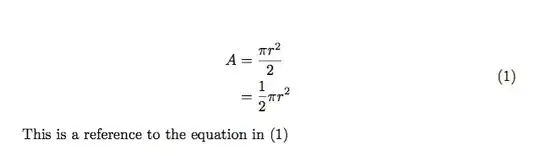
\documentclass{article}
\usepackage{amsmath}

\begin{document}
\begin{equation} \label{eq1}
\begin{split}
A & = \frac{\pi r^2}{2} \\
 & = \frac{1}{2} \pi r^2
\end{split}
\end{equation}

This is a reference to the equation in \eqref{eq1}
\end{document}


\begin{equation}1=2\end{equation}will produce something like1=2 (1)– David Carlisle Dec 20 '15 at 12:57\[,$$, \begin{equation*}, etc are not numbered math environments. For numbering you had to use\begin{equation.... \end{equation}(see answer below) or\begin{gather} ...\end{gather}etc (provided byamsmathpackage) . – Zarko Dec 20 '15 at 13:44$$,\[,\begin{equation*}, etc starts equations, which are not numbered . For numbered equations you had to use\begin{equation}.... \end{equation}or\begin{gather} ...\end{gather}and other math environments provided by amsmath package. – Zarko Dec 22 '15 at 20:33