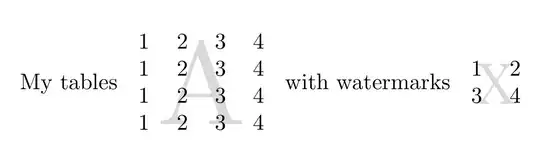
Here's a TikZ solution which uses a matrix of nodes for the table, rather than a tabular, and hence gets the positions for the letters automatically from the TikZ code. It uses the matrix library for that and the backgrounds library to put the letters on a layer drawn in the background i.e. behind the numbers in the matrix.
\documentclass[border=5pt, multi, tikz]{standalone}
\usepackage[rm={lining},sf={lining},tt={lining,tabular,monowidth}]{cfr-lm}
\usetikzlibrary{backgrounds,matrix}
\begin{document}
\begin{tikzpicture}
  [
    font=\tstyle,
    big alph/.style={text opacity=.2, text=gray, font=\Huge}
  ]
  \matrix (m) [matrix of nodes]
  {
    1 & 2 & 3 & 4 \\
    1 & 2 & 3 & 4 \\
    1 & 2 & 3 & 4 \\
    1 & 2 & 3 & 4 \\
  };
  \begin{scope}[on background layer, big alph]
    \node at (m-1-1.south east) {A};
    \node at (m-1-3.south east) {B};
    \node at (m-3-1.south east) {C};
    \node at (m-3-3.south east) {D};
  \end{scope}
\end{tikzpicture}
\end{document}

If your table includes more complex mathematics, use matrix of math nodes to have the nodes automatically switch to maths mode.
The (m) gives the matrix its name which is then used to position the letters by referencing the matrix's name, the row and the column (e.g. m-1-1 etc.). The anchor of the node south east is the relevant position on the border of the individual node within the matrix i.e. bottom left for south east. So (m-3-3.north west) would refer to the top right corner of the node in the third column and third row of the matrix named m.