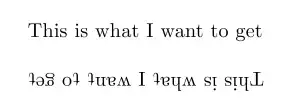
I was a bit surprised to learn that this isn't catered for in TikZ's text decorations. However, a judicious insertion of a \rotatebox in to the code at the correct point (I hope) led to:

The code for that would be:
\documentclass{standalone}
%\url{http://tex.stackexchange.com/q/28861/86}

\usepackage{tikz}
\usetikzlibrary{decorations.transformedtext}

\begin{document}
\begin{tikzpicture}
\useasboundingbox (-1,1) -- (5,-1);
\path[decorate,decoration={transformed text along path,text={upside down}, text rotation=180}] (0,0) -- (5,0);
\end{tikzpicture}
\end{document}
if there was a PGF library pgflibrarydecorations.transformedtext.code.tex. The actual code for that is an extremely minor modification of pgflibrarydecorations.text.code.tex, but in order to make it an actual library it would need a little stress testing. For example, rotating the text only 90 degrees results in:

which is missing the space (maybe the box containing a space has width but not height?), and could do with a little more separation between the characters.
Incidentally, although this looks neat, it is working in exactly the manner said: walking along the text, measuring each character, and typsetting it in the correct place. It's just that this code (almost) already exists, and can be used to do:

which, I'm sure, is what Lewis Carroll would have written had he known about TeX and TikZ.




dbecomes a descender after the rotation, but thetdoesn't behave the same way (it should also protrude below the new baseline). How do you want the letters to behave? Should capitals protrude below the baseline? Should ascenders? – Jake Sep 19 '11 at 01:38LaTeX. :) I think the guys from Facebook just wanted to turn the text upside-down, but there might be some bug in the way it finally is rotated. – Count Zero Sep 19 '11 at 01:53