I can't understand why you use \tabularx if you than not use X column type ... If you like to have table width equal to \textwidth, than exploit tabularx capabilities!
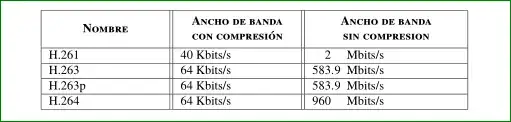
Anyway, see if the following solutions is what you looking for:
\documentclass{article}
\usepackage[utf8]{inputenc}
\usepackage[spanish]{babel}
\usepackage{newtxtext,newtxmath}

    \usepackage{makecell,tabularx}
    \renewcommand\theadfont{\bfseries\scshape}
    \usepackage{siunitx}

    \begin{document}
\begin{tabularx}{\textwidth}{|X||X||S[table-format=3.2]@{}X<{Mbits/s}|}
                                    \hline
\thead{Nombre}
        & \thead{Ancho de banda\\ con compresión}
                     & \multicolumn{2}{c|}{
                       \thead{Ancho de banda\\ sin compresion}}
                               \\   \hline
H.261   & 40 Kbits/s &   2   & \\   \hline
H.263   & 64 Kbits/s & 583.9 & \\   \hline
H.263p  & 64 Kbits/s & 583.9 & \\   \hline
H.264   & 64 Kbits/s & 960   & \\   \hline
\end{tabularx}
    \end{document}
In it I stole font issues from Mico answer, employ makecell package for seting column headers and for numbers in the third column use S columns from siunitx.
Alternative solution, as rswponse to Mico comment:
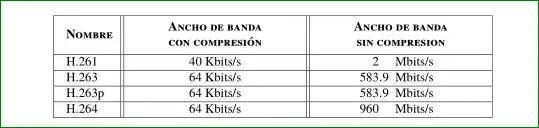
In this case the code is a bit modified:
\documentclass{article}
    \usepackage[utf8]{inputenc}
    \usepackage[spanish]{babel}
    \usepackage{newtxtext,newtxmath}

    \usepackage{makecell,tabularx}
    \renewcommand\theadfont{\bfseries\scshape}
    \usepackage{siunitx}

    \begin{document}
\begin{tabularx}{\textwidth}{|@{\quad}l||
           >{\centering\arraybackslash}X||S[table-format=9.2]@{}l<{Mbits/s\qquad\qquad}|}
                                    \hline
\thead{Nombre}
        & \thead{Ancho de banda\\ con compresión}
                     & \multicolumn{2}{c|}{
                       \thead{Ancho de banda\\ sin compresion}}
                               \\   \hline
H.261   & 40 Kbits/s &   2   & \\   \hline
H.263   & 64 Kbits/s & 583.9 & \\   \hline
H.263p  & 64 Kbits/s & 583.9 & \\   \hline
H.264   & 64 Kbits/s & 960   & \\   \hline
\end{tabularx}
    \end{document}
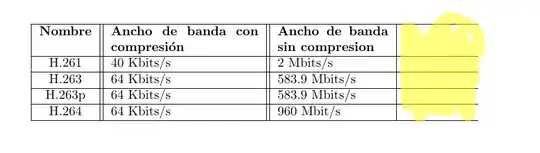


X– touhami Feb 02 '16 at 13:14tabularxtries to fill the whole width, regardless whether there are columns or not. (And as touhami said: useXfor at least one column) – Feb 02 '16 at 13:15