Here's a possible solution:
\documentclass{article}
\usepackage[table]{xcolor}
\usepackage{xparse,environ}

\ExplSyntaxOn
\NewEnviron{matlabtabular}[1]
 {
  \tl_set:Nx \l_angelino_matlab_preamble_tl
   {
    \tl_tail:n { #1 }
   }
  \tl_put_left:Nn \l_angelino_matlab_preamble_tl { | >{\columncolor{red!20}} }
  \angelino_matlabtab:VV \l_angelino_matlab_preamble_tl \BODY
 }

\cs_new_protected:Nn \angelino_matlabtab:nn
 {
  \seq_set_split:Nnn \l_angelino_matlabtab_rows_seq { \hline } { #2 }
  % the first item is empty
  \seq_pop_left:NN \l_angelino_matlabtab_rows_seq \l_angelino_matlabtab_body_tl
  % the last item is empty
  \seq_pop_right:NN \l_angelino_matlabtab_rows_seq \l_tmpa_tl
  % separate the first row
  \seq_pop_left:NN \l_angelino_matlabtab_rows_seq \l_angelino_matlabtab_body_tl
  % fix the first row
  \tl_put_left:Nn \l_angelino_matlabtab_body_tl { \hline\rowcolor{blue!20} }
  \tl_put_right:Nn \l_angelino_matlabtab_body_tl { \hline }
  \seq_map_inline:Nn \l_angelino_matlabtab_rows_seq
   {
    \int_incr:N \l_angelino_matlab_currentrow_int
    \int_zero:N \l_angelino_matlab_currentcol_int
    \seq_set_split:Nnn \l_angelino_matlabtab_row_seq { & } { ##1 }
    \seq_pop_left:NN \l_angelino_matlabtab_row_seq \l_angelino_matlabtab_first_tl
    \tl_put_right:NV \l_angelino_matlabtab_body_tl \l_angelino_matlabtab_first_tl
    \seq_map_inline:Nn \l_angelino_matlabtab_row_seq
     {
      \int_incr:N \l_angelino_matlab_currentcol_int
      \int_compare:nTF { \l_angelino_matlab_currentcol_int == \l_angelino_matlab_currentrow_int }
       {
        \tl_put_right:Nn \l_angelino_matlabtab_body_tl { & \cellcolor{green} ####1 }
       }
       {
        \tl_put_right:Nn \l_angelino_matlabtab_body_tl { & \angelino_print_number:n { ####1 } }
       }
     }
    \tl_put_right:Nn \l_angelino_matlabtab_body_tl { \hline }
   }
  \begin{tabular}{#1}
  \l_angelino_matlabtab_body_tl
  \end{tabular}
 }
\cs_generate_variant:Nn \angelino_matlabtab:nn { VV }

\cs_new_protected:Nn \angelino_print_number:n
 {
  \tl_set:Nn \l_tmpa_tl { #1 }
  \tl_if_in:NnTF \l_tmpa_tl { \\ }
   {
    \tl_replace_once:Nnn \l_tmpa_tl { \\ } { }
    \__angelino_print_number:V \l_tmpa_tl
    \\
   }
   {
    \__angelino_print_number:V \l_tmpa_tl
   }
 }
\cs_new_protected:Nn \__angelino_print_number:n
 {
  \fp_compare:nTF { #1 > 0 }
   {
    \textcolor{blue}{$#1$}
   }
   {
    \textcolor{red}{$#1$}
   }
 }
\cs_generate_variant:Nn \__angelino_print_number:n { V }
\int_new:N \l_angelino_matlab_currentcol_int
\int_new:N \l_angelino_matlab_currentrow_int
\seq_new:N \l_angelino_matlabtab_rows_seq
\seq_new:N \l_angelino_matlabtab_row_seq
\tl_new:N \l_angelino_matlabtab_body_tl
\tl_new:N \l_angelino_matlabtab_first_tl
\tl_new:N \l_angelino_matlab_preamble_tl
\ExplSyntaxOff

\begin{document}

\begin{matlabtabular}{|l|c|c|c|}
\hline
&\textbf{ciao}&\textbf{ciao2}&\textbf{ciao3}\\\hline
\textbf{ciao}&0.815&0.913&0.278\\\hline
\textbf{ciao2}&-0.906&0.632&0.547\\\hline
\textbf{ciao3}&-0.127&0.098&0.958\\\hline
\end{matlabtabular}

\end{document}
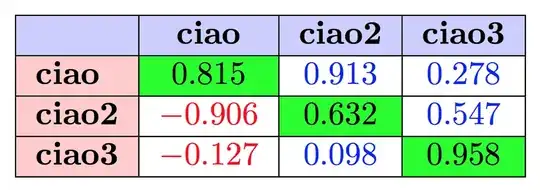
With some more work we can add customization of colors; in the new optional argument to \begin{matlabtabular} you can specify colors for
header
legend
diag
positive
negative
Each should be of the form <key>=<color> like in the example below. The default are
header=blue!20,
legend=red!20,
diag=green,
positive=., % normalcolor
negative=., % normalcolor
like in the first specification you gave.
\documentclass{article}
\usepackage[table]{xcolor}
\usepackage{xparse,environ}

\ExplSyntaxOn
\NewEnviron{matlabtabular}[2][]
 {
  \keys_set:nn { angelino/matlabtab } { #1 }
  \tl_set:Nx \l_angelino_matlabtab_preamble_tl
   {
    \tl_tail:n { #2 }
   }
  \tl_put_left:Nn \l_angelino_matlabtab_preamble_tl { | >{\columncolor{\l_angelino_matlabtab_legend_tl}} }
  \angelino_matlabtab:VV \l_angelino_matlabtab_preamble_tl \BODY
 }

\keys_define:nn { angelino/matlabtab }
 {
  header   .tl_set:N  = \l_angelino_matlabtab_head_tl,
  header   .initial:n = blue!20,
  legend   .tl_set:N  = \l_angelino_matlabtab_legend_tl,
  legend   .initial:n = red!20,
  diag     .tl_set:N  = \l_angelino_matlabtab_diag_tl,
  diag     .initial:n = green,
  positive .tl_set:N = \l_angelino_matlabtab_positive_tl,
  positive .initial:n = .,
  negative .tl_set:N = \l_angelino_matlabtab_negative_tl,
  negative .initial:n = .,
 }

\cs_new_protected:Nn \angelino_matlabtab:nn
 {
  \seq_set_split:Nnn \l_angelino_matlabtab_rows_seq { \hline } { #2 }
  % the first item is empty
  \seq_pop_left:NN \l_angelino_matlabtab_rows_seq \l_angelino_matlabtab_body_tl
  % the last item is empty
  \seq_pop_right:NN \l_angelino_matlabtab_rows_seq \l_tmpa_tl
  % separate the first row
  \seq_pop_left:NN \l_angelino_matlabtab_rows_seq \l_angelino_matlabtab_body_tl
  % fix the first row
  \tl_put_left:Nn \l_angelino_matlabtab_body_tl { \hline\rowcolor{\l_angelino_matlabtab_head_tl} }
  \tl_put_right:Nn \l_angelino_matlabtab_body_tl { \hline }
  \seq_map_inline:Nn \l_angelino_matlabtab_rows_seq
   {
    \int_incr:N \l_angelino_matlabtab_currentrow_int
    \int_zero:N \l_angelino_matlabtab_currentcol_int
    \seq_set_split:Nnn \l_angelino_matlabtab_row_seq { & } { ##1 }
    \seq_pop_left:NN \l_angelino_matlabtab_row_seq \l_angelino_matlabtab_first_tl
    \tl_put_right:NV \l_angelino_matlabtab_body_tl \l_angelino_matlabtab_first_tl
    \seq_map_inline:Nn \l_angelino_matlabtab_row_seq
     {
      \int_incr:N \l_angelino_matlabtab_currentcol_int
      \int_compare:nTF { \l_angelino_matlabtab_currentcol_int == \l_angelino_matlabtab_currentrow_int }
       {
        \tl_put_right:Nn \l_angelino_matlabtab_body_tl { & \cellcolor{\l_angelino_matlabtab_diag_tl} ####1 }
       }
       {
        \tl_put_right:Nn \l_angelino_matlabtab_body_tl { & \angelino_print_number:n { ####1 } }
       }
     }
    \tl_put_right:Nn \l_angelino_matlabtab_body_tl { \hline }
   }
  \begin{tabular}{#1}
  \l_angelino_matlabtab_body_tl
  \end{tabular}
 }
\cs_generate_variant:Nn \angelino_matlabtab:nn { VV }

\cs_new_protected:Nn \angelino_print_number:n
 {
  \tl_set:Nn \l_tmpa_tl { #1 }
  \tl_if_in:NnTF \l_tmpa_tl { \\ }
   {
    \tl_replace_once:Nnn \l_tmpa_tl { \\ } { }
    \__angelino_print_number:V \l_tmpa_tl
    \\
   }
   {
    \__angelino_print_number:V \l_tmpa_tl
   }
 }
\cs_new_protected:Nn \__angelino_print_number:n
 {
  \fp_compare:nTF { #1 >= 0 }
   {
    \textcolor{\l_angelino_matlabtab_positive_tl}{$#1$}
   }
   {
    \textcolor{\l_angelino_matlabtab_negative_tl}{$#1$}
   }
 }
\cs_generate_variant:Nn \__angelino_print_number:n { V }
\int_new:N \l_angelino_matlabtab_currentcol_int
\int_new:N \l_angelino_matlabtab_currentrow_int
\seq_new:N \l_angelino_matlabtab_rows_seq
\seq_new:N \l_angelino_matlabtab_row_seq
\tl_new:N \l_angelino_matlabtab_body_tl
\tl_new:N \l_angelino_matlabtab_first_tl
\tl_new:N \l_angelino_matlabtab_preamble_tl
\ExplSyntaxOff

\begin{document}

\begin{matlabtabular}{|l|c|c|c|}
\hline
&\textbf{ciao}&\textbf{ciao2}&\textbf{ciao3}\\\hline
\textbf{ciao}&0.815&0.913&0.278\\\hline
\textbf{ciao2}&-0.906&0.632&0.547\\\hline
\textbf{ciao3}&-0.127&0.098&0.958\\\hline
\end{matlabtabular}

\bigskip

\begin{matlabtabular}[positive=blue,negative=red]{|l|c|c|c|}
\hline
&\textbf{ciao}&\textbf{ciao2}&\textbf{ciao3}\\\hline
\textbf{ciao}&0.815&0.913&0.278\\\hline
\textbf{ciao2}&-0.906&0.632&0.547\\\hline
\textbf{ciao3}&-0.127&0.098&0.958\\\hline
\end{matlabtabular}

\end{document}


\fp_compare:nNnTFdifficult, in my point of view. – Feb 04 '16 at 23:27expl3tag, since the whole code isexpl3– Feb 04 '16 at 23:57