If your paragraphs have only normal text, you can define
\newenvironment{highlightnobreak}
  {\par\bfseries
   \def\par{\widowpenalty=10000 \endgraf\penalty10000 }}
  {\par}
Use it like
... some text before.

\begin{highlightnobreak}
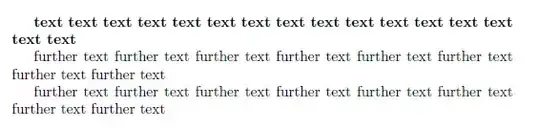
The first paragraph here will be typeset in bold face.
\end{highlightnobreak}

And this text, which is in the paragraph following the
environment will be in normal type.
The highlighted paragraph will never end along with a page and will be always accompanied by at least one line of the following paragraph on a page. A page break can however happen before the second-to-last line of the highlighted paragraph.
More customization is possible. For example, a vertical space after the highlighted paragraph can be inserted modifying the definition into
\newenvironment{highlightnobreak}
  {\par\bfseries
   \def\par{\widowpenalty=10000 \endgraf\penalty10000 \medskip}}
  {\par}
We can improve it with a progressive number and also a vertical space before it, to match the one after:
\newcounter{highlightpar}
\newenvironment{highlightnobreak}
  {\medskip\par
   \def\par{\widowpenalty=10000 \endgraf\penalty10000 \medskip}%
   \stepcounter{highlightpar}\bfseries\thehighligthpar. \ignorespaces}
  {\par}
TeXnical note
It's important that the \par that closes the environment does more things than usual: here we order it to set \widowpenalty to a no-break-before-the-last-line value, then to finish off the paragraph and to tell TeX no-pagebreak-here.
The relevant items TeX will see are then
〈last line of the highlighed paragraph〉
〈penalty 10000〉
〈\medskipamount glue〉
〈\parskip glue〉
〈\baselineskip glue〉
〈first line of the following paragraph〉
so that, by rule, it will not break pages at any of the glue items, because they are not preceded by nondiscardable items. Only the penalty would be a feasible page break point, but it's "infinitely big" and so TeX won't consider it.



minipage. The specialminipagecan be defined in the header. – Marco Daniel Sep 25 '11 at 08:29