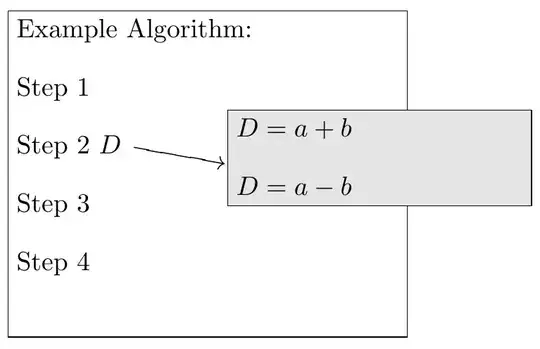
Here I save the individual boxes and then inset one over the other.
\documentclass{report}
\usepackage{stackengine,xcolor,mathtools}
\begin{document}
\setbox0=\hbox{%
  \fboxsep0pt\fbox{\fboxsep3pt\colorbox{black!10}{\parbox{1.5in}{\parskip 1em
  $D = a + b$\par
  $D = a - b$}}}%
}
\savestack{\graybox}{\box0}
\setbox0=\hbox{\fboxsep3pt\fbox{\parbox{2in}{\parskip 1em
  Example Algorithm:\par
  Step 1\par
  Step 2 $D \xrightarrow{\rule{7ex}{0pt}}$\par
  Step 3\par
  Step 4\par~}}%
}%
\savestack\whitebox{\box0}
\stackinset{c}{65pt}{c}{9pt}{\graybox}{\whitebox}
\end{document}

If rotating the pointing arrow is essential, then this small modification could help:
\documentclass{report}
\usepackage{stackengine,xcolor,mathtools,graphicx}
\begin{document}
\setbox0=\hbox{%
  \fboxsep0pt\fbox{\fboxsep3pt\colorbox{black!10}{\parbox{1.5in}{\parskip 1em
  $D = a + b$\par
  $D = a - b$}}}%
}
\savestack{\graybox}{\box0}
\setbox0=\hbox{\fboxsep3pt\fbox{\parbox{2in}{\parskip 1em
  Example Algorithm:\par
  Step 1\par
  Step 2 $D$ \smash{\rotatebox{-10}{$\xrightarrow{\rule{7ex}{0pt}}$}}\par
  Step 3\par
  Step 4\par~}}%
}%
\savestack\whitebox{\box0}
\stackinset{c}{65pt}{c}{6pt}{\graybox}{\whitebox}
\end{document}


stackenginepackage. Pages 11-12 describe the\stackinsetmacro (also, pp. 19-20 give examples of nested insets). Basically, first argument isl,c, orrdenoting horizontal alignment. 2nd argument is the length offset from that alignment. 3rd and 4th arguments are the same for vertical alignment (t,c, orb). 5th argument is the inset, 6th argument is the base image. – Steven B. Segletes Mar 03 '16 at 13:24\stackinset, as described on p.20 of the manual, or here: http://tex.stackexchange.com/questions/171483/mathematical-formulas-on-a-graph-not-made-by-tex/171486#171486 – Steven B. Segletes Mar 03 '16 at 17:02