5

I have a LaTeX document written with normal English quotes, eg.:

``This is a quoted text.''

Now, I would like to redefine `` and '', so the combination of two ` characters is substituted with, say, < and >. The result should be as if I had written:

<This is a quoted text.>

I find that I miss the Latex vocabulary for describing and searching for the issue. What is `` at all? A two glyph character? A command? A macro? What is its relation to `?

lockstep
  • 250,273
Einar
  • 185
  • Have you seen the package csquotes? – yo' Mar 08 '16 at 19:52
  • Yes, that's why I began digging into this. I want to transparently switch my document to csquotes. – Einar Mar 08 '16 at 20:03
  • Then just replace \`` with \\enquote{ and '' with } – yo' Mar 08 '16 at 20:36
  • @Mico Not really; the ligature substitution happens deep down TeX's bowels, at the typesetting stage. – egreg Mar 08 '16 at 21:43
  • @yo' But then I need to change the text in my document. I am looking for something I can just place in the preamble so that I can easily redefine it later and only in a single place. – Einar Mar 08 '16 at 21:44

2 Answers2

5

Normally ' and ` are simple characters that, when found in normal text, are passed unchanged to TeX’s stomach where paragraphs are split into lines, boxes are built and pages are formed.

When paragraphs are split into lines, TeX recognizes ligatures, for instance changing fi into a single glyph (but remembering the two original ones in case hyphenation between the two letters is needed).

The same happens with the combinations

`` ''

that are converted into “ and ” respectively. For instance, the input

``word''

is converted, when boxes are formed, into

....\OT1/cmr/m/n/10 \ (ligature ``)
....\OT1/cmr/m/n/10 w
....\kern-0.27779
....\OT1/cmr/m/n/10 o
....\OT1/cmr/m/n/10 r
....\OT1/cmr/m/n/10 d
....\OT1/cmr/m/n/10 " (ligature '')

At the same stage, automatic kerning based on font information takes place. Indeed, the ligatures are programmed into the font and are out of the user’s control.

You could make ` and ' into active characters, so basically the same as macros.

\documentclass{article}
\usepackage[T1]{fontenc}

\makeatletter
\protected\def\myleftquote{\futurelet\next\left@quote@check}
\protected\def\myrightquote{\futurelet\next\right@quote@check}

\begingroup\lccode`~=`` \lowercase{\endgroup
  \def\left@quote@check{\ifx\next~<\expandafter\@gobble\else`\fi}
}
\begingroup\lccode`~=`' \lowercase{\endgroup
  \def\right@quote@check{\ifx\next~>\expandafter\@gobble\else'\fi}
}
\begingroup\lccode`~=`` \lowercase{\endgroup\let~}\myleftquote
\begingroup\lccode`~=`' \lowercase{\endgroup\let~}\myrightquote
\AtBeginDocument{%
  \catcode``=\active
  \catcode`'=\active
}

\begin{document}

A ``word'' and more

A `word' and more

\end{document}
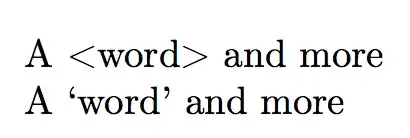
enter image description here

However, this is quite fragile. As you see, the code is written in a very indirect way, doing the activation at the very last moment, because ` and ' also have syntactic meaning.

For instance, you won't be able to use \symbol{'123} (an octal number according to TeX syntax) in the document, because ' would be an unexpected token in that context, being active. You also lose the “Spanish” ligatures `? and `! for ¿ and ¡ (this might be arranged for, with more tests).

You should also fix the behavior of ` in verbatim modes.

egreg
  • 1,121,712
  • This is the answer, I was looking for. It can be done, but not without technical debt. I discussed it with my study group and we decided to convert our documents to csqoutes format for robustness. Thank you very much! – Einar Mar 10 '16 at 14:18
2

If you are able and willing to run LuaLaTeX, you can (a) set up a Lua function that does the string substitution work and (b) assign this function to the process_input_buffer callback, which operates at a very early stage, before TeX's "eyes", "mouth", etc. start their work.

enter image description here

% !TEX TS-program = lualatex
\documentclass{article}
\usepackage[T1]{fontenc} % handle "<" and ">" in text mode

\usepackage{luacode}
\begin{luacode*}
function change_quotes ( buff )
   return ( string.gsub ( buff, "``(.-)''", "<%1>" ) )
end
luatexbase.add_to_callback( "process_input_buffer", change_quotes, "change_quotes")
\end{luacode*}

\begin{document}
``This is a quoted text.'' 

Here are ``three'' ``quoted'' ``words''.  

This is an ``'' empty quote.
\end{document}

Addendum: If the character substitutions are not supposed to happen in verbatim and Verbatim environments, the code of the Lua function needs to be extended a bit to check. Basically, the code has to check if the material being scanned by the function is in a verbatim-type environment. This can be handled by replacing the code shown above between the \begin{luacode} and \end{luacode} lines with the following code:

\begin{luacode}
in_verbatim = false  -- Set up a Boolean variable
function change_quotes ( buff )
   if string.find ( buff , "\\begin{[vV]erbatim}" ) then
      in_verbatim = true
      return buff
   elseif string.find ( buff , "\\end{[vV]erbatim}" ) then
      in_verbatim = false
      return buff
   elseif in_verbatim == false then
      return string.gsub ( buff , "``(.-)''" , "<%1>" ) 
   end
end
luatexbase.add_to_callback( "process_input_buffer", change_quotes, "change_quotes")
\end{luacode}
Mico
  • 506,678
  • LuaLatex seems very interesting suggestion, but unfortunately we are dependent on pdflatex. – Einar Mar 10 '16 at 14:25