Update:
the correct way, using the non-deprecated below = of instead of the old below of =, will be the following (see Why positioning "above" is at a different height than "above right"?):
\documentclass{standalone}
\usepackage{tikz}
\usetikzlibrary{arrows,positioning,calc}
\begin{document}
\begin{tikzpicture}[
    thick,  on grid]
    \node (n1) {1};
    \node [below right = of n1] (n2) {2};
    \node [below right = of n2] (n3) {3};
    \node [below right = of n3] (n4) {4};
    \node [right = of n4] (n6) {6};
    \node [above right = of n6] (phantom) {};
    \node [above = of phantom] (n5) {5};
    \node [below right = of phantom] (n7) {7};
    \begin{scope}[->]
        \draw (n1) -- (n2);
        \draw (n2) -- (n3);
        \draw (n3) -- (n4);
        \draw (n5) -- (n6);
        \draw (n5) -- (n7);
        \draw[dashed] (n2) -- (n5);
        \draw[dashed] (n4) -- (n6);
    \end{scope}
\end{tikzpicture}
\end{document}
which leads to:

Old answer (left as reference... for now):
This works, althoug I do not know why you need the yshift on node 5...
\documentclass{standalone}
\usepackage{tikz}
\usetikzlibrary{arrows,positioning,calc}
\begin{document}
\begin{tikzpicture}[
    thick, node distance=1cm]
    \node (n1) {1};
    \node [below right of=n1] (n2) {2};
    \node [below right of=n2] (n3) {3};
    \node [below right of=n3] (n4) {4};
    \node [right of=n4] (n6) {6};
    \node [above right of=n6] (fake) {};
   \node [above of=fake, yshift=-0.3cm] (n5) {5}; %% WHY?
    \node [below right of=fake] (n7) {7};
    \begin{scope}[->]
        \draw (n1) -- (n2);
        \draw (n2) -- (n3);
        \draw (n3) -- (n4);
        \draw (n5) -- (n6);
        \draw (n5) -- (n7);
        \draw[dashed] (n4) -- (n6);
        \draw[dashed] (n2) -- (n5);
    \end{scope}
\end{tikzpicture}
\end{document}

Or, without the strange yshift:
\documentclass{standalone}
\usepackage{tikz}
\usetikzlibrary{arrows,positioning,calc}
\begin{document}
\begin{tikzpicture}[
    thick, node distance=1cm]
    \node (n1) {1};
    \node [below right of=n1] (n2) {2};
    \node [below right of=n2] (n3) {3};
    \node [below right of=n3] (n4) {4};
    \node [right of=n4] (n6) {6};
    \node [right = 3cm of n2] (n5) {5};
    \node [right = 1.5cm of n6] (n7) {7};
    \begin{scope}[->]
        \draw (n1) -- (n2);
        \draw (n2) -- (n3);
        \draw (n3) -- (n4);
        \draw (n5) -- (n6);
        \draw (n5) -- (n7);
        \draw[dashed] (n4) -- (n6);
        \draw[dashed] (n2) -- (n5);
    \end{scope}
\end{tikzpicture}
\end{document}
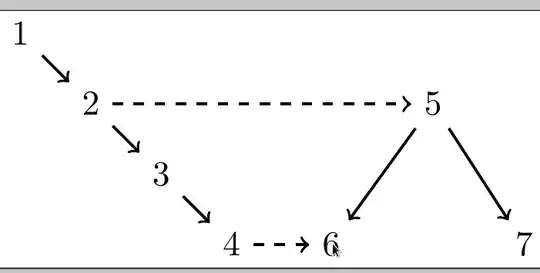
...and now the line between 2 and 5 is perfectly horizontal.


node distancefor the picture? – cfr Apr 02 '16 at 13:48