I'm using kile in Linux, but, unfortunately writing math with it is very hard.
I'd like a tool to write math formulas in a easy way, like "Basic Math Input" in Mathematica software.
Is there a good one?
I'm using kile in Linux, but, unfortunately writing math with it is very hard.
I'd like a tool to write math formulas in a easy way, like "Basic Math Input" in Mathematica software.
Is there a good one?
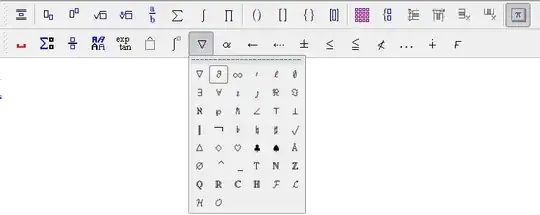
If you're used to using Mathematica with the various input assistant palettes, then maybe the best option for you to switch to LaTeX is LyX. It has toolbars that contain everything you'd find in Mathematica's basic math assistant, so typing math and structuring your document is quite easy. Just like Mathematica, the math can be entered "by hand" or by using the toolbar.
Here's the math toolbar:
And here's what the main input window looks like and what it compiles to:


Note that you could write your document fully in Mathematica and distribute it as CDF and PDF - this is a perfectly valid option. However, I don't believe that the export to LaTeX is optimal. I'm not a big fan of how it lays out the maths and which commands it uses to it with, but a larger issue is that it does not deal with numbered equations very well. And using Mathematica to generate every LaTeX equation you want (through TeXForm) then copy/pasting into your LaTeX document, is going to be very inefficient.
This said, I have used Mathematica to generate some particularly nasty equations (see the appendix of arXiv:1102.3043). However I did use a customized TeXForm type command that used lots of string replacements to make things look nicer and then I had to do all of the line breaks by hand...
My personal opinion is that you should take the plunge and learn how to type LaTeX by hand. It's not that hard and is a useful skill. Kile or TeXWorks are both good linux environments, I use gedit with the LaTeX plugin. If you want to be hard core and impress your friends, then try Emacs (with AUXTeX) or vim (with LaTeX-suite). Ultimately, once you learn your way around one of these environments, then you'll get things done much faster than any GUI/WYSIWYG environment.
Have a look at our visual equation editor JMathEdit. It's free on Linux platform.
Equation elements provided by this editor include sub/super/over/under scripts, roots, fractions, matrices, fences, stretchy arrows,integrals, summation operators and accents. Symbols supported include greek letters, some old book symbols, mathematical operators and arrows.
The editor supports saving and loading in LaTeX and MathML formats (only files created by the editor can be loaded). Exports as SVG, EPS, PNG, EMF, RTF and XHTML.
Fonts, styling and shortcuts can be customized.


