9

How to redefine \lstinline to automatically highlight or draw frames around all inline code snippets? E.g. using \bh and \eh commands from Highlight text in code listing while also keeping syntax highlighting ? (I like the tikz solution since \f[color]box doesn't work with some characters sequences in code, like ^^^)

Added:

Minimal example:

\documentclass{article}
\usepackage{listings}
% (definitions from https://tex.stackexchange.com/questions/15237/highlight-text-in-code-listing-while-also-keeping-syntax-highlighting/18890#18890 should be inserted here)

% how to redefine the \lstinline command?

% Where to insert \bh and \eh commands?

\makeatletter
% \renewcommand\lstinline[1][]{%
%     \leavevmode\bgroup % \hbox\bgroup --> \bgroup
%       \def\lst@boxpos{b}%
%       \lsthk@PreSet\lstset{flexiblecolumns,#1}%            <-- \bh can be here (before '%')
%       \lsthk@TextStyle \lsthk@Endgroup\@empty
%       \@ifnextchar\bgroup{\afterassignment\lst@InlineG \let\@let@token}%
%                          \lstinline@}                      <-- but where to place \eh ???
\makeatother

\begin{document}

The following \emph{inline} code snippet should appear
in a frame (or highlighted) if lstinline command is properly redefined above:
\lstinline´chainl1(term, "+" ^^^ Add | "-" ^^^ Sub)´

\end{document}

I.e. how to achieve that inline code snippets in the whole document will be displayed inside small frames (or highlighted) without adding anything to \lstinline|xxx| commands in the document but only via redefinition of the \lstinline command itself? Is it possible?

Eugen Labun
  • 193
  • 1
  • 6

1 Answers1

7

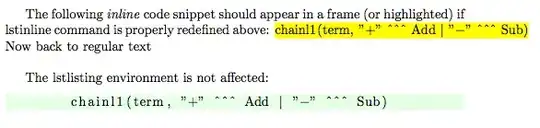
One way to automatically apply the solutions form Highlight text in code listing while also keeping syntax highlighting around each lstinline is to redefine some of the internal macros from the listings package to include a \bh{} at the beginning of the listing and a \eh{}. To ensure that this only applies to inline listings, we use iftoggle from the etoolbox package to produce:

enter image description here

Known Issues:

  • Highlighting does not span line breaks correctly.

Code:

\documentclass{article}
\usepackage{etoolbox}
\usepackage{atbegshi,ifthen,listings,tikz}

% change this to customize the appearance of the highlight \tikzstyle{highlighter} = [ yellow, line width = \baselineskip, ]

% enable these two lines for a more human-looking highlight %\usetikzlibrary{decorations.pathmorphing} %\tikzstyle{highlighter} += [decorate, decoration = random steps]

% implementation of the core highlighting logic; do not change! \newcounter{highlight}[page] \newcommand{\tikzhighlightanchor}[1]{\ensuremath{\vcenter{\hbox{\tikz[remember picture, overlay]{\coordinate (#1 highlight \arabic{highlight});}}}}} \newcommand{\bh}[0]{\stepcounter{highlight}\tikzhighlightanchor{begin}} \newcommand{\eh}[0]{\tikzhighlightanchor{end}} \AtBeginShipout{\AtBeginShipoutUpperLeft{\ifthenelse{\value{highlight} > 0}{\tikz[remember picture, overlay]{\foreach \stroke in {1,...,\arabic{highlight}} \draw[highlighter] (begin highlight \stroke) -- (end highlight \stroke);}}{}}} %--------------------------

\makeatletter % Redefine macros from listings package: \newtoggle{@InInlineListing}% \togglefalse{@InInlineListing}%

\renewcommand\lstinline[1][]{% \leavevmode\bgroup\toggletrue{@InInlineListing}\bh % \hbox\bgroup --> \bgroup \def\lst@boxpos{b}% \lsthk@PreSet\lstset{flexiblecolumns,#1}% \lsthk@TextStyle @ifnextchar\bgroup{\afterassignment\lst@InlineG \let@let@token}% \lstinline@}%

\def\lst@LeaveAllModes{% \ifnum\lst@mode=\lst@nomode \expandafter\lsthk@EndGroup\iftoggle{@InInlineListing}{\eh{}}{}% \else \expandafter\egroup\expandafter\lst@LeaveAllModes \fi% } \makeatother

\lstset{backgroundcolor=\color{green!10}}%

\begin{document} The following \emph{inline} code snippet should appear in a frame (or highlighted) if lstinline command is properly redefined above: \lstinline´chainl1(term, "+" ^^^ Add | "-" ^^^ Sub)´Now back to regular text

\bigskip The lstlisting environment is not affected: \begin{lstlisting} chainl1(term, "+" ^^^ Add | "-" ^^^ Sub) \end{lstlisting} \end{document}

Peter Grill
  • 223,288
  • Peter, thank you for your answer. \bh \lstinline... \eh does work, of course. What I'm trying to achieve is to redefine the \lstinline command globally to avoid changing \lstinline commands in the whole document. (It's not convenient if using LyX). – Eugen Labun Oct 07 '11 at 16:31
  • \framebox gives errors sometimes, e.g. with ^^^ sequence, as in:

    \framebox{\lstinline{abc ^^^ }}

    results in

    ! Text line contains an invalid character.

    – Eugen Labun Oct 07 '11 at 16:32
  • I.e. each occurence of \lstinline... in document body should result in a framed (or highlighted) code, without explicit enclosing of each \lstinline usage in \bh..\eh or other surrounding commands. – Eugen Labun Oct 07 '11 at 16:51
  • See updated solution. – Peter Grill Oct 07 '11 at 19:00
  • Peter, your solution is fantastisch! Thank you very much for your efforts! – Eugen Labun Oct 07 '11 at 20:06
  • @PeterGrill: Very nice! – Werner Oct 07 '11 at 20:09
  • A little issue: how to get rid of a space after end of highlighting zone? (\lstinline|code|) produces (code ) (note a space between 'code' and ')') – Eugen Labun Oct 07 '11 at 21:48
  • solved: add '%' at the end in this line: \expandafter\lsthk@EndGroup\iftoggle{@InInlineListing}{\eh}{}% – Eugen Labun Oct 07 '11 at 21:56
  • hmmm... Sometimes the highlighting goes on the wrong (next) page. Not sure what exactly this depends on. Perhaps on some floats placed before?

    And if the code has a line break then the highlighting becomes wrong (goes simply as a thick line directly from beginning to the end of the code snippet across the page). How to split the highlighting properly like the code?

    – Eugen Labun Oct 07 '11 at 22:37
  • Yes, that is a limitation of the bh and eh macros as pointed out in the link you provided. The inline code needs to be one line. – Peter Grill Oct 07 '11 at 22:42
  • In that topic there is also the link http://tex.stackexchange.com/questions/19242/how-to-draw-text-anchored-tikz-line-below-text-instead-of-above/19716#19716 Would this perhaps help? – Eugen Labun Oct 07 '11 at 22:46
  • Try it an let me know. I will look into it also, but won't be able to until later. – Peter Grill Oct 07 '11 at 22:52
  • OK, I'll try it tomorrow. It's too late now. Thank you again, Peter. – Eugen Labun Oct 07 '11 at 22:55
  • Hi there! Thanks for the useful code! However, I found (in newer versions of Tikz, at least) I needed to add cap=butt to the path style to avoid the highlighter from being \baselineskip too wide. – mhelvens Oct 08 '12 at 14:32