A tabular specification such as
\begin{tabular}{
  p{0.15\textwidth}
  p{0.12\textwidth}
  p{0.17\textwidth}
  p{0.17\textwidth}
  p{0.27\textwidth}
}
means reserving 0.88\textwidth for the columns. However, each column is surrounded on either side by spaces as wide as the value of \tabcolsep (default 6pt).
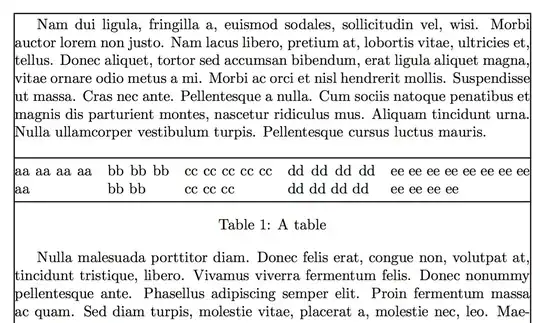
If you really need columns with those widths, you can locally set \tabcolsep; assuming that the first column has no space on its left and the last column no space at its right, you still have eight spaces to take care of. So we want to divide 0.12\textwidth equally among eight chunks, and the right width is 0.015\textwidth; here's an example
\documentclass{article}
\usepackage{booktabs}

\usepackage{showframe,lipsum} % just for the example

\begin{document}

\lipsum[2]

\begin{table}[htp]

\setlength{\tabcolsep}{0.015\textwidth}

\begin{tabular}{
  @{}% remove space at the left
  p{0.15\textwidth}
  p{0.12\textwidth}
  p{0.17\textwidth}
  p{0.17\textwidth}
  p{0.27\textwidth}
  @{}% remove space at the right
}
\toprule
aa aa aa aa aa & bb bb bb bb bb & cc cc cc cc cc cc cc cc &
  dd dd dd dd dd dd dd dd & ee ee ee ee ee ee ee ee ee ee ee ee \\
\bottomrule
\end{tabular}

\caption{A table}

\end{table}

\lipsum[3]

\end{document}


\tabcolsepspacing is there too, which is twice6ptfor each column, unless switched off – Jul 01 '16 at 20:170.88\textwidth? – Jul 01 '16 at 20:26