I would like to know how to scale a single component in CircuiTikZ.
There are several possibilities to scale paths, a hole diagram, etc., but I didn't find a way to do so with a single component.
Note: I'm trying to scale a voltage source.
I would like to know how to scale a single component in CircuiTikZ.
There are several possibilities to scale paths, a hole diagram, etc., but I didn't find a way to do so with a single component.
Note: I'm trying to scale a voltage source.

I don't see an official way to do it, but it appears that all the lengths are based on /tikz/circuitikz/bipoles/length, so you can just change that. Here is the default size and scaled version in between:
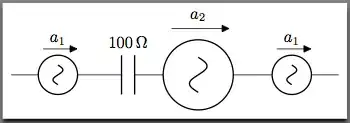
\documentclass[border=5pt]{standalone}
\usepackage{tikz}
\usepackage{circuitikz}
\usepackage{siunitx}
\begin{document}
\begin{circuitikz}
\draw (0,0)
to [sV=$a_1$] (2,0)
to [C=$\SI{100}{\ohm}$](3,0)
to [/tikz/circuitikz/bipoles/length=2.5cm,sV=$a_2$] (5,0)
to [sV=$a_1$] (7,0);
\end{circuitikz}
\end{document}

\pgf@circ@Rlen) to scale every component. – John Kormylo Jul 12 '19 at 15:15