I'm using consecutive \cmidrule commands in conjunction with \arrayrulecolor to alternately hide and unhide horizontal rules in a table. However, when \arrayrulecolor is used with \cmidrule, some odd vertical spacing is introduced. I'd like to eliminate it.
(I'm using longtable, so a colorbox, minipage, or anything else tied to a page won't work.)
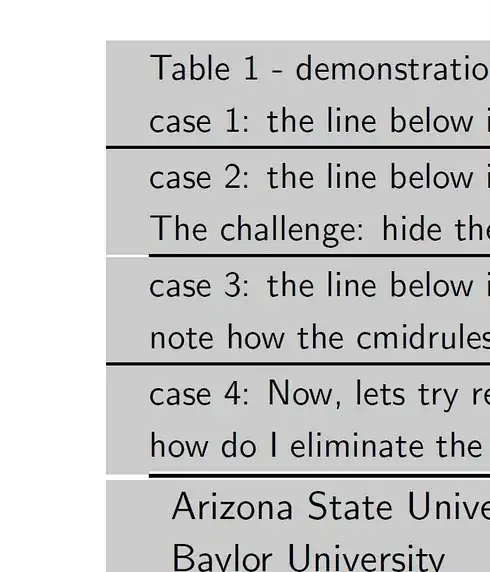
Below is an image that introduces the challenge. The first block shows a \toprule. My goal is to create a shaded border around the table, so I've added a dummy column. The second rule shows a \cmidrule that skips the first column. The third block shows how I can use a \cmidrule to fill in the whitespace with a shorter \cmidrule. Finally, I want to recolor this short \cmidrule to the background color and restore the color later.
Note the jagged vertical skipping in case 4 compared to case 3. Why would \arrayrulecolor change vertical alignment? How can I eliminate the jagged edges?
Here is the code:
\documentclass[11pt]{article}

\usepackage{longtable}
\usepackage{booktabs}
\usepackage{color}
\usepackage{xcolor}
\usepackage{colortbl}

\setlength{\aboverulesep}{0pt}
\setlength{\belowrulesep}{0pt}
\setlength{\extrarowheight}{0.25ex}

\newcolumntype{L}{>{\columncolor[gray]{0.8}}l}
\newcolumntype{C}{>{\columncolor[gray]{0.8}}c}
\newcolumntype{R}{>{\columncolor[gray]{0.8}}r}

\begin{document}

\textsf{
\begin{longtable}{LLLLL}
 & \multicolumn{3}{@{}L}{\small {\tablename\ \thetable{}} - demonstration of odd vertical alignment with arrayrulecolor} & \\%
 & \multicolumn{3}{@{}L}{\small {case 1: the line below is a toprule}} & \\%
\toprule
 & \multicolumn{3}{@{}L}{\small {case 2: the line below is a cmidrule that spans the middle 3 columns.  Note the whitespace!}} & \\%
 & \multicolumn{3}{@{}L}{\small {The challenge: hide the widespace giving the appearance of a spacing around a longtable.}} & \\%
\cmidrule[\heavyrulewidth]{2-4}
 & \multicolumn{3}{@{}L}{\small {case 3: the line below is 3 cmidrules, 1 each for the first and last columns and 1 for the middle}} & \\%
 & \multicolumn{3}{@{}L}{\small {note how the cmidrules align vertically ... perfect!}} & \\%
\cmidrule[\heavyrulewidth]{1-1}\cmidrule[\heavyrulewidth]{2-4}\cmidrule[\heavyrulewidth]{5-5}
 & \multicolumn{3}{@{}L}{\small {case 4: Now, lets try recoloring the first and last cmidrules}} & \\%
 & \multicolumn{3}{@{}L}{\small {how do I eliminate the odd vertical alignments?}} & \\%
\arrayrulecolor[gray]{0.80}\cmidrule[\heavyrulewidth]{1-1}\arrayrulecolor[gray]{0.0}\cmidrule[\heavyrulewidth]{2-4}\arrayrulecolor[gray]{0.80}\cmidrule[\heavyrulewidth]{5-5}\arrayrulecolor[gray]{0.00}
\endfirsthead
 &  Arizona State University &  & ASU &\\
 &   Baylor University &  & BAYLOR &\\
 &   Boston University & 164988 & BU &\\
 &   Brown University & 217156 & BROWN &\\
 &   California Institute of Technology & 110404 & CALTECH &\\
 &   Carnegie Mellon University & 211440 & CMU &\\
 &   Case Western Reserve University & 201645 & CASE &\\
 &   Columbia University & 190150 & COLUMBIA &\\
 &   Cornell University & 190415 & CORNELL &\\
    & Yale University & 130794 & YALE & %
\label{tab:schools}
\end{longtable}
}

\end{document}



\cmidruleand then another, without changing colour. – cfr Dec 23 '16 at 17:56