3

In a regular table, I'm trying to remove the small horizontal space before the first column and after the last one as achieved with package booktabs with the option @{}. How can I do that? Please compile the code below:

\documentclass[fleqn,11pt]{book}
\usepackage{booktabs}
\begin{document}
\begin{table}[!ht]\centering
\begin{tabular}{@{}llr@{}} \toprule
Gnat & per gram & 13.65 \\
Gnu & stuffed & 92.50 \\ \bottomrule
\end{tabular}
\end{table}
\begin{table}[!ht]\centering
\begin{tabular}{llr} \toprule
Gnat & per gram & 13.65 \\
Gnu & stuffed & 92.50 \\ \bottomrule
\end{tabular}
\end{table}
\end{document} 
David Carlisle
  • 757,742
pluton
  • 16,421
  • 3
    The @{} specification in tabular works with any table; it's not specific to booktabs. – Alan Munn Oct 27 '11 at 03:20
  • too bad! I tried few minutes ago and I did not notice it worked. Thanks. I see why I missed it. Option @{} has no effect on colored rows – pluton Oct 27 '11 at 03:22

2 Answers2

7

The @{} specification in tabular works with any table. It's not specific to the booktabs package.

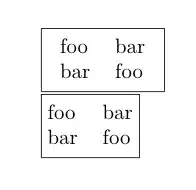
Here's an example with \fboxes around the table to show the boundaries.

\documentclass{article}
\begin{document}

\fbox{\begin{tabular}{ll}
foo & bar\\
bar & foo
\end{tabular}}

\fbox{\begin{tabular}{@{}ll@{}}
foo & bar\\
bar & foo
\end{tabular}}

\end{document}

output of code

David Carlisle
  • 757,742
Alan Munn
  • 218,180
3

The colortbl commands \columncolor and \rowcolor add a overhang to the colored cells in order to connect them; the default value of the overhang is \tabcolsep; if you color by columns you can specify the left and right overhangs as optional arguments to \columncolor; for \rowcolor it's more difficult, as the same overhang is used for all cells in a row:

\setlength{\tabcolsep}{1pt}
\begin{tabular}{l<{\hspace{2pt}}
                >{\hspace{2pt}}l<{\hspace{2pt}}
                >{\hspace{2pt}}r}
\toprule
\rowcolor{green}
Gnat & per gram & 13.65 \\
\rowcolor{blue}
Gnu & stuffed & 92.50 \\ 
\bottomrule
\end{tabular}

In other words, you emulate the \tabcolsep space between columns by inserting space manually. With colored rows I would stick to the normal \tabcolsep space also before and after the table.

David Carlisle
  • 757,742
egreg
  • 1,121,712
  • the colortbl package offers an option to control horizontal space for row coloring as follows: \rowcolor{blue!5}[0pt][0pt]. By adding an extra empty column in the middle I could achieve what I wanted, i.e. \begin{table} \begin{tabular}{@{}r@{}r@{}p{5cm}@{}} \hline \rowcolor{blue!5}[0pt][0mm]0&\hphantom{0}& text \\ 10&& text \\\hline\end{tabular}\end{table} – pluton Oct 27 '11 at 12:34
  • @pluton The cell won't be connected, with this setting, unless you set also \tabcolsep to 0pt; with the trick there will still be a small overhang that's necessary with l or r columns and the widest entry in c columns. – egreg Oct 27 '11 at 12:39