11

In my document I want to emphasize some key points by placing them in a box with rounded corners. This I do using the following code:

\documentclass{report}
\usepackage{fancybox}

\begin{document}

\ovalbox{
\begin{minipage}[c][.35\textwidth]{.5\textwidth} % [text in box][height][width]
\begin{center}
\begin{minipage}[c]{.9\textwidth}
This text might be too large to fit into the (.35x.50)$\cdot$textwidth box,
in which case the font size should be decreased to make it fit.
\end{minipage}
\end{center}
\end{minipage}
}

\end{document}

The dimensions of the box I would like to have fixed. When the text now becomes too big for the box, can I let LateX notice that and have it adjust the font size such that it does fit?

I was made aware of this fit-text-into-given-box-by-adjusting-the-fontsize question, but have not been able to transform the answer it into a workable solution for me (i.e. getting an \ovalbox around it).

Further have I noticed that paragraphs in the proposed solutions are not indented anymore, how can that be avoided?

D.Roepo
  • 3,347

2 Answers2

11
\documentclass{report}
\usepackage{lmodern}
\usepackage{fancybox,environ}

\NewEnviron{textinoval}
  {\def\trysize{10.5pt}\def\tryblskip{12.5pt}%
   \retry}
\makeatletter
\def\retry{%
  \ifdim\trysize<5.5pt
    \WARNING\expandafter\@gobble
  \else
    \expandafter\@firstofone
  \fi
  {\edef\trysize{\the\dimexpr\trysize-0.5pt\relax}%
   \edef\tryblskip{\the\dimexpr\tryblskip-0.5pt\relax}%
   \sbox0{\begin{minipage}{.45\textwidth}
   \begingroup\edef\x{\endgroup
     \noexpand\fontsize{\trysize}{\tryblskip}\noexpand\selectfont}\x
   \BODY\end{minipage}}%
  }%
  \dimen0=\dimexpr\ht0+\dp0\relax
  \ifdim\dimen0>.3\textwidth
    \expandafter\retry
  \else
    \expandafter\outputoval
  \fi}
\makeatletter

\def\WARNING{\sbox{0}{WARNING}}

\def\outputoval{\ovalbox{\begin{minipage}[c][.35\textwidth]{.5\textwidth}
  \begin{center}\usebox{0}\end{center}\end{minipage}}}
\begin{document}

\begin{textinoval}
This text might be too large to fit into the (.35x.50)$\cdot$textwidth box,
in which case the font size should be decreased to make it fit.
\end{textinoval}

\begin{textinoval}
This text might be too large to fit into the (.35x.50)$\cdot$textwidth box,
in which case the font size should be decreased to make it fit.
This text might be too large to fit into the (.35x.50)$\cdot$textwidth box,
in which case the font size should be decreased to make it fit.
\end{textinoval}

\begin{textinoval}
This text might be too large to fit into the (.35x.50)$\cdot$textwidth box,
in which case the font size should be decreased to make it fit.
This text might be too large to fit into the (.35x.50)$\cdot$textwidth box,
in which case the font size should be decreased to make it fit.
This text might be too large to fit into the (.35x.50)$\cdot$textwidth box,
in which case the font size should be decreased to make it fit.
\end{textinoval}

\begin{textinoval}
This text might be too large to fit into the (.35x.50)$\cdot$textwidth box,
in which case the font size should be decreased to make it fit.
This text might be too large to fit into the (.35x.50)$\cdot$textwidth box,
in which case the font size should be decreased to make it fit.
This text might be too large to fit into the (.35x.50)$\cdot$textwidth box,
in which case the font size should be decreased to make it fit.
This text might be too large to fit into the (.35x.50)$\cdot$textwidth box,
in which case the font size should be decreased to make it fit.
\end{textinoval}

\end{document}

enter image description here

Here are some explanations. First of all, the \NewEnviron-defined environment gathers its contents. This contents is typeset in a "private" box and if it fits the size requirements it's passed for final typesetting; otherwise we try at a size half a point less and redo until the requirements are respected. One can redefine \WARNING as wished; it will be come into action when the recursion is started and the font is already at 5pt size.

egreg
  • 1,121,712
7

For the general case please see Fit text into given box by adjusting the fontsize. For your specific case you could use the following way, which scales the content if required. I'm not saying that will give nice results in all cases.

Note that the use of minipage modifies the \textwidth so that length can be different at different places. Keep also in mind that later adjustbox keys can effect earlier one because of this:

\documentclass{report}
\usepackage{fancybox}
\usepackage{adjustbox}

\newenvironment{myovalbox}{%
    \noindent
    \adjustbox{minipage=[c]{.45\textwidth},margin=1ex,max totalsize={\textwidth}{.7\textwidth},center=.5\textwidth,
    env={minipage}[c][.35\textwidth]{.5\textwidth},
    precode=\ovalbox}\bgroup
}{%
    \egroup
}

\begin{document}

\begin{myovalbox}
This text is small enough to fit in the box.
\end{myovalbox}

\begin{myovalbox}
This text might be too large to fit into the (.35x.50)$\cdot$textwidth box,
in which case the font size should be decreased to make it fit.
\end{myovalbox}

\begin{myovalbox}
This text might be too large to fit into the (.35x.50)$\cdot$textwidth box,
in which case the font size should be decreased to make it fit.
This text might be too large to fit into the (.35x.50)$\cdot$textwidth box,
in which case the font size should be decreased to make it fit.
\end{myovalbox}

\begin{myovalbox}
This text might be too large to fit into the (.35x.50)$\cdot$textwidth box,
in which case the font size should be decreased to make it fit.
This text might be too large to fit into the (.35x.50)$\cdot$textwidth box,
in which case the font size should be decreased to make it fit.
This text might be too large to fit into the (.35x.50)$\cdot$textwidth box,
in which case the font size should be decreased to make it fit.
\end{myovalbox}

\begin{myovalbox}
This text might be too large to fit into the (.35x.50)$\cdot$textwidth box,
in which case the font size should be decreased to make it fit.
This text might be too large to fit into the (.35x.50)$\cdot$textwidth box,
in which case the font size should be decreased to make it fit.
This text might be too large to fit into the (.35x.50)$\cdot$textwidth box,
in which case the font size should be decreased to make it fit.
This text might be too large to fit into the (.35x.50)$\cdot$textwidth box,
in which case the font size should be decreased to make it fit.
This text might be too large to fit into the (.35x.50)$\cdot$textwidth box,
in which case the font size should be decreased to make it fit.
This text might be too large to fit into the (.35x.50)$\cdot$textwidth box,
in which case the font size should be decreased to make it fit.
\end{myovalbox}

\end{document}
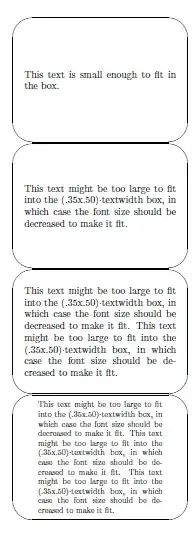
Result

Martin Scharrer
  • 262,582
  • 1
    You seem to use an old version of storebox. Use the one on CTAN or https://bitbucket.org/martin_scharrer/storebox/src/tip/storebox.sty. – Martin Scharrer Nov 02 '11 at 18:25
  • "fotsize stays fied"? You means "fontsize stays fixed", right? But what does "the bi size varies" mean? – Martin Scharrer Nov 02 '11 at 18:51
  • Bluntly copy-pasting your code yield boxes of different sizes in my document. I slightly modified your environment definition, to \newenvironment{myovalbox}{% \noindent \adjustbox{minipage=[c][.35\textwidth]{.465\textwidth},max totalsize={.4185\textwidth}{.315\textwidth},center=.5\textwidth, env={minipage}[c][.35\textwidth]{.465\textwidth}, precode=\ovalbox}\bgroup }{% \egroup }. This way the box size stays fixed, but the fontsize is not affected whatsoever, resulting in text outside its box. Any suggestions? – D.Roepo Nov 06 '11 at 18:47
  • Sorry to hear that, but the code works as shown for me with a freshly updated TeX Live 2011. Which LaTeX distribution are you using then? – Martin Scharrer Nov 06 '11 at 19:43