If you want to get fancier, you could also use something like mdframed, or tikz.
Here is a tikz solution using shadedbox from How to right align a table in a tikz picture, so if you like this solution, please up vote that answer.
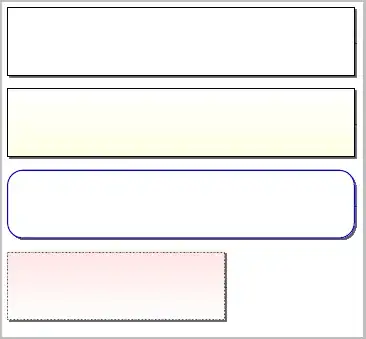
The \putansbox defined here accept an optional first parameter that provides you the option of using the full power of tikz to modify what you want. Refer to the TikZ documentation for more details and options, but the options that are shown in this MWE include:
- specify a top/bottom color for the shading:
bottom color=yellow!10, top color=red!10
- using rounded corners:
rounded corners=15pt
- adjusting the line width:
line width=1pt
- adjusting the line color:
draw=blue
- adjusting the width of the box:
text width=0.6\linewidth
- adjusting the line style:
densely dotted
See the TikZ documentation for more options.
\documentclass[border=5pt]{standalone}
\usepackage{calc}
\usepackage{xcolor}
\usepackage{tikz}
\usetikzlibrary{shadows}

\tikzstyle{shadedbox} = [
  text width=0.97\linewidth,
  draw=black,
  shade, top color=white, bottom color=white,
  drop shadow={
    top color=black,
    bottom color=black,
    shadow xshift=2pt,
    shadow yshift=-2pt,
  },
  rectangle,
]

\newcommand*\putansbox[2][]{%
  \noindent%
  \begin{tikzpicture}%
    \node [shadedbox, #1] (box) {%
    \vspace {#2\baselineskip}%
    };%
  \end{tikzpicture}\\%
}


\begin{document}

\putansbox{5}

\putansbox[bottom color=yellow!10]{5}

\putansbox[rounded corners=15pt, line width=1pt, draw=blue]{5}

\putansbox[text width=0.6\linewidth, top color=red!10, densely dotted]{5}
\end{document}


