What's your build process? With the entry counting enabled, two LaTeX runs are required before makeglossaries to determine which entries should be included. Your MWE works fine for me with pdflatex, pdflatex, makeglossaries, pdflatex and produces:

All referenced entries are listed in the glossary.
Incidentally, there are some differences between the way glossaries and glossaries-extra handle entry counting. With glossaries-extra's \GlsXtrEnableEntryCounting, you can use \gls etc directly, so you don't need the code in your \AtEndPreamble. If the term being referenced has had entry counting enabled for its category then this will automatically use \cgls otherwise it will use the original \gls.
You can take advantage of the more sophisticated abbreviation handling provided by glossaries-extra to deal with your TNFalpha entry. You can define an abbreviation style for abbreviations that are dependent on another term. For example, if the dependent abbreviation uses the user1 key to store the label of the term it's dependent on, then the following style definition can be used:
\newabbreviationstyle{dependent}%
{% base it on the long-short style
  \GlsXtrUseAbbrStyleSetup{long-short}%
}
{% base it on long-short
  \GlsXtrUseAbbrStyleFmts{long-short}%
% full form no case-changing format:
  \renewcommand*{\glsxtrfullformat}[2]{%
    % get the dependent label
    \glsfieldfetch{##1}{useri}{\deplabel}%
    % if the dependent term has been used, just use this term's name
    \ifglsused{\deplabel}{\glsentrytext{##1}}%
    {% otherwise, unset dependent term and do long form followed by
     % short form
      \glsunset{\deplabel}\glsentrylong{##1}~(\glsentryshort{##1})%
    }%
  }%
% full plural form no case-changing format:
  \renewcommand*{\glsxtrfullplformat}[2]{%
    % get the dependent label
    \glsfieldfetch{##1}{useri}{\deplabel}%
    % if the dependent term has been used, just use this term's name
    \ifglsused{\deplabel}{\glsentryplural{##1}}%
    {% otherwise, unset dependent term and do long form followed by
     % short form
      \glsunset{\deplabel}\glsentrylongpl{##1}~(\glsentryshortpl{##1})%
    }%
  }%
% full form first letter upper case format:
  \renewcommand*{\Glsxtrfullformat}[2]{%
    % get the dependent label
    \glsfieldfetch{##1}{useri}{\deplabel}%
    % if the dependent term has been used, just use this term's name
    \ifglsused{\deplabel}{\Glsentrytext{##1}}%
    {% otherwise, unset dependent term and do long form followed by
     % short form
      \glsunset{\deplabel}\Glsentrylong{##1}~(\glsentryshort{##1})%
    }%
  }%
% full plural form first letter upper case format:
  \renewcommand*{\glsxtrfullplformat}[2]{%
    % get the dependent label
    \glsfieldfetch{##1}{useri}{\deplabel}%
    % if the dependent term has been used, just use this term's name
    \ifglsused{\deplabel}{\Glsentryplural{##1}}%
    {% otherwise, unset dependent term and do long form followed by
     % short form
      \glsunset{\deplabel}\Glsentrylongpl{##1}~(\glsentryshortpl{##1})%
    }%
  }%
}
The TNFalpha term can then be given the category label dependent with the above dependent style:
\setabbreviationstyle[dependent]{dependent}

\newacronym[sort={TNF-a},category=dependent,user1=TNF]% dependent on TNF
 {TNFalpha}{TNF--{\textalpha}}{tumor necrosis factor alpha}
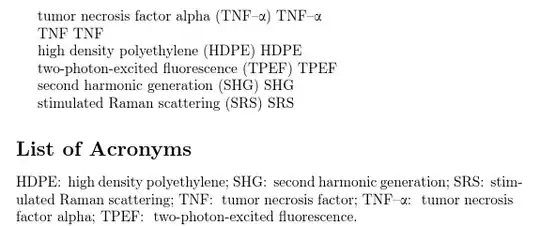
This has the advantage in that it won't break if you happen to start a sentence with \Gls{TNFalpha}. The code at the start of your first key will break with this. The following works fine. (The build sequence is pdflatex, pdflatex, makeglossaries, pdflatex.)
\documentclass{article}

\usepackage{textgreek}
\usepackage[abbreviations]{glossaries-extra}

\makeglossaries

\GlsXtrEnableEntryCounting{abbreviation,dependent}{1}

\newglossarystyle{paragraphAcronymList}{%
    \setglossarystyle{tree}% base this style on the list style
    \renewcommand*{\glsgroupskip}{}%
    \def\entrysep{\def\entrysep{; }}%
    \renewenvironment{theglossary}%
    {\setlength{\parindent}{0pt}%
        \setlength{\parskip}{0pt plus 0.3pt}}%
    {.}%
    \renewcommand*{\glossentry}[2]{%
        \entrysep\glstarget{##1}{\glossentryname{##1}}:~\space\glossentrydesc{##1}\glspostdescription}%
}

% style for abbreviations dependent on another abbreviation
% (the dependent term should be supplied in the user1 key)

\newabbreviationstyle{dependent}%
{% base it on the long-short style
  \GlsXtrUseAbbrStyleSetup{long-short}%
}
{% base it on long-short
  \GlsXtrUseAbbrStyleFmts{long-short}%
% full form no case-changing format:
  \renewcommand*{\glsxtrfullformat}[2]{%
    % get the dependent label
    \glsfieldfetch{##1}{useri}{\deplabel}%
    % if the dependent term has been used, just use this term's name
    \ifglsused{\deplabel}{\glsentrytext{##1}}%
    {% otherwise, unset dependent term and do long form followed by
     % short form
      \glsunset{\deplabel}\glsentrylong{##1}~(\glsentryshort{##1})%
    }%
  }%
% full plural form no case-changing format:
  \renewcommand*{\glsxtrfullplformat}[2]{%
    % get the dependent label
    \glsfieldfetch{##1}{useri}{\deplabel}%
    % if the dependent term has been used, just use this term's name
    \ifglsused{\deplabel}{\glsentryplural{##1}}%
    {% otherwise, unset dependent term and do long form followed by
     % short form
      \glsunset{\deplabel}\glsentrylongpl{##1}~(\glsentryshortpl{##1})%
    }%
  }%
% full form first letter upper case format:
  \renewcommand*{\Glsxtrfullformat}[2]{%
    % get the dependent label
    \glsfieldfetch{##1}{useri}{\deplabel}%
    % if the dependent term has been used, just use this term's name
    \ifglsused{\deplabel}{\Glsentrytext{##1}}%
    {% otherwise, unset dependent term and do long form followed by
     % short form
      \glsunset{\deplabel}\Glsentrylong{##1}~(\glsentryshort{##1})%
    }%
  }%
% full plural form first letter upper case format:
  \renewcommand*{\glsxtrfullplformat}[2]{%
    % get the dependent label
    \glsfieldfetch{##1}{useri}{\deplabel}%
    % if the dependent term has been used, just use this term's name
    \ifglsused{\deplabel}{\Glsentryplural{##1}}%
    {% otherwise, unset dependent term and do long form followed by
     % short form
      \glsunset{\deplabel}\Glsentrylongpl{##1}~(\glsentryshortpl{##1})%
    }%
  }%
}

\setabbreviationstyle[abbreviation]{long-short}
\setabbreviationstyle[dependent]{dependent}

\newabbreviation{HDPE}{HDPE}{high density polyethylene}
\newabbreviation{TNF}{TNF}{tumor necrosis factor}
\newabbreviation{SHG}{SHG}{second harmonic generation}
\newabbreviation{SRS}{SRS}{stimulated Raman scattering}
\newabbreviation{TPEF}{TPEF}{two-photon-excited fluorescence}

\newabbreviation[sort={TNF-a},category=dependent,user1=TNF]% dependent on TNF
 {TNFalpha}{TNF--{\textalpha}}{tumor necrosis factor alpha}


\begin{document}

\gls{TNFalpha}
\gls{TNFalpha}

\gls{TNF}
\gls{TNF}

\gls{HDPE}
\gls{HDPE}

\gls{TPEF}
\gls{TPEF}

\gls{SHG}
\gls{SHG}

\gls{SRS}
\gls{SRS}


\printabbreviations[title={List of Acronyms},style=paragraphAcronymList]

\end{document}
This produces:
Now test with the order switched:
\gls{TNF}
\gls{TNF}

\gls{TNFalpha}
\gls{TNFalpha}

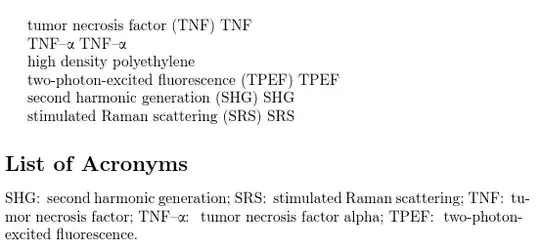
Now test the entry counting by removing the second use of HDPE:
Internal Workings
Here's a bit more information about the internal working of \cgls within glossaries-extra.sty.
The actual \cgls is simply defined as
\@gls@hyp@opt\@cgls
This is the original glossaries definition that processes the optional modifier (* or +) and arguments. The \gls command is defined in a similar way:
\@gls@hyp@opt\@gls
The actual inner working is performed by \@cgls@ (for \cgls) and \@gls@ (for \gls). The outer \@cgls, \cgls, \@gls and \gls simply provide the convenient user interface.
It's the inner \@cgls@ command that's redefined by glossaries-extra. By default with glossaries.sty this internal command generates an error until it's redefined when entry counting is enabled. With glossaries-extra.sty, \@cgls@ is initially redefined to just \@gls@. This is why with glossaries-extra, \cgls by default behaves exactly the same as \gls.
When glossaries-extra's \glsenableentrycount is used (which is used internally by \GlsXtrEnableEntryCounting) \@cgls@ is set to \@@cgls@. This is defined as follows:
\def\@@cgls@#1#2[#3]{%
  \glsxtrifcounttrigger{#2}%
  {%
    \cglsformat{#2}{#3}%
    \glsunset{#2}%
  }%
  {%
    \@gls@{#1}{#2}[#3]%
  }%
}%
This uses \glsxtrifcounttrigger{label} to determine whether or not the entry counting applies to label. If it doesn't apply, then \@gls@ is again used, so \cgls still behaves in exactly the same way as \gls in this instance. If the entry counting is triggered, then the entry is formatted according to \cglsformat and is then unset (\glsunset increments the total count for that entry in addition to unsetting the first use flag).
For convenience \GlsXtrEnableEntryCounting does
\let\gls\cgls
so you don't have to modify your document if you decide to add entry counting at some later date. Now instead of directly using \@gls@, \gls internally uses \@cgls@ which will only use \@gls@ if the entry counting mechanism isn't triggered.
The trigger command is defined as:
 \newcommand*{\glsxtrifcounttrigger}[3]{%
 \glshasattribute{#1}{entrycount}%
 {%
   \ifnum\glsentryprevcount{#1}>\glsgetattribute{#1}{entrycount}\relax
    #3%
   \else
    #2%
   \fi
 }%
 {#3}%
}
So the first thing it does is check if the entrycount attribute has been set for the entry whose label is provided in the first argument. If that attribute hasn't been set then it performs #3 which will be \@gls@{options}{label}[insert] (the normal behaviour of the original \gls[options]{label}[insert]).
If the entrycount attribute has been set, then it's expected to be an integer. The total count from the previous run (\glsentryprevcount{#1}) for this entry is then compared against the value of this attribute (\glsgetattribute{#1}{entrycount}). That's the only way to find out the total number of times this entry has been used throughout the document. TeX can't look ahead to find out if that entry has been used later. This is why two LaTeX calls are required before makeglossaries.
Here's a simple example:
\documentclass{article}

\usepackage{glossaries-extra}

\makeglossaries

\GlsXtrEnableEntryCounting{foo,bar}{1}

\newglossaryentry{foo1}{name={foo1},
 category=foo,
 first={foo1 (first use)},
 description={foo 1 example}}

\newglossaryentry{foo2}{name={foo2},
 category=foo,
 first={foo2 (first use)},
 description={foo 2 example}}

\newglossaryentry{bar1}{name={bar1},
 category=bar,
 first={bar1 (first use)},
 description={bar 1 example}}

\newglossaryentry{bar2}{name={bar2},
 category=bar,
 first={bar2 (first use)},
 description={bar 2 example}}

\newglossaryentry{example1}{name={example1},
 % no category label provided, implicit category=general
 first={example 1 (first use)},
 description={general 1 example}}

\newglossaryentry{example2}{name={example2},
 % no category label provided, implicit category=general
 first={example 2 (first use)},
 description={general 2 example}}

\begin{document}
First use.

\gls{foo1}, \gls{foo2}.

\gls{bar1}, \gls{bar2}.

\gls{example1}, \gls{example2}.

Second use.

\gls{foo1}.

\gls{bar1}.

\printglossaries
\end{document}
My first call of pdflatex adds the following lines to the .aux file:
\@gls@entry@count{foo1}{2}
\@gls@entry@count{foo2}{1}
\@gls@entry@count{bar1}{2}
\@gls@entry@count{bar2}{1}
These are the total number of times foo1, foo2, bar1 and bar2 were used in the document. The entries example1 and example2 aren't included because their category (general) doesn't have the entrycount attribute set.
On this first run \glsentryprevcount returns 0 for all entries because there's no previous total count. So the \ifnum part in \glsxtrifcounttrigger is comparing 0>1, which is false so this triggers the \cglsformat part. This means that the first field is always used, even though foo1 and bar1 have actually been used twice.
The main body of the document looks like this:

First use.
foo1 (first use), foo2 (first use).
bar1 (first
use), bar2 (first use).
example 1 (first use), example 2 (first
use).
Second use.
foo1 (first use).
bar1 (first use).
The next pdflatex call now has the correct values for \glsentryprevcount because they've been supplied in the .aux file. The document now looks like:

First use.
foo1 (first use), foo2 (first use).
bar1 (first
use), bar2 (first use).
example 1 (first use), example 2 (first
use).
Second use.
foo1.
bar1.
In the case of foo1 and bar1, the total entry count from the previous run is 2, so the \ifnum conditional is testing 2>1, which is true so it uses the regular \@gls@ which means it behaves like a normal \gls.
In the case of foo2 and bar2, the total entry count from the previous run is 1, so the test is now 1>1, which is false, so \cglsformat is used instead.
The glossaries-extra definition of \cglsformat is:
\renewcommand*{\cglsformat}[2]{%
  \glsifregular{#1}
  {\glsentryfirst{#1}}%
  {\ifglshaslong{#1}{\glsentrylong{#1}}{\glsentryfirst{#1}}}#2%
}
This first checks if the entry is considered "regular". This is determined by the existence and value of the regular attribute. If the regular attribute is set to true (or hasn't been set) for the entry's category it's assumed regular.
Entries defined using \newglossaryentry are assumed to be regular by default. Some of the abbreviation styles (such as long-short) set the regular attribute to false. This identifies them as abbreviations that require different treatment to regular entries when being displayed by commands like \gls.
In this example, all the entries are regular so \glsentryfirst is used. If you want some other field to be used, you can redefine \cglsformat. For example, suppose foo2 is now defined as:
\newglossaryentry{foo2}{name={foo2},
 category=foo,
 first={foo2 (first use)},
 long={foooooo2},
 description={foo 2 example}}
I can redefine \cglsformat to skip the check for the regular attribute and check instead for the long field:
\renewcommand*{\cglsformat}[2]{%
  \ifglshaslong{#1}{\glsentrylong{#1}}{\glsentryfirst{#1}}#2%
}
I now get

First use.
foo1 (first use), foooooo2.
bar1 (first use), bar2
(first use).
example 1 (first use), example 2 (first use).
Second use.
foo1.
bar1.
Alternatively, another field could be used specifically for this value. For example:
\glsaddstoragekey{cformat}{}{\cformatentry}

\renewcommand*{\cglsformat}[2]{%
  \ifglshasfield{cformat}{#1}%
  {\cformatentry{#1}}%
  {%
    \glsifregular{#1}
    {\glsentryfirst{#1}}%
    {\ifglshaslong{#1}{\glsentrylong{#1}}{\glsentryfirst{#1}}}%
  }%
  #2%
}
The entry can now be defined as:
\newglossaryentry{foo2}{name={foo2},
 category=foo,
 cformat={foooooo2},
 first={foo2 (first use)},
 description={foo 2 example}}
If you want different trigger values for different categories, you can change the entrycount attribute for the appropriate category like this:
\GlsXtrEnableEntryCounting{foo,bar}{1}
\glssetcategoryattribute{bar}{entrycount}{2}
\cglsformat is just for the singular no case-changing version (\gls). There are analogous commands \cglsplformat (plural no case-change), \cGlsformat (singular first letter upper case) and \cGlsplformat (plural first letter upper case).
Here's an example that uses just the description or descriptionplural fields regardless of whether or not the entry is considered regular:
\renewcommand*{\cglsformat}[2]{%
  \glsentrydesc{#1}#2%
}

\renewcommand*{\cglsplformat}[2]{%
  \glsentrydescplural{#1}#2%
}

\renewcommand*{\cGlsformat}[2]{%
  \Glsentrydesc{#1}#2%
}

\renewcommand*{\cGlsplformat}[2]{%
  \Glsentrydescplural{#1}#2%
}
Resetting the First Use Flag
Note that the entry counting mechanism works by hooking into the macros that modify the first use flag (which is why entry counting is only designed to work with commands that modify the first use flag). This means that \glsreset (and therefore \glsresetall) not only resets the first use flag but also resets the entry counter. This can be illustrated in the following modification to the MWE:
\documentclass{article}

\usepackage{glossaries-extra}

\makeglossaries

\GlsXtrEnableEntryCounting{foo,bar}{1}

\newglossaryentry{foo1}{name={foo1},
 category=foo,
 first={foo1 (first use)},
 description={foo 1 example}}

\newglossaryentry{foo2}{name={foo2},
 category=foo,
 first={foo2 (first use)},
 description={foo 2 example}}

\newglossaryentry{bar1}{name={bar1},
 category=bar,
 first={bar1 (first use)},
 description={bar 1 example}}

\newglossaryentry{bar2}{name={bar2},
 category=bar,
 first={bar2 (first use)},
 description={bar 2 example}}

\newglossaryentry{example1}{name={example1},
 % no category label provided, implicit category=general
 first={example 1 (first use)},
 description={general 1 example}}

\newglossaryentry{example2}{name={example2},
 % no category label provided, implicit category=general
 first={example 2 (first use)},
 description={general 2 example}}

\begin{document}
First use.

\gls{foo1}, \gls{foo2}.

\gls{bar1}, \gls{bar2}.

\gls{example1}, \gls{example2}.

Second use.

\gls{foo1}.

\gls{bar1}.

Current count value. foo1: \glsentrycurrcount{foo1},
foo2: \glsentrycurrcount{foo2}, bar1: \glsentrycurrcount{bar1},
bar2: \glsentrycurrcount{bar2}.

Resetting the first use flag resets the counter.\glsresetall

Back to first use.

\gls{foo1}, \gls{foo2}.

\gls{bar1}, \gls{bar2}.

\gls{example1}, \gls{example2}.

Current count value. foo1: \glsentrycurrcount{foo1},
foo2: \glsentrycurrcount{foo2}, bar1: \glsentrycurrcount{bar1},
bar2: \glsentrycurrcount{bar2}.

Count value obtained from previous run. foo1: \glsentryprevcount{foo1},
foo2: \glsentryprevcount{foo2}, bar1: \glsentryprevcount{bar1},
bar2: \glsentryprevcount{bar2}.

\printglossaries
\end{document}

First use.
foo1 (first use), foo2 (first use).
bar1 (first use), bar2 (first use).
example 1 (first use), example 2 (first use).
Second use.
foo1 (first use).
bar1 (first use).
Current count value. foo1: 2, foo2: 1, bar1: 2, bar2: 1.
Resetting the first use flag resets the counter.
Back to first use.
foo1 (first use), foo2 (first use).
bar1 (first use), bar2 (first use).
example 1 (first use), example 2 (first use).
Current count value. foo1: 1, foo2: 1, bar1: 1, bar2: 1.
Count value obtained from previous run. foo1: 1, foo2: 1, bar1: 1, bar2: 1.
Glossary
example1 general 1 example 1
example2 general 2 example 1
The current count value is obtained through \glsentrycurrcount. This is incremented at every \glsunset and reset to zero at every \glsreset. At the end of the document the value is written to the .aux file and can be retrieved on the next run with \glsentryprevcount.
It's therefore not advisable to use \glsreset (or \glsresetall) when using the document-wide entry counting mechanism. If you are resetting per sectional unit, then it's better to use the unit-counting version. For example, the above document is converted so that the unit counting is per \section:
\documentclass{article}

\usepackage{glossaries-extra}

\makeglossaries

\GlsXtrEnableEntryUnitCounting{foo,bar}{1}{section}

\newglossaryentry{foo1}{name={foo1},
 category=foo,
 first={foo1 (first use)},
 description={foo 1 example}}

\newglossaryentry{foo2}{name={foo2},
 category=foo,
 first={foo2 (first use)},
 description={foo 2 example}}

\newglossaryentry{bar1}{name={bar1},
 category=bar,
 first={bar1 (first use)},
 description={bar 1 example}}

\newglossaryentry{bar2}{name={bar2},
 category=bar,
 first={bar2 (first use)},
 description={bar 2 example}}

\newglossaryentry{example1}{name={example1},
 % no category label provided, implicit category=general
 first={example 1 (first use)},
 description={general 1 example}}

\newglossaryentry{example2}{name={example2},
 % no category label provided, implicit category=general
 first={example 2 (first use)},
 description={general 2 example}}

\begin{document}
\section{Sample Section}
First use.

\gls{foo1}, \gls{foo2}.

\gls{bar1}, \gls{bar2}.

\gls{example1}, \gls{example2}.

Second use.

\gls{foo1}.

\gls{bar1}.

Current count value. foo1: \glsentrycurrcount{foo1},
foo2: \glsentrycurrcount{foo2}, bar1: \glsentrycurrcount{bar1},
bar2: \glsentrycurrcount{bar2}.

\section{Another Section}
Resetting the first use flag.\glsresetall

Back to first use.

\gls{foo1}, \gls{foo2}.

\gls{bar1}, \gls{bar2}.

\gls{example1}, \gls{example2}.

Current count value. foo1: \glsentrycurrcount{foo1},
foo2: \glsentrycurrcount{foo2}, bar1: \glsentrycurrcount{bar1},
bar2: \glsentrycurrcount{bar2}.

Count value obtained from previous run for the current section.
foo1: \glsentryprevcount{foo1},
foo2: \glsentryprevcount{foo2}, bar1: \glsentryprevcount{bar1},
bar2: \glsentryprevcount{bar2}.

Total count value obtained from previous run for the entire document.
foo1: \glsentryprevtotalcount{foo1},
foo2: \glsentryprevtotalcount{foo2}, bar1: \glsentryprevtotalcount{bar1},
bar2: \glsentryprevtotalcount{bar2}.

\printglossaries
\end{document}
This now produces:

1 Sample Section
First use.
foo1 (first use), foo2 (first use).
bar1 (first use), bar2 (first use).
example 1 (first use), example 2 (first use).
Second use.
foo1.
bar1.
Current count value. foo1: 2, foo2: 1, bar1: 2, bar2: 1.
2 Another Section
Resetting the first use flag.
Back to first use.
foo1 (first use), foo2 (first use).
bar1 (first use), bar2 (first use).
example 1 (first use), example 2 (first use).
Current count value. foo1: 1, foo2: 1, bar1: 1, bar2: 1.
Count value obtained from previous run for the current section. foo1: 1, foo2: 1, bar1: 1, bar2: 1.
Total count value obtained from previous run for the entire document. foo1:
3, foo2: 2, bar1: 3, bar2: 2.
Glossary
bar1 bar 1 example 1
example1 general 1 example 1
example2 general 2 example 1
foo1 foo 1 example 1


\renewcommand*{\gls}{\cgls}%type of redefinition performed by\GlsXtrEnableEntryCountingmanages to stay specific to the type of value in the declaring list. When I define a new glossary type, i.e. supplier, or product, I find that it stops working when I only have one instance. I want to see companies expanded even if only used once because it has to show the info at least once. To me, the logic of using a minimum instance count of 0 would do it, but this doesn't work it. – EngBIRD Nov 13 '16 at 04:19Catalogue No. 6210H; \ncgls{corp_Cambridge}. It used to work, but I have so many complex commands,glssetnoexpandfieldetc, that I'm sure I'm mashing up some expansions because it used to expand. – EngBIRD Nov 13 '16 at 19:19\glsptinstead (described in Nested Links). There are also some debugging commands listed in section 1.20 of theglossariesdocumented code that you can use to test how values have been expanded. For example,\showglofirst{TNFalpha}will show the actual value of thefirstfield for theTNFalphaentry. – Nicola Talbot Nov 14 '16 at 08:48user1equivalant innewglossaryentry. At this stage, my infastructure has me committed tonewglossaryentryand I'm not sure how easy it would be to switch tonewacronym. I think I'm slowly making progress on this. Sorry this question has stayed open so long. Thanks for your help! – EngBIRD Nov 22 '16 at 05:17user1in\newglossaryentry. All the key=value options in the optional argument of\newacronymare internally passed to the second argument of\newglossaryentry, so any key that you can use in one you can also use in the other. – Nicola Talbot Nov 22 '16 at 09:02Here's a simple example) and outputs matched by\newabbreviationand solutions with like http://tex.stackexchange.com/a/230664/69378 with\newacronym.\GlsXtrEnableEntryCounting{category}{n}repeats first usentimes. I've been expecting it to use 'description' or 'descriptionplural', i.e. no need to give an acronym because it's never used more than once. Using your second simple example commenting out everything after second use leaves me with (xx). – EngBIRD Feb 25 '17 at 02:48\cglsformatntimes. If you want it to usedescriptionordescriptionplural, you need to redefine\cglsformatto use\glsentrydescinstead (and\cglsplformatto use\glsentrydescplural). – Nicola Talbot Feb 26 '17 at 13:14GlsXtrEnableEntryCountingwhen trying to use one of the...resetlocalall...or...resetall...commands. I.e. the document breaks down and always uses the first use instance. And If I'm using thecglsformatdefined above, I only get the description entry. Is there an environment I can define to truly have a proper localized/contained scope of the document? To reproduce this as an MWE, repeating the body text below a\glsresetallcommand should break the counting. Thanks! – EngBIRD Dec 11 '17 at 04:03\glsresetallI get exactly what I want -- but this MWE is unique, in the second section there are no multi-use cases of acronyms. So if I modify the second section to include a second instance, it forgets to redisplay the first use use (or n use because its got counting enabled) expansion. i.e.Back to first use. \gls{foo1}, \gls{foo1}.shows "foo1, foo1" as opposed to "foo1 (first use), foo1". Thanks again! – EngBIRD Jan 12 '18 at 02:47\glsresetallthen\gls{foo1}in the second section is no longer the first use so it will just show "foo1" rather that "foo1 (first use)". I think it might be easier to post a follow-up question to clarify the problem. – Nicola Talbot Jan 12 '18 at 14:04