0

I'm new to LaTeX and I wanna know how to make exactly this with LaTeX code.

enter image description here

I tried to use eqnarray to get the numbers but I get errors. Also, I tried to align the last 3 matrices but they all get centered and get appeared in a row one after another.

My code:

\[
\textbf{I=}\begin{pmatrix}
1&0&0&0 \\
0&1&0&0 \\
0&0&1&0 \\
0&0&0&1
\end{pmatrix}
\]

\[
\textbf{I=}\begin{bmatrix}
1&0&0&0 \\
0&1&0&0 \\
0&0&1&0 \\
0&0&0&1
\end{bmatrix}
\]

\[
\textbf{I=}\begin{Bmatrix}
1&0&0&0 \\
0&1&0&0 \\
0&0&1&0 \\
0&0&0&1
\end{Bmatrix}
\]

\[
\textbf{I=}\begin{vmatrix}
1&0&0&0 \\
0&1&0&0 \\
0&0&1&0 \\
0&0&0&1
\end{vmatrix}
\]

\[
\textbf{I=}\begin{Vmatrix}
1&0&0&0 \\
0&1&0&0 \\
0&0&1&0 \\
0&0&0&1
\end{Vmatrix}
\]
Torbjørn T.
  • 206,688
  • Could you post your code, not a screenshot? – Bernard Dec 18 '16 at 20:58
  • [ \textbf{I=}\begin{pmatrix} 1&0&0&0 \ 0&1&0&0 \ 0&0&1&0 \ 0&0&0&1 \end{pmatrix} ]

    [ \textbf{I=}\begin{bmatrix} 1&0&0&0 \ 0&1&0&0 \ 0&0&1&0 \ 0&0&0&1 \end{bmatrix} ]

    [ \textbf{I=}\begin{Bmatrix} 1&0&0&0 \ 0&1&0&0 \ 0&0&1&0 \ 0&0&0&1 \end{Bmatrix} ]

    [ \textbf{I=}\begin{vmatrix} 1&0&0&0 \ 0&1&0&0 \ 0&0&1&0 \ 0&0&0&1 \end{vmatrix} ]

    [ \textbf{I=}\begin{Vmatrix} 1&0&0&0 \ 0&1&0&0 \ 0&0&1&0 \ 0&0&0&1 \end{Vmatrix} ]

    – Georgio3 Dec 18 '16 at 20:59
  • Please update your post with this code. – Bernard Dec 18 '16 at 21:01
  • Did it. Sorry for the way it appears :/ – Georgio3 Dec 18 '16 at 21:05

3 Answers3

3

In general you should never have multiple display math environments (like \[ ... \] or \begin{equation} .. \end{equation}) after each other. The amsmath package provides several environments for multi-line displayed math. In this case, you want the gather environment I think.

After the first and the second matrix I added a linebreak with \\. After the third and the fourth, I added some horizontal space with \qquad.

Note also that you should have \mathbf{I}=.., not \textbf{I=}. With the latter you get the wrong spacing around the =.
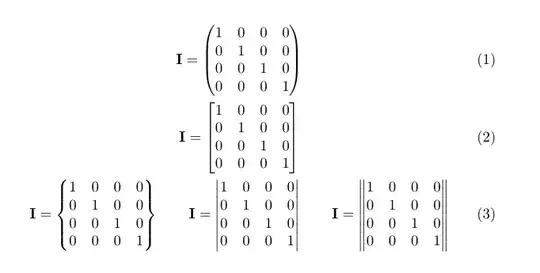
enter image description here

\documentclass{article}
\usepackage{amsmath}
\begin{document}
\begin{gather}
\mathbf{I}=\begin{pmatrix}
1&0&0&0 \\
0&1&0&0 \\
0&0&1&0 \\
0&0&0&1
\end{pmatrix}
\\
\mathbf{I}=\begin{bmatrix}
1&0&0&0 \\
0&1&0&0 \\
0&0&1&0 \\
0&0&0&1
\end{bmatrix}
\\
\mathbf{I}=\begin{Bmatrix}
1&0&0&0 \\
0&1&0&0 \\
0&0&1&0 \\
0&0&0&1
\end{Bmatrix},
\qquad
\mathbf{I}=\begin{vmatrix}
1&0&0&0 \\
0&1&0&0 \\
0&0&1&0 \\
0&0&0&1
\end{vmatrix},
\qquad
\mathbf{I}=\begin{Vmatrix}
1&0&0&0 \\
0&1&0&0 \\
0&0&1&0 \\
0&0&0&1
\end{Vmatrix}
\end{gather}

\end{document}

Another possibility might be using align instead of gather, and add a & before selected =, to align those horizontally.

enter image description here

\documentclass{article}
\usepackage{amsmath}
\begin{document}
\begin{align}
\mathbf{I}&=\begin{pmatrix}
1&0&0&0 \\
0&1&0&0 \\
0&0&1&0 \\
0&0&0&1
\end{pmatrix}
\\
\mathbf{I}&=\begin{bmatrix}
1&0&0&0 \\
0&1&0&0 \\
0&0&1&0 \\
0&0&0&1
\end{bmatrix}
\\
\mathbf{I}=\begin{Bmatrix}
1&0&0&0 \\
0&1&0&0 \\
0&0&1&0 \\
0&0&0&1
\end{Bmatrix},
\qquad
\mathbf{I}&=\begin{vmatrix}
1&0&0&0 \\
0&1&0&0 \\
0&0&1&0 \\
0&0&0&1
\end{vmatrix},
\qquad
\mathbf{I}=\begin{Vmatrix}
1&0&0&0 \\
0&1&0&0 \\
0&0&1&0 \\
0&0&0&1
\end{Vmatrix}
\end{align}
\end{document}
Torbjørn T.
  • 206,688
1

Here are two codes to do that:

\documentclass{article}
\usepackage{mathtools}
\usepackage{makecell}
\setcellgapes{2pt}

\begin{document}


\[ \makegapedcells \begin{matrix*}[l]   
  & \mathbf{I=}\begin{pmatrix} 1&0&0&0 \\ 0&1&0&0 \\ 0&0&1&0 \\ 0&0&0&1 \end{pmatrix}\\
  &  \mathbf{I=}\begin{bmatrix} 1&0&0&0 \\ 0&1&0&0 \\ 0&0&1&0 \\ 0&0&0&1 \end{bmatrix}\\
  \mathbf{I=}\begin{Bmatrix} 1&0&0&0 \\ 0&1&0&0 \\ 0&0&1&0 \\ 0&0&0&1 \end{Bmatrix},
  & \mathbf{I=}\:\begin{vmatrix}\, 1&0&0&0\, \\\, 0&1&0&0 \,\\\, 0&0&1&0\,\\ \,0&0&0&1 \,\end{vmatrix},
  &  \mathbf{I=}\begin{Vmatrix} 1&0&0&0 \\ 0&1&0&0 \\ 0&0&1&0 \\ 0&0&0&1 \end{Vmatrix}
  \end{matrix*} \]


  \begin{alignat}{3}
      &   & \mathbf{I=}& \begin{pmatrix} 1 & 0 & 0 & 0 \\ 0&1&0&0 \\ 0&0&1&0 \\ 0&0&0&1 \end{pmatrix}\\
      &   & \mathbf{I=}& \begin{bmatrix} 1 & 0 & 0 & 0 \\ 0&1&0&0 \\ 0&0&1&0 \\ 0&0&0&1 \end{bmatrix}\\
    & \mathbf{I=}\begin{Bmatrix} 1&0&0&0 \\ 0&1&0&0 \\ 0&0&1&0 \\ 0&0&0&1 \end{Bmatrix},
    &\quad  \mathbf{I=}& \:\begin{vmatrix}\, 1&0&0&0\, \\\, 0&1&0&0 \,\\\, 0&0&1&0\,\\ \,0&0&0&1 \,\end{vmatrix},
    & \quad \mathbf{I=}& \begin{Vmatrix} 1&0&0&0 \\ 0&1&0&0 \\ 0&0&1&0 \\ 0&0&0&1 \end{Vmatrix}
  \end{alignat}

\end{document}

enter image description here

Bernard
  • 271,350
0

Every matrix should be an element of a super-matrix. See the answer in this post.

You can also do it like this. Put \usepackage{amsmath} in your preamble and then put this in you document:

\begin{align}
&& FIRST MATRIX && \\
&& SECOND MATRIX && \\
THIRD MATRIX, && FOURTH MATRIX, && FIFTH MATRIX
\end{align}

Every row will have equation number on the right.

You can just fill the placeholders with your own matrices.