You can use a pic which is kind of a "subfigure" which can be later placed, rotated or scaled as if it was a node.
For example, this could be the pic:
\tikzset{
mynode/.pic={
   \coordinate (center) at (0,0);
   \fill[top color=blue!50!cyan!40!white, bottom color=blue!40!black] (90:#1) circle(0.1);
   \fill[top color=blue!50!cyan!40!white, bottom color=blue!40!black] (-30:#1) circle(0.1);
   \fill[top color=blue!50!cyan!40!white, bottom color=blue!40!black] (210:#1) circle(0.1);
   },
pics/mynode/.default=0.2
}
The (center) coordinate is a name suffix which can be later be used to connect such a pics.
To use these pics you put them as part of a \path command. The syntax is similar to a node, but using pic instead of node, and putting the kind of pic in braces, instead of the text of the node. I.e: pic[options] (name) {kind}. In this example, kind would be mynode.
The following example uses three of these pics at different coordinates, scales and rotations. Then two of them are joined by an arrow.
\begin{tikzpicture}
\path (0,0)  pic            (p1) {mynode}
      (1,0)  pic[rotate=90] (p2) {mynode}
      (0,1)  pic[scale=0.5] (p3) {mynode};
\draw[->] (p3center) to[bend left] (p2center);
\end{tikzpicture}
Note that the coordinates used to draw the arrow are p3center and p2center, which are the concatenation of the "outer" name of each pic with the "inner" name of one coordinate/node inside the pic. This way you can define "anchors" for each of the three inner circles, if required.
Result:
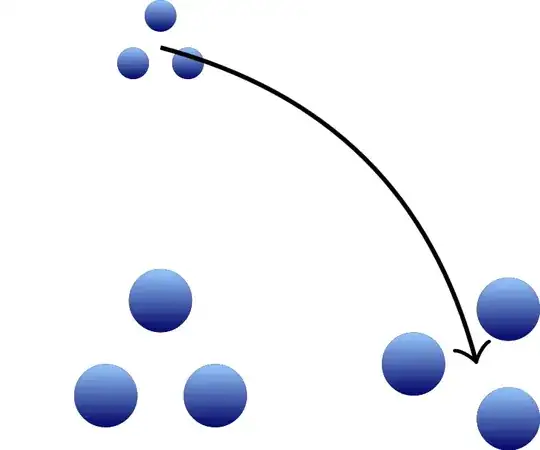
The definition of the pic uses polar coordinates around (0,0) to position the three blue circles. The distance to that origin is the parameter #1 which has the default value 0.2. You can give it another value if you write pic {myshape=0.5}, for example.


