You give the options [hp], which means "put the figure here; if it doesn't fit on the page, put it on a separate page". And this is what LaTeX does.
Removing the p option doesn't help, since the second figure still doesn't fit. If LaTeX took the [h] option literally, you would have a large empty space between the second text and the second figure. LaTeX doesn't like this and will automatically modify [h] to [ht].
You have (at least) three options.
Set the options to [htbp] or something similar. This way the figures will be as close as possible to the place where they have been defined. This is the intended usage of floats (figures and tables).
Load the package float und use the option [H]. This will place the figure where you have defined it, at the price of empty space if there is not enough room on the current page.
Load the package caption, remove \begin{figure}\centering ...\caption{...}\label{...}\end{figure} and use \begin{center}...\captionof{figure}{...}\label{...}\end{center} instead. This will also place the figure where you have defined it, again at the price of empty space if there is not enough room on the current page.
See e.g. WikiBooks: LaTeX/Floats, Figures and Captions for more information.
Below you find sample code for the second and third variant. The output is the same in both cases. Note the white space at the end of the first page, which may be considerably larger if there is less text to fill the gap.
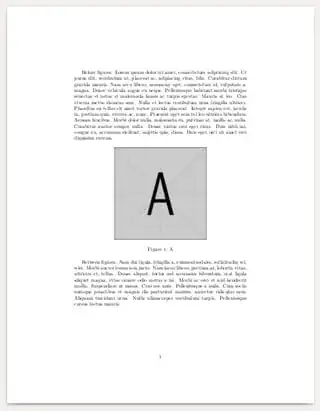

Code for the float package and the [H] option:
\documentclass{article}
\usepackage{graphicx}
\usepackage{float}
\usepackage{lipsum}
\begin{document}
Before figures.
\lipsum[1]

\begin{figure}[H]
\centering
\includegraphics[width=65mm, height=65mm]{example-image-a}
\caption{A}\label{fig1}
\end{figure}

Between figures.
\lipsum[2]

\begin{figure}[H]
\centering
\includegraphics[width=65mm, height=65mm]{example-image-b}
\caption{B}\label{fig2}
\end{figure}

After figures.
\lipsum[3]
\end{document}
Code for the caption package:
\documentclass{article}
\usepackage{graphicx}
\usepackage{caption}
\usepackage{lipsum}
\begin{document}
Before figures.
\lipsum[1]

\begin{center}
\includegraphics[width=65mm, height=65mm]{example-image-a}
\captionof{figure}{A}\label{fig1}
\end{center}

Between figures.
\lipsum[2]

\begin{center}
\includegraphics[width=65mm, height=65mm]{example-image-b}
\captionof{figure}{B}\label{fig2}
\end{center}

After figures.
\lipsum[3]
\end{document}


figures are floating this way, i.e. LaTeX puts it to a position where it 'thinks' it is best. See http://tex.stackexchange.com/questions/39017/how-to-influence-the-position-of-float-environments-like-figure-and-table-in-lat for example to get possible solutions. And this is one of the most asked questions here ;-) – Dec 31 '16 at 15:06[hp]with[!htb]. – Bernard Dec 31 '16 at 15:40\begin{document}\setcounter{totalnumber}{8}, I have try to change\begin{figure}[hp]into\begin{figure}[h!]… but it still does not show the image where it is supposed to be – bixoez Dec 31 '16 at 15:41\usepackage{float}and then write\begin{figure}[H]– bixoez Dec 31 '16 at 15:46