Here's a different approach which does not rely on the use of labels. The latter will only really work properly if they are confined to a single line because Forest cannot accommodate them when packing the tree. For short labels, they are most convenient in this kind of tree, but for longer labels, they are not the best choice, in my opinion.
minecraft schematic styles the tree;icon adds a default file icon to a node;icon=<style> adds a file icon in <style> to a node.
As examples, I use a default style, which can be redefined by changing icon/style/.style, icon/main/.style, icon/dim/.style and icon/elk/.style.
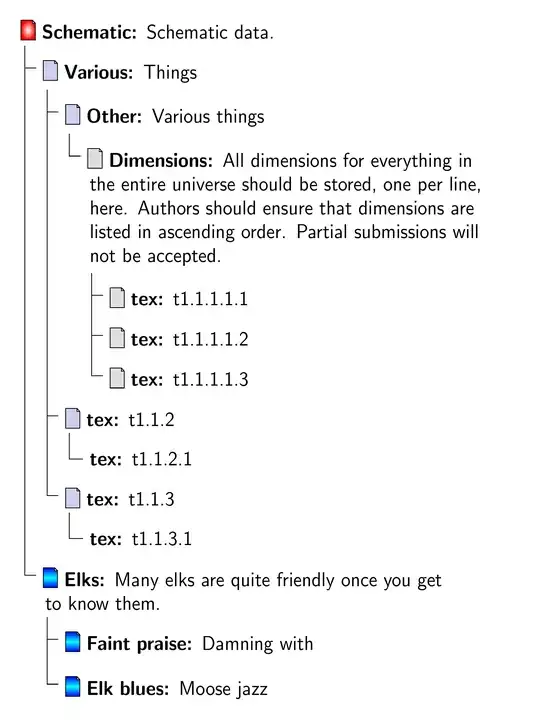
\documentclass[tikz,border=10pt,multi,dvipsnames,svgnames,x11names]{standalone}
\usepackage[edges]{forest}
\usepackage{calc}
\forestset{
  declare toks={my label}{},
  declare toks={my details}{},
  declare boolean={my icon}{0},
  minecraft schematic/.style={% addaswyd o ateb: http://tex.stackexchange.com/a/340354/
    for tree={% addaswyd o gôd Gonzalo Medina: http://tex.stackexchange.com/a/270761/
      folder,
      font=\sffamily,
      grow'=0,
      text width=75mm,
    },
    before typesetting nodes={
      for tree={
        split option={content}{:}{my label,my details},
        delay={
          content/.process={On=?_OOw3}{my icon}{1}{\makebox[\iconwidth+\iconmargin]{}}{}{my label}{my details}{##1\textbf{##2:} ##3},
        },
      },
    },
  },
  icon/.style={
    my icon,
    tikz+={
      \pic at ([xshift=\iconmargin,yshift=-.1*\baselineskip].north west) {my file={#1}};
    },
    edge path'/.expanded={% addaswyd o forest-lib-edges.sty
      ([xshift=\forestregister{folder indent}]!u.parent anchor) |- ([xshift=-.5*\iconmargin,yshift=-.5*\iconheight].north west)
    },
  }
}
\tikzset{
  my file/.pic={
    \draw [icon/.cd, style, #1] (0,-\iconheight) |- +([xshift=-.2*\iconwidth]\iconwidth,\iconheight) edge +([yshift=-.2*\iconwidth]\iconwidth,\iconheight) |- +([yshift=-.2*\iconwidth]\iconwidth,\iconheight) |- cycle;
  },
  icon/.search also={/tikz},
  icon/.cd,
  width/.store in=\iconwidth,
  height/.store in=\iconheight,
  margin/.store in=\iconmargin,
  style/.style={fill=gray!50!blue!25},
  width=7.5pt,
  height=10pt,
  margin=2.5pt,
  main/.style={inner color=white, outer color=red},
  dim/.style={fill=gray!25},
  elk/.style={top color=blue, bottom color=blue, middle color=cyan},
}
\begin{document}
\begin{forest}
  minecraft schematic,
  where level<=2{icon}{},
  [Schematic:Schematic data., icon=main
    [Various:Things
      [Other:Various things
        [Dimensions:{All dimensions for everything in the entire universe should be stored, one per line, here.
          Authors should ensure that dimensions are listed in ascending order.
          Partial submissions will not be accepted.}, for tree={icon=dim}
          [tex:t1.1.1.1.1]
          [tex:t1.1.1.1.2]
          [tex:t1.1.1.1.3]
        ]
      ]
      [tex:t1.1.2
        [tex:t1.1.2.1]
      ]
      [tex:t1.1.3
        [tex:t1.1.3.1]
      ]
    ]
    [Elks:Many elks are quite friendly once you get to know them., for tree={icon=elk}
      [Faint praise:Damning with]
      [Elk blues:Moose jazz]
    ]
  ]
\end{forest}
\end{document}
EDIT
Note that a proper example in the question could have clarified what you wanted and avoided a lot of wasted time and effort. You say you tried to adapt the code above and had problems, but you provide no details of what you tried and minimal additional information about your desiderata.
The following may or may not be like what you tried, may or may not be what you want, may or may not be of any use. Really, I have no idea.
We add an additional Forest style, icon square img:
  icon square img/.style={
    my icon,
    tikz+={
      \node [anchor=north west] at ([xshift=-.5*\iconmargin,yshift=.2*\iconwidth].north west) {\includegraphics[width=\iconwidth]{example-grid-100x100pt}};
    },
    edge path'/.expanded={% addaswyd o forest-lib-edges.sty
      ([xshift=\forestregister{folder indent}]!u.parent anchor) |- ([xshift=-.5*\iconmargin,yshift=-.5*\iconwidth].north west)
    },
  },
Then we can adapt the original tree to use the new style.
\begin{forest}
  minecraft schematic,
  where level<=2{icon square img}{},
  /tikz/icon/width=10pt,
  [Schematic:Schematic data.
    [Various:Things
      [Other:Various things
        [Dimensions:{All dimensions for everything in the entire universe should be stored, one per line, here.
          Authors should ensure that dimensions are listed in ascending order.
          Partial submissions will not be accepted.}
          [tex:t1.1.1.1.1]
          [tex:t1.1.1.1.2]
          [tex:t1.1.1.1.3]
        ]
      ]
      [tex:t1.1.2
        [tex:t1.1.2.1]
      ]
      [tex:t1.1.3
        [tex:t1.1.3.1]
      ]
    ]
    [Elks:Many elks are quite friendly once you get to know them.
      [Faint praise:Damning with]
      [Elk blues:Moose jazz]
    ]
  ]
\end{forest}

I note that not one of the icons in the sample you linked to elsewhere was square. Every one was a standard file-shaped icon. Files in icons are never square, even though their containing icons are. Therefore, I did not even think I needed my crystal ball, which is unreliable at the best of times.


for tree={s sep=1cm}; e.g., in the above sampe code, use... [tex:t1.1.1.1, for tree={s sep=1cm} [tex:t1.1.1.1.1 long long .... Replace1cmby whatever distance looks reasonable. – gernot Jan 05 '17 at 18:08foldermodifiessafter packing node. I think the change will still work, but it would be worth checking. – cfr Jan 06 '17 at 00:38