7

I have a preamble which defines lots of symbols and a LaTeX document for testing them. In particular, I have source like this:

\[\wlength{abc} = 3\]
\[\lang{A} = \lang{\varphi}\]
\[\kplus{L} \defeq \kstar{L} \setminus \emptyword\]

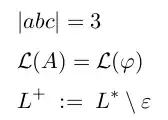
Which faithfully creates this:

Default output

Now I would like to use the same PDF also as a reference which requires the source code to show up. That is, I want something like that:

enter image description here

Ideally, what I did by hand here (copy source into a Verbatim environment from fancvrb) would be done automatically; why write the same thing down twice, blowing up everything?

Can this be done and if, how? I guess you would have to rewrite how math environments are translated, but that is beyond me.

Solutions using pdflatex are preferred.

Martin Scharrer
  • 262,582
Raphael
  • 5,983

1 Answers1

8

For short math you can use the following. It might not give you good results for longer equations.

\documentclass{article}

\let\mopen\[
\let\mclose\]

\def\[#1\]{%
    \par\noindent
    \framebox[\linewidth]{\texttt{\detokenize{#1}}}%
    \mopen #1 \mclose
}


\begin{document}
\[a = b^C_D \]
\[A = \varphi\]
\end{document}

Result


For left aligned output you could use:

\documentclass{article}

\def\[#1\]{%
    \par\medskip\par\noindent
    \framebox[\linewidth][l]{\texttt{\detokenize{#1}}}%
    \par\smallskip
    \(\displaystyle #1 \)
}


\begin{document}
\[a = b^C_D \]
\[A = \varphi\]
\end{document}

Result2


Update:

Here a real verbatim implementation which doesn't add spaces after macros. It goes the other way around. Instead of reading the code normally and then turning it into verbatim, it reads it verbatim and then turns it back to code when required.

I also added line breaking support.

\documentclass{article}
\usepackage{amsmath}

\makeatletter
\def\[{%
    \begingroup
    \let\do\@makeother
    \dospecials
    \obeyspaces
    \readmath
}
\long\expandafter\def\expandafter\readmath\expandafter#\expandafter1\string\]{%
    \endgroup
    \par\medskip\par\noindent
    \fbox{\minipage{\dimexpr\linewidth-2\fboxsep-2\fboxrule\relax}\raggedright\verbatim@font #1\endminipage}%
    \par\smallskip
    \(\displaystyle \scantokens{#1} \)%
    \par
}
\makeatother

\begin{document}

\[a = b^C_D \]

\[A = \varphi\]


\[a = b^C_\text{i} \]


\[ a = 
\alpha_1 + \beta_1 + \gamma_1 +
\alpha_2 + \beta_2 + \gamma_2 +
\alpha_3 + \beta_3 + \gamma_3 +
\alpha_4 + \beta_4 + \gamma_4
\]

\end{document}

Result3


This all requires e-TeX, which is part of any modern LaTeX compiler. I could code an alternative if wanted.
Martin Scharrer
  • 262,582
  • Great, that's already a good solution! However, verbatim math includes numerous additional spaces after command names. Is this to be expected from detokenize? Also, linebreaks inside the box would obviously be great. Is there a chance? – Raphael Nov 14 '11 at 11:09
  • Yes, \detokenize will add a space after every command, to make sure it doesn't fuse together with any trailing text. You would need to use a full verbatim environment to avoid that. – Martin Scharrer Nov 14 '11 at 11:10
  • For the line breaking use the adjustbox package and then \adjustbox{minipage=\linewidth-2\fboxep-2\fboxrule,fbox}{\texttt{\detokenize{#1}} instead of \framebox. You could also just place a minipage environment into \framebox. – Martin Scharrer Nov 14 '11 at 11:12
  • @Raphael: See my updated answer now. – Martin Scharrer Nov 14 '11 at 11:32
  • (Legacy comment:) I'm not allowed to use LaTeX syntax in there, right? :> Running (pdf)latex on adjustbox, I get prompted for ydocstrip.tex which I don't have. – Raphael Nov 14 '11 at 11:40
  • You can use LaTeX macros everywhere here. You don't need adjustbox, it is just simpler with it. The latest code above doesn't use it. Anyway, you can get it as ready-to-be-used TDS ZIP on CTAN. To extract it you need to install the ydoc bundle first. – Martin Scharrer Nov 14 '11 at 11:44