When there is going to be a lot of repeated code (for the different games, in this instance), then I write a macro to simplify my latex file - and to make it easier to change things later, if needed.
(I) The first thought that came to mind was to write a macro that takes as "input":
- a comma separated list of the positions of the X's
- a comma separated list of the positions of the O's
- the commentary
The X and O positions I would encode as 1,2,...,9 reading from left to right, and top to bottom, in the grid. For example, \NoughtsCrosses{5,6}{9}{Third move} would produce

(II) A second way of doing this is to assume that the moves alternate as X,O,X,... and just give a comma separated list of moves together with the commentary. For example, \NoughtsCrossesII{5,9,6,4}{Fourth move} would produce
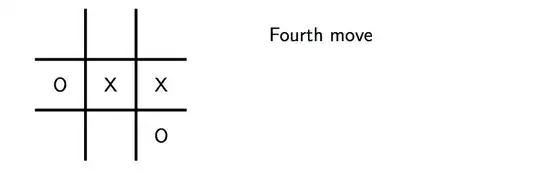
As cfr says in the comments to the question, you probably want to enclose these commands inside something like \only<5>{\NoughtsCrossesII{5,9,6,4}{Fourth move}} in order to reveal one move at a time. I do this in the MWE below.
(III) Taking the last remark into account, and going a little OTT, a smarter macro would simply take a list of the moves and commentary and then construct all of the slides for the game in the frame. All of the macros so far use tikz and the tikz\foreach command allows for multiple looping variables separated by a slash, so the easiest way to implement this is to use the following syntax:
  \NoughtsCrossesGame{%
     5/First move,
     9/Second move,
     6/Third move,
     4/Fouth move
  }
The output is the "same" as above except that the "game" appears over 4 slides. The macro \NoughtsCrossesGame takes an optional argument, which behaves similar to the optional argument to the\pause command. That is, it acts as an "offset" controlling when the moves in the game start to appear in the slides for the given frame.
Here is code giving the definitions of the three macros above, completed to a MWE to show how to use them:
\documentclass{beamer}
\usepackage{tikz}

% Helper macro for placing a node at "position" 1,2,...,9 into the grid
% \PlaceMarker[optional node styling]<position><X or O>
\usepackage{xparse}
\NewDocumentCommand\PlaceMarker{ O{}mm }{%
   \ifnum#2>0
       \def\markercol{#1}
       \def\PlaceMakerNumber{#2}
    \else
       \def\markercol{red}
       \def\PlaceMakerNumber{\numexpr-#2}
    \fi
   \ifcase\PlaceMakerNumber%
      \or\node[\markercol] at (1,3) {#3}; % 1 = (3,1)
      \or\node[\markercol] at (2,3) {#3}; % 2 = (3,2)
      \or\node[\markercol] at (3,3) {#3}; % 3 = (3,3)
      \or\node[\markercol] at (1,2) {#3}; % 4 = (2,1)
      \or\node[\markercol] at (2,2) {#3}; % 5 = (2,2)
      \or\node[\markercol] at (3,2) {#3}; % 6 = (2,3)
      \or\node[\markercol] at (1,1) {#3}; % 7 = (1,1)
      \or\node[\markercol] at (2,1) {#3}; % 8 = (1,2)
      \or\node[\markercol] at (3,1) {#3}; % 9 = (1,3)
   \fi
}

% Creates a noughts and cross game with commentary
%\NoughtsCrosses{x-positions}{y-positions}{Commentary}
\newcommand\NoughtsCrosses[3]{%
  \begin{tikzpicture}
     \foreach \x in {1.5,2.5} {
         \draw[ultra thick](\x,0.5)--+(0,3);
         \draw[ultra thick](0.5,\x)--+(3,0);
     }
     \foreach \x in {#1} {\PlaceMarker{\x}{X}}
     \foreach \y in {#2} {\PlaceMarker{\y}{O}}
     \node[text width=40mm,text ragged, anchor=west] at (5,3) {#3};
  \end{tikzpicture}
}

% Creates a noughts and cross game with commentary
%\NoughtsCrossesII{move positions}{Commentary}
% Moves alternate as X,O,...
\newcommand\NoughtsCrossesII[2]{%
  \begin{tikzpicture}
     \foreach \x in {1.5,2.5} {
         \draw[ultra thick](\x,0.5)--+(0,3);
         \draw[ultra thick](0.5,\x)--+(3,0);
     }
     \foreach \move [count=\m] in {#1} {
         \ifodd\m \PlaceMarker{\move}{X}
         \else\PlaceMarker{\move}{O}
         \fi
     }
     \node[text width=40mm,text ragged, anchor=west] at (5,3) {#2};% add comment
  \end{tikzpicture}
}

% Creates a noughts and cross game with commentary
%\NoughtsCrossesII{move positions}{Commentary}
% Moves alternate as X,O,...
\makeatletter
\newcommand\NoughtsCrossesGame[2][0]{%
  \begin{tikzpicture}
     \foreach \x in {1.5,2.5} {
         \draw[ultra thick](\x,0.5)--+(0,3);
         \draw[ultra thick](0.5,\x)--+(3,0);
     }
     % count length of game
     \foreach \move/\com [count=\lmove] in {#2} {}
     \def\endgame{\the\numexpr\lmove+#1\relax}
     \def\Endgame{\the\numexpr\endgame+1\relax}
     \foreach \move/\com [count=\m,
                          evaluate=\m as \mm using int(\m+#1),
                          evaluate=\move as \mov using int(abs(-\move))] in {#2} {
         \ifodd\m\def\Marker{X}
         \else\def\Marker{O}
         \fi
         \def\mmm{\the\numexpr\mm+1\relax}
         \only<\mm>{\PlaceMarker[blue]{\mov}{\Marker}}
         \ifnum\move<0
            \only<\mmm-\endgame>{\PlaceMarker{\mov}{\Marker}}
            \only<\Endgame->{\PlaceMarker[blue]{\mov}{\Marker}}
         \else
            \only<\mmm->{\PlaceMarker{\mov}{\Marker}}
         \fi
         \only<\mm>{
           \node[text width=40mm,text ragged, anchor=west] at (5,3){\com};
         }
     }
  \end{tikzpicture}
}
\makeatother

\begin{document}


%%%%%%%%%%%%%%%%%%%%%%%%%%%%%%%%%%%%%%
\begin{frame}{A game of noughts and crosses}
  Here is a game of noughts and crosses. On the left we have the
  game, and on the right the commentary.

  \medskip

  \only<2>{\NoughtsCrosses{5}{}{First move}}
  \only<3>{\NoughtsCrosses{5}{9}{Second move}}
  \only<4>{\NoughtsCrosses{5,6}{9}{Third move}}
  \only<5>{\NoughtsCrossesII{5,9,6,4}{Fourth move}}

\end{frame}

%%%%%%%%%%%%%%%%%%%%%%%%%%%%%%%%%%%%%
\begin{frame}{Another game of noughts and crosses}
  Here is a game of noughts and crosses. On the left we have the
  game, and on the right the commentary.

  \pause Here is a clever game
  \medskip

  \NoughtsCrossesGame[1]{% offset start of game because of \pause above
    -5/First move,
     6/Middle square,
     7/Forcing,
     3/Forced block,
    -9/Forced block leading to a pincer!,
     8/Forced defence!,
    -1/Wins!
  }

\end{frame}

\end{document}
A few comments:
- All of the macros use tikz to draw the games as this gives better control over the placement of the X/O markers and in drawing the grid
- The
\PlaceMarker macro is a "helper function" for placing a marker at the specified position. This uses \ifcase to translate the position indices 1,2,...,9 into (x,y) coordinates.
- The macros use
\foreach to loop over the comma separated list of marker positions. The second macro uses, in addition, \ifodd to determine whether to place an X or an O.
- The "commentary" is placed inside a tikz node as ragged left text of width 40mm. You might need to fine tune the placement of the (x,y)-coordinates and the width of the text.
- As requested in the comments I have improved the macros to allow easy highlighting of some of the moves. Giving a "negative position" index now colours the corresponding
X or O. For example, \NoughtsCrosses{-5,-6}{9}{Third move} will make the two Xs red.
- More amusingly, the
\NoughtsCrossesGame macro now colours each move and then puts the final "winning" streak in blue at the end of the game - the winning streak must again be highlighted using negative position indices. In both cases the colouring is done by an enhancement to \PlaceMarker, although the automatic colouring for \NoughtsCrosses is more involved.
For completeness, here is an animated version of the last slide produced by the \NoughtsCrossesGame example:

Except for the frame made by beamer, this collection of slides is essentially the output of the command:
\NoughtsCrossesGame[1]{% offset start of game because of \pause above
  -5/First move,
   6/Middle square,
   7/Forcing,
   3/Forced block,
  -9/Forced block leading to a pincer!,
   8/Forced defence!,
  -1/Wins!
}


\onslide<2->{X}or whatever. – cfr Jan 26 '17 at 00:11