7

I have a very specific problem that needs solving: I would like to produce a shape which can be most easily thought of as a circle or an ellipsis cut out of another bigger circle: Think e.g. the apple of the Apple logo (basically a big circle with something cut out on the right).

I have tried the following fragment with the pstricks package:

\begin{psclip}{\psellipse(1.8,0)(0.8,0.6)}
  \pscircle(2.6,0){.45}
\end{psclip}

This draws an ellipsis, and inside part of a circle clipped to the shape of the ellipsis.

Is it possible to subtract or cut out some shape out of another shape with pstricks (or other)? Thanks!

glts
  • 263

6 Answers6

5

Thanks to Jake's answer to " How can I invert a 'clip' selection within TikZ? ", here's a way of doing what (I think) you are asking using TikZ (since you say "or other").

First, the result:

Clipped Ellipses

I wasn't sure if you wanted them filled or just drawn.

Now, the code:

\documentclass{article}
\thispagestyle{empty}
\usepackage{tikz}

\begin{document}
\begin{tikzpicture}[remember picture,overlay]

% A path that follows the edges of the current page
\tikzstyle{reverseclip}=[insert path={(current page.north east) --
  (current page.south east) --
  (current page.south west) --
  (current page.north west) --
  (current page.north east)}
]

\begin{scope}
\begin{pgfinterruptboundingbox}
\path [clip] (1.5,0) circle (1) [reverseclip];
\end{pgfinterruptboundingbox}

\draw[thick] (0,0) ellipse (2 and 1);
\end{scope}
\begin{scope}
\path[clip] (0,0) ellipse (2 and 1);
\draw[thick] (1.5,0) circle (1);
\end{scope}

\begin{scope}
\begin{pgfinterruptboundingbox}
\path [clip] (1.5,-3) circle (1) [reverseclip];
\end{pgfinterruptboundingbox}

\draw[red,fill=blue,ultra thick] (0,-3) ellipse (2 and 1);
\end{scope}
\begin{scope}
\path[clip] (0,-3) ellipse (2 and 1);
\draw[red,ultra thick] (1.5,-3) circle (1);
\end{scope}

\end{tikzpicture}
\end{document}

And lastly, the explanation. Jake's answer (linked above) gives a method of doing a "reverse clip" by drawing around the whole page and then punching out the desired shape in the middle. We use this to clip the ellipse against the circle. That produces the truncated ellipse (either filled or unfilled) but we need to do some more to complete the shape. To do that, we use the same size circle that we'd clipped out and clip that against the ellipse. One could easily make all of this a single command.

The major drawback of this is that the shapes are not single paths. Where this makes a difference are in the joins: if you look very closely you'll see that the corner where the circle and ellipse meet is not perfect. This has to do with how the clipping and stroking work. The clipping path is infinitesimally thin, but the stroked path is not, so clipping against a path and then stroking the original path doesn't quite work right. To make this perfect, one would have to use fadings, or modify the clipping paths so that they were (effectively) the outside of the stroked paths. Jake's solution would readily adapt to fadings.

Andrew Stacey
  • 153,724
  • 43
  • 389
  • 751
3

I think this does somewhat what you are looking for, using pstricks :

\pscustom[fillstyle=solid,fillcolor=yellow]{%
\psarc(0,0){2}{29}{-29}
\psarcn(2,0){1}{-105}{105}
}

The \pscustom command is quite powerful but requires care. One important point to note is that when you are gluing curves together you should remember to start one curve where the previous one ends.

I hope this helps.

Regards

Frédéric
  • 11,087
  • 3
  • 37
  • 43
  • There are a lot of good answers to choose from now. I'm giving this the underdog's thumbs-up because it was the first answer after a long silence, spot-on, and using pstricks. – glts Feb 26 '11 at 20:01
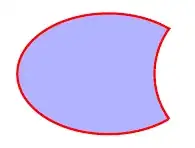
3
\documentclass{minimal}
\usepackage{pstricks}
\begin{document}

\begin{pspicture}(-3,-2)(4,2)
\pscustom[linecolor=red,linewidth=2pt,fillcolor=blue!30,fillstyle=solid]{
  \psarcn(4,0){2.5}{216}{144}
  \psellipticarc(0,0)(3,2){37}{323}}
\end{pspicture}

\end{document}

enter image description here

3

This may be a slightly simplistic answer, but I think you can do this in Tikz by "overlaying with white":

\begin{tikzpicture}
\path[fill=green,draw=none] (0,0) circle(3cm); 
\path[fill=white,draw=none] (2,0) circle(2cm); 
\end{tikzpicture}
  • BTW, Tikz takes a lot of beating, IMO – Brent.Longborough Sep 27 '10 at 19:41
  • Fair enough. But still, I'm hoping for a method that lets me produce nice outline shapes, e.g. for use in diagrams. (Apart from subtraction, intersection would be the next operation I'd like to do.) – glts Sep 28 '10 at 11:42
2

A solution with tikz with two circles but I've a problem if the first path is an ellipse. I don't why but the intersections are fine but the last arc is wrong with an ellipse

\documentclass{article}
\usepackage{tikz}
\usetikzlibrary{intersections}
\thispagestyle{empty} 
\begin{document} 

\begin{tikzpicture}
\coordinate (A) at (0,-3);
\coordinate (B) at (1.5,-3); 

\path[name path=circleA] (A) circle (2); 
\path[name path=circleB] (B) circle (1); 
 \path [ name intersections={of=circleA and circleB}]
(intersection-1) coordinate (E)
(intersection-2) coordinate (F) ;
\pgfmathanglebetweenpoints{\pgfpointanchor{B}{center}}{%
                           \pgfpointanchor{E}{center}} 
\global\let\FirstAngleB\pgfmathresult 
 \pgfmathanglebetweenpoints{\pgfpointanchor{B}{center}}{%
                           \pgfpointanchor{F}{center}} 
\global\let\SecondAngleB\pgfmathresult
\pgfmathanglebetweenpoints{\pgfpointanchor{A}{center}}{%
                           \pgfpointanchor{E}{center}} 
\global\let\FirstAngleA\pgfmathresult 
 \pgfmathanglebetweenpoints{\pgfpointanchor{A}{center}}{%
                           \pgfpointanchor{F}{center}} 
\global\let\SecondAngleA\pgfmathresult

\draw[color=red,fill=blue,ultra thick] (E)   arc  (\FirstAngleB:\SecondAngleB: 1cm) arc  (\SecondAngleA:\FirstAngleA: 2cm)  ; 

\end{tikzpicture} 

\end{document} 

circle and circle

with an ellipse I try this :

\path[name path=circleA] (A) ellipse (2cm and 1cm); 
\draw[color=red,fill=blue,ultra thick] (E)   arc  (\FirstAngleB:\SecondAngleB: 1cm) arc  (\SecondAngleA:\FirstAngleA: 2cm and 1cm)  ; 

perhaps I made a mistake, but the last point is wrong. Perhaps a problem with the angles. The two points of circle are right and the intersection is fine too but ... enter image description here

Alain Matthes
  • 95,075
0

is this what you want?

\documentclass{book}
\usepackage{pstricks-add}
\begin{document}
\begin{pspicture}(0,0)(5,5)
\psclip{\psellipse[fillstyle=solid,fillcolor=red,linestyle=none](1.8,0)(0.8,0.6)}
\pscircle[fillstyle=solid,fillcolor=blue,linestyle=none](2.6,0){.45}
\endpsclip
\end{pspicture}
\end{document}
pluton
  • 16,421
  • No -- this is what I already have. If you could make the blue bit disappear entirely then: yes. (fillcolor=white won't work.) – glts Sep 28 '10 at 11:13
  • so pstricks won't be able (I think) to remove the portion of a circle on an ellipse except you draw it by yourself. By the way, I do not think there are many situations where mimicking a fake cut is not sufficient. – pluton Sep 28 '10 at 15:09