Uppercase and number formatting is already the same using page style headings of class book:

or page style fancy of fancyhdr. Nevertheless, the headings themself are different, because fancyhdr's default uses \leftmark and \rightmark on every page, which is very uncommon. You can change this using, e.g., \fancyhead. If you also want the page number at the outer margin, you may also use \fancyfoot to change the page footer. If you also want to remove the rule below the head, you can set \headrulewidth to 0pt. So you get something like:
\documentclass{book}
\usepackage{fancyhdr}
\fancyhead[RE]{\slshape\leftmark}% right even head with chapter mark
\fancyhead[LO]{\slshape\rightmark}% left odd head with section mark
\fancyhead[LE,RO]{}% remove left even and right odd head
\fancyfoot[LE,RO]{\thepage}% set left even and right odd foot
\fancyfoot[C]{}% remove centre foot
\renewcommand{\headrulewidth}{0pt}% Note: It's a command not a length!
\pagestyle{fancy}
\usepackage{mwe}
\begin{document}
\blinddocument
\end{document}
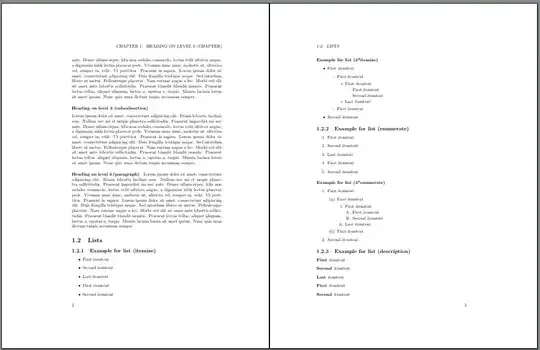
Another approach would be to use scrlayer-scrpage instead of fancyhdr. This package does not change the default of book. So to move the page number into the foot, you only have to remove it from the head and put it into the foot:
\documentclass{book}
\usepackage[automark]{scrlayer-scrpage}
\ohead{}% remove page number from head
\ofoot*{\pagemark}% put page number into the foot (also at plain pages)
\usepackage{mwe}
\begin{document}
\blinddocument
\end{document}
The result is the same as above.
If you don't want uppercase headings, you can use:
\documentclass{book}
\usepackage[markcase=noupper,automark]{scrlayer-scrpage}
\ohead{}% remove page number from head
\ofoot*{\pagemark}% put page number into the foot (also at plain pages)
\usepackage{mwe}
\begin{document}
\blinddocument
\end{document}

If you really want the page number centered:
\documentclass{book}
\usepackage[markcase=noupper,automark]{scrlayer-scrpage}
\ohead{}% remove page number from head
\cfoot*{\pagemark}% add page number at the centre
\usepackage{mwe}
\begin{document}
\blinddocument
\end{document}
Nevertheless, for twoside documents I would prefer the headings and the page number at the outer margin:
\documentclass{book}
\usepackage[pagestyleset=KOMA-Script,markcase=noupper,automark]{scrlayer-scrpage}
\usepackage{mwe}
\begin{document}
\blinddocument
\end{document}
And if you want to remove the Chapter from the running head, you can use:
\documentclass{book}
\usepackage[pagestyleset=KOMA-Script,markcase=noupper,automark]{scrlayer-scrpage}
\renewcommand*{\chaptermarkformat}{\thechapter.\enskip}
\usepackage{mwe}
\begin{document}
\blinddocument
\end{document}


bookclass capitalises chapter and section titles. – Bernard Mar 06 '17 at 09:21