In my book I have a page with index. The content of it exceeds one page only with two items, so I would like to decrease some vertical spaces on this page to hold the whole index on this page.
By default the layout of the first index page is set with \indexsetup{level=\chapter*}, and then the index looks as follows:


When I change the index layout with \indexsetup{level=\section*} then all index records fall into a single page (what I want), but the title word "Index" is too small:
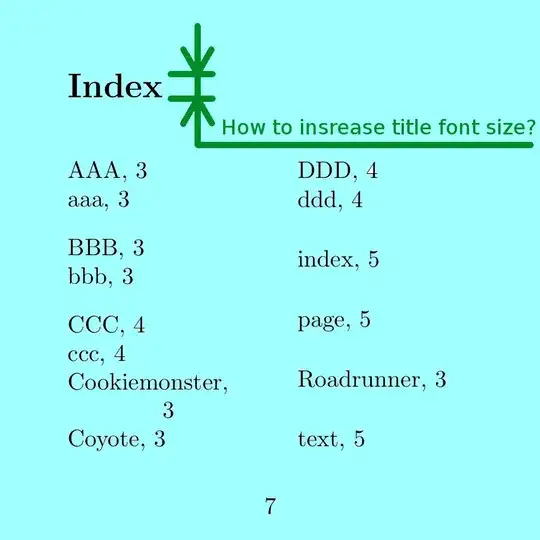
I tried to find the solution in idxlayout package manual - without any effect. I found something that seems to be connected with the problem, but I don't know how to use it: \renewcommand*{\indexstheadcase}{\Huge} (?). A bit similar question is here (without answer).
My code:
\documentclass{book}
\usepackage[
paperwidth=8cm,paperheight=8cm,
top=10mm,bottom=10mm,left=10mm,right=10mm,
headsep=3mm,footskip=6mm
]{geometry}
\usepackage[utf8]{inputenc}
\usepackage[english]{babel}
\usepackage{imakeidx}

% header and footer contetnt adjustment
\usepackage{fancyhdr}
\pagestyle{fancy}
\fancyhead{}    % page header emptying
\renewcommand{\headrulewidth}{0pt}

% title page layout adjustment
\usepackage{titlesec}
\titlespacing*{\chapter}{0pt}{-5pt}{20pt}
\titleformat{\chapter}[display]{\normalfont\huge\bfseries}{\chaptertitlename\ \thechapter}{15pt}{\Huge}

\indexsetup{level=\section*}
\makeindex[columnsep=8mm]

\begin{document}

\tableofcontents

\chapter{Introduction}
The Roadrunner\index{Roadrunner} run on long distances.
The Coyotewill\index{Coyote} has lower continuous po\-wer.

Cookiemonster\index{Cookiemonster} can eat safe.

AAA\index{AAA} aaa\index{aaa} BBB\index{BBB} bbb\index{bbb}.

CCC\index{CCC} ccc\index{ccc} DDD\index{DDD} ddd\index{ddd}.
\clearpage

\chapter{Some section}
This is an exemplary text\index{text}
which serves to demonstration the problem with index layout\index{index}.

More text on the page\index{page}.

\printindex
\end{document}


\titlespacingfor\chapterjust before\printindex. – egreg Mar 21 '17 at 16:05